Posted on

Is This $16 Keycap Set the Ultimate Keyboard Upgrade on a Budget?

Is This $16 Keycap Set the Ultimate Keyboard Upgrade on a Budget?

Tired of Your Boring Keyboard? This ~$16 Keycap Set Might Be Your Answer!

Does your mechanical keyboard feel a bit… uninspired? Perhaps your current keycaps are showing signs of wear, or you simply crave a fresh, personalized look. Upgrading your keycaps is one of the easiest and most impactful ways to transform your typing experience and give your setup a unique flair. But with so many options out, finding a quality set that won’t break the bank can be a challenge.

Enter the 136 Keys Keycaps PBT Key Cap Set. Priced at just ~$16.83, this comprehensive collection promises to deliver a significant aesthetic and tactile upgrade without demanding a premium price tag. Could this be the budget-friendly keyboard refresh you’ve been searching for?

Why This Keycap Set Is a Steal

In a world where premium keycap sets can easily cost upwards of $50 or even $100, finding a full 136-key set made from PBT plastic for just ~$16.83 is genuinely remarkable. This isn’t just about saving money; it’s about getting surprising value for every single dollar.

Is This $16 Keycap Set the Ultimate Keyboard Upgrade on a Budget? Detail
A closer look at the details

While it won’t offer the artisanal craftsmanship of ultra-premium, custom-made keycaps, for its price point, this set provides an incredible foundation for personalization or a much-needed replacement. Just like we explored whether the $8.33 T-Rex3 Pro Smartwatch is a budget beast, this keycap set aims to deliver maximum impact for minimal investment.

Key Features Deep Dive

Let’s unpack what makes this ~$16.83 keycap set stand out:

Generous 136-Key Layout for Broad Compatibility

The name says it all: 136 keycaps. This isn’t just a standard set; it includes extra keys to accommodate a vast array of mechanical keyboard layouts. Whether you have a full-size, TKL (Tenkeyless), 60%, 65%, 75%, 96%, or 98% keyboard, you’ll likely find all the keys you need, plus some spares for customization or future replacements. This flexibility is a huge benefit, ensuring your investment works with multiple setups.

Durable PBT Material for Lasting Quality

Unlike cheaper ABS plastic keycaps that can develop an unsightly shine and wear down quickly, these are made from PBT (Polybutylene Terephthalate). PBT is renowned for its superior durability, resistance to shine, and a more textured, premium feel. This means your keycaps will look and feel consistent for much longer, maintaining that satisfying tactile experience even after countless hours of typing or gaming.

Versatile Fit for Any Setting (Game, Office, PC, Laptop)

The product description highlights its fit for “Laptop PC Game Office Mechanical Keyboard Keycaps.” This underscores the set’s versatility. Whether you’re a dedicated gamer looking for a fresh aesthetic, a professional spending hours typing at the office, or simply someone wanting to enhance their home PC or laptop’s external mechanical keyboard, these keycaps are designed to cater to various use cases, blending functionality with style.

Who Is This For?

This 136-key PBT keycap set is perfect for:

  • Budget-Conscious Keyboard Enthusiasts: Looking for a significant upgrade or aesthetic change without spending a fortune.
  • New Mechanical Keyboard Owners: Wanting to personalize their first board.
  • Gamers: Seeking durable, comfortable keycaps that can withstand intense sessions.
  • Office Workers & Students: Desiring a more pleasant and long-lasting typing experience.
  • DIY Builders: Needing a reliable, comprehensive keycap set for custom builds.

✅ Pros

  • Exceptional Value: ~$16.83 for 136 PBT keycaps is outstanding.
  • Durable PBT Material: Resists shine and wear, providing a lasting quality feel.
  • Extensive Key Count (136): Ensures compatibility with most mechanical keyboard layouts.
  • Versatile Use: Suitable for gaming, office, and general typing.
  • Instant Aesthetic Upgrade: Easily refreshes your keyboard’s look.

🔻 Cons

  • No Rating Available: Quality is unverified by user reviews.
  • Potential for Thin PBT: Budget PBT can sometimes be thinner than premium sets.
  • No RGB Shine-Through: Likely solid legends, so backlighting won’t shine through characters.
  • May Not Fit All Non-Standard Layouts: While extensive, some very niche bottom rows might be an issue.

Final Verdict

For just ~$16.83, the 136 Keys PBT Keycap set offers an undeniable value proposition. It brings the highly sought-after durability and feel of PBT plastic to a price point that makes keyboard customization accessible to everyone. While you might not get the absolute thickest PBT or the most intricate legends, what you do get is a vast, high-quality set that will significantly enhance your mechanical keyboard’s appearance and longevity.

If you’re looking for an affordable way to breathe new life into your setup, upgrade from worn-out stock keycaps, or simply experiment with a new aesthetic, this PBT keycap set is a smart and wallet-friendly choice. It’s a powerful reminder that you don’t always need to spend big to make a big impact.

Frequently Asked Questions

What is PBT and why is it good for keycaps?

PBT (Polybutylene Terephthalate) is a durable, high-quality plastic known for its excellent resistance to shine and wear over time. Unlike ABS plastic, PBT keycaps maintain their textured feel and don’t get greasy or shiny with prolonged use, providing a more consistent typing experience and longer lifespan.

Are these keycaps compatible with all mechanical keyboards?

While this 136-key set is designed to fit a wide range of standard mechanical keyboard layouts (including full-size, TKL, 60%, 65%, 75%, 96%, 98% layouts), it’s important to note that some non-standard layouts, especially those with unique bottom row sizes (e.g., some Razer, Corsair, or Logitech boards), might not be fully compatible for every single key. The generous key count, however, usually provides enough options for most users.

How do I install new keycaps on my mechanical keyboard?

Installing keycaps is a straightforward process. First, gently remove your existing keycaps using a keycap puller (often included with keyboards or keycap sets, though not explicitly mentioned here). Then, align the new keycap with the switch stem and press down firmly until it clicks into place. It’s recommended to take a photo of your keyboard layout before removal for easier reassembly.

Will these keycaps work with RGB lighting?

Based on the product description, these appear to be solid PBT keycaps without specific mention of transparent legends for RGB passthrough. This typically means that while they will still look great, the legends themselves (the letters/symbols) will not illuminate if your keyboard has RGB backlighting. The backlight will shine around the keycaps, but not through the characters.


Check Best Price âž”

*Price may vary based on promotions.

Posted on

AULA SC900 Review: Is This $43 Gaming Mouse an 8000Hz Beast?

AULA SC900 Review: Is This $43 Gaming Mouse an 8000Hz Beast?
★★★★★ (100.0%/5)

Introduction: Elevate Your Game Without Breaking the Bank

Tired of losing crucial in-game moments to a laggy mouse? Does a tangled cable constantly disrupt your perfect flick shot? For competitive gamers, precision and responsiveness aren’t luxuries—they’re necessities. But what if you could achieve top-tier performance without emptying your wallet?

Enter the AULA SC900 Tri-Mode Wireless Gaming Mouse. With an astonishing 100% 5-star rating and a price tag of just ~$43.70, this lightweight powerhouse promises to elevate your game. Is it too good to be true, or have we found the ultimate budget beast?

Why It’s a Steal: Unpacking the Value

In a market often dominated by mice costing upwards of $100-$200, the AULA SC900 stands out like a beacon of value. It’s rare to find a mouse packing such advanced features at this price point. While it might not boast the same ultra-premium materials or hyper-customizable ecosystem as a flagship model, for $43.70, the performance it delivers is nothing short of incredible.

AULA SC900 Review: Is This $43 Gaming Mouse an 8000Hz Beast? Detail
A closer look at the details

This isn’t just a cheap mouse; it’s a meticulously designed tool aimed squarely at FPS gamers who demand responsiveness and flexibility without breaking the bank. The perfect 5-star rating isn’t just a number; it’s a testament to real-world satisfaction from users who’ve experienced its capabilities firsthand.

Key Features Deep Dive

Unrivaled Responsiveness: The 8000Hz Polling Rate

Imagine your mouse communicating with your PC 8,000 times every second. That’s the power of the AULA SC900’s 8000Hz polling rate. For FPS gamers, this translates to virtually zero input lag, incredibly smooth cursor movement, and instantaneous reaction times. Every subtle twitch, every precise aim adjustment, is registered faster than ever before, giving you a tangible edge in fast-paced games where milliseconds matter.

Precision & Versatility: Paw3950 Sensor & Tri-Mode Connectivity

At the heart of the AULA SC900 lies the Paw3950 sensor, known for its accuracy and consistent tracking. This ensures that your movements are translated precisely, without jitters or prediction, critical for pixel-perfect aim. But the versatility doesn’t stop there. With Tri-Mode Wireless connectivity, you get the best of all worlds: rock-solid 2.4GHz wireless for gaming, convenient Bluetooth for productivity, and traditional wired mode for charging or guaranteed zero-latency performance. Plus, the battery detachable design means you can quickly swap out power sources, ensuring your game never stops.

Built for Speed: Lightweight Design & FPS Focus

The ‘Lightweight PC Accessories FPS Gamer’ moniker isn’t just marketing—it’s a promise. The AULA SC900 is engineered to be exceptionally light, allowing for quicker flicks, less wrist fatigue during extended gaming sessions, and effortless maneuverability. This design philosophy directly caters to the demands of competitive FPS titles, where rapid, unencumbered movement can be the difference between victory and defeat.

Who Is This For?

The AULA SC900 is tailor-made for competitive FPS gamers and esports enthusiasts on a budget who refuse to compromise on performance. It’s perfect for anyone seeking a high-response, versatile wireless mouse for their PC setup without paying a premium price. If you value precision, low latency, and comfort during long gaming sessions, this mouse should be at the top of your list.

✅ Pros

  • Groundbreaking 8000Hz polling rate for ultra-low latency
  • High-precision Paw3950 sensor for accurate tracking
  • Versatile Tri-Mode Wireless connectivity (2.4G, Bluetooth, Wired)
  • Lightweight design ideal for FPS gaming and reduced fatigue
  • Battery detachable for continuous play
  • Exceptional value for money at ~$43.70
  • Perfect 5-star rating from users

🔻 Cons

  • Brand recognition not as prominent as premium gaming brands
  • Likely lacks the ultra-premium build materials of much more expensive mice
  • Specific battery life duration not explicitly detailed

Final Verdict

The AULA SC900 Mouse delivers an astounding package of features for its ~$43.70 price point. From its groundbreaking 8000Hz polling rate and precise Paw3950 sensor to its versatile tri-mode wireless and lightweight design, it genuinely offers an experience typically found in much more expensive peripherals. If you’re an FPS gamer looking for a serious upgrade without breaking the bank, the AULA SC900 is an undisputed champion of value and a truly smart investment.

Frequently Asked Questions

What exactly is an 8000Hz polling rate and why is it important for gaming?

An 8000Hz polling rate means the mouse reports its position to your computer 8,000 times per second. For gaming, especially competitive FPS titles, this significantly reduces input lag and provides smoother, more precise cursor movement, allowing for faster reactions and more accurate aim.

Is the AULA SC900 suitable for professional or competitive gaming?

Absolutely. With its high-precision Paw3950 sensor, ultra-fast 8000Hz polling rate, and lightweight design, the AULA SC900 is designed with competitive FPS gamers in mind. Its tri-mode connectivity offers reliable wireless performance for intense gaming sessions.

What are the benefits of the tri-mode wireless connectivity?

Tri-mode connectivity gives you ultimate flexibility. You can use 2.4GHz wireless for low-latency gaming, Bluetooth for general productivity or connecting to other devices, and a wired connection for charging or ensuring absolute zero-latency performance. This makes it a versatile tool for any scenario.

How does the AULA SC900 offer such high performance at its price?

The AULA SC900 leverages efficient manufacturing and smart design choices to pack high-end features like the Paw3950 sensor and 8000Hz polling rate into a budget-friendly package. While it might not have the brand prestige or extensive software suite of premium brands, it focuses on delivering core gaming performance where it matters most for an incredible value.


Check Best Price âž”

*Price may vary based on promotions.

Posted on

Kensington Orbit Trackball Review: Is This $78.12 Mouse a Game-Changer?

Kensington Orbit Trackball Review: Is This $78.12 Mouse a Game-Changer?
★★★★★ (100.0%/5)

Tired of Wrist Strain? The Kensington Orbit Trackball Might Be Your Solution

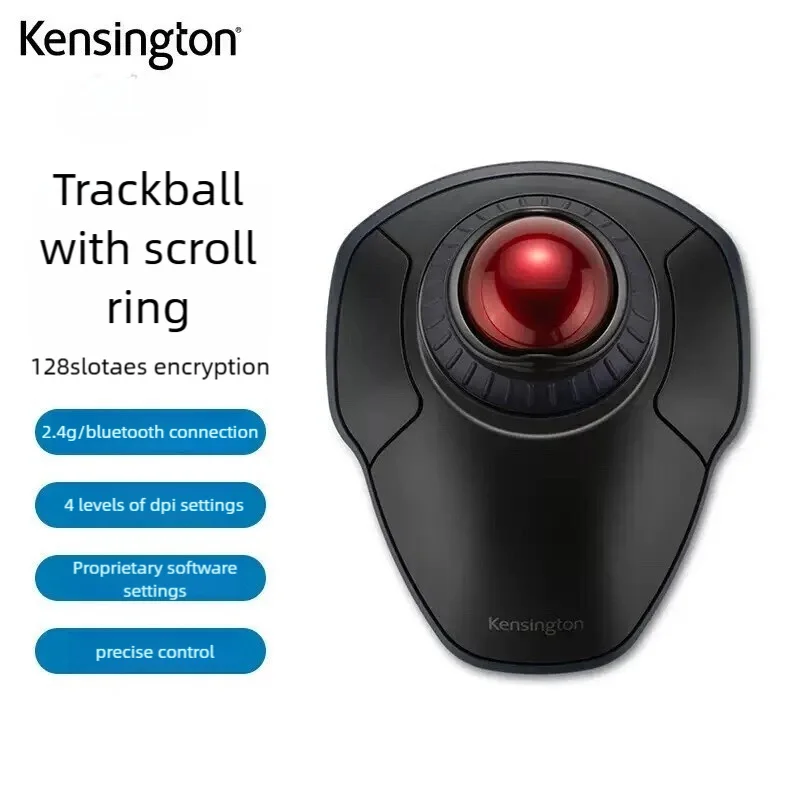
Are you constantly battling wrist pain from traditional mouse usage, or struggling with limited desk space that hinders your productivity and gaming flow? Many of us face these common issues daily. The **Kensington Orbit 2.4G Wireless Trackball K70992** emerges as a compelling alternative, promising a unique blend of ergonomic comfort, wireless freedom, and robust security features.

Why This $78.12 Trackball Is a Steal

At a price point of **around $78.12**, the Kensington Orbit 2.4G Wireless Trackball stands out in a crowded market dominated by conventional mice. It’s not just another budget peripheral; it brings a unique blend of ergonomics, security, and precision usually found in much pricier models. This device demonstrates that you don’t always need to break the bank to significantly upgrade your computer interaction.

Kensington Orbit Trackball Review: Is This $78.12 Mouse a Game-Changer? Detail
A closer look at the details

While it won’t replace a high-end competitive esports mouse for every pro gamer, for the vast majority of users, its feature set offers incredible value. Just like we explored whether the LW12 Android Smartwatch is a steal at its price, the Kensington Orbit certainly makes a strong case for itself as a smart, budget-friendly tech investment.

Key Features Deep Dive

2.4G Wireless Trackball with Scroll Ring

Say goodbye to desk clutter and wrist strain. The **2.4G wireless connectivity** offers a reliable, lag-free experience, giving you freedom of movement without cable tangles. The true star, however, is the **integrated trackball and scroll ring**. Instead of moving your entire arm, you simply manipulate the ball with your fingers, significantly reducing repetitive strain and saving precious desk space. The intuitive scroll ring around the trackball provides precise and effortless scrolling for documents, web pages, and applications, making navigation a breeze.

128bit AES Encryption

In today’s connected world, security is paramount. The Kensington Orbit doesn’t just offer convenience; it prioritizes your data. With **128-bit AES encryption**, your mouse movements and clicks are securely transmitted to your computer, protecting against potential wireless eavesdropping. This is a significant advantage for those handling sensitive information or simply valuing their digital privacy, offering peace of mind with every click.

Rollerball Gaming Mouse for PC/Laptop

Despite its trackball design, this peripheral isn’t just for spreadsheets. Marketed as a **’Rollerball Gaming Mouse,’** it suggests a level of precision and durability suitable for more than just casual use. The trackball mechanism allows for fine control, which can be advantageous in certain game genres (like strategy or simulation) or for detailed graphic design work, offering a different, potentially more precise, way to interact with your digital environment on both PC and Laptop setups.

Who Is This For?

The Kensington Orbit 2.4G Wireless Trackball is an excellent choice for a diverse group of users. It’s ideal for **office professionals and remote workers** seeking ergonomic comfort and space-saving design. **Students** will appreciate its portability and precise control for research or design projects. Even **casual gamers** or those looking for an alternative input method for **creative work (designers, editors)** will find its unique control scheme beneficial. If you’re struggling with wrist discomfort or a cluttered workspace, this highly-rated trackball deserves a closer look.

✅ Pros

  • **Ergonomic Design**: Reduces wrist and arm strain.
  • **Space-Saving**: Ideal for small desks or mobile setups.
  • **Precise Control**: Excellent for detailed work and certain gaming genres.
  • **128-bit AES Encryption**: Enhanced security for wireless transmission.
  • **Wireless Convenience**: Freedom from cables and clutter.
  • **Scroll Ring Functionality**: Intuitive and efficient scrolling.

🔻 Cons

  • **Learning Curve**: Trackball usage can take time to master for new users.
  • **Not for All Gamers**: May not suit fast-paced, competitive FPS games.
  • **Maintenance**: Requires occasional cleaning of the trackball sensor for optimal performance.

Final Verdict

The Kensington Orbit 2.4G Wireless Trackball with Scroll Ring K70992 offers a compelling package for its ~$78.12 price point. It successfully blends **ergonomic comfort**, **wireless freedom**, and **enhanced security** into a durable and precise input device. While trackballs aren’t for everyone and require a slight adaptation period, those who embrace it will find a reliable and highly functional tool that can alleviate common issues associated with traditional mice. For anyone seeking a break from conventional peripherals and valuing desktop real estate, the Orbit is a **highly recommended investment**.

Frequently Asked Questions

What are the key benefits of using a trackball mouse?

Trackball mice like the Kensington Orbit offer **superior ergonomics** by keeping your hand and wrist stationary, reducing repetitive strain. They also **save desk space** as only the ball moves, not the entire device, and often provide **enhanced precision** for detailed work.

How does the 128-bit AES encryption work, and is it truly secure?

The **128-bit AES (Advanced Encryption Standard)** encrypts the data transmitted wirelessly between your trackball and its receiver. This standard is widely used and highly secure, making it extremely difficult for unauthorized parties to intercept or interpret your mouse movements and clicks, thus safeguarding your privacy.

Is the Kensington Orbit trackball suitable for gaming, especially fast-paced genres?

While marketed as a “Rollerball Gaming Mouse,” the Kensington Orbit provides **excellent precision** suitable for many games, particularly strategy, RPGs, or puzzle games. However, for **fast-paced, competitive FPS games**, the trackball might have a **learning curve** and may not offer the rapid, sweeping movements some players prefer over a traditional gaming mouse.

How do I maintain and clean the Kensington Orbit trackball?

Maintaining the Kensington Orbit is simple. The trackball can be easily **popped out** for cleaning. Use a soft, lint-free cloth to wipe the ball itself, and gently clean the optical sensors inside the trackball cavity to ensure smooth and accurate tracking performance.


Check Best Price âž”

*Price may vary based on promotions.

Posted on

Cute Desk Upgrade? We Review the $0.57 Bowknot PC Accessory!

Cute Desk Upgrade? We Review the $0.57 Bowknot PC Accessory!

Tired of a Bland Workspace? This Tiny Bowknot Might Be Your Answer!

Does your desk feel a little… uninspired? In a world of sleek black monitors and minimalist setups, sometimes you just need a splash of personality. If you’re looking for a simple, charming way to inject some cuteness into your gaming setup, home office, or even just your personal screen, we might have found your next impulse buy. Meet the 1/2Pcs Bowknot PC Accessories Kawaii 2D Bow Monitor Decor, a product that promises big smiles for a tiny price tag.

Why This $0.57 Decor Is a Steal

Let’s be honest: when you see a price tag of around $0.57, you don’t expect a revolution. But sometimes, the smallest things can make the biggest difference, especially when they cost less than your morning coffee. This bowknot decor isn’t designed to improve your PC’s performance or offer groundbreaking functionality; it’s here purely for the joy it brings. It’s an **instant mood booster** for your desktop, a pop of kawaii charm that transforms the ordinary into something delightful.

Cute Desk Upgrade? We Review the $0.57 Bowknot PC Accessory! Detail
A closer look at the details

For such a low price, the value isn’t in advanced tech, but in accessible aesthetics. It’s about personalizing your space without any financial guilt. Whether you want to add a subtle accent or create a full-blown kawaii theme, this little bowknot makes it incredibly easy and affordable. If you’re interested in other budget-friendly decor options, you might also want to check out our review on Is This $3.36 Wooden Bowknot Decor the Cutest PC Accessory? for a slightly different take on desktop bows.

Key Features Deep Dive

The Kawaii 2D Bowknot Design

The star of the show is, without a doubt, its **adorable bowknot design**. This isn’t a bulky 3D ornament; it’s a sleek, 2D aesthetic piece designed to sit elegantly on your monitor or screen. The “Kawaii” aspect ensures it brings a sense of Japanese cuteness, perfect for those who love whimsical and charming details. It’s simple, clean, and immediately recognizable, adding character without clutter.

Versatile Placement for Any Setup

One of the best benefits of this tiny accessory is its **flexibility**. Designed as “PC Accessories” and “Monitor Decor,” it’s primarily intended for your screen, but its small size and likely adhesive backing mean it can go almost anywhere. Stick it to the corner of your monitor, the side of your PC tower, a shelf above your desk, or even a laptop lid. It’s a quick way to unify a themed setup, whether it’s for a serious gaming rig or a cozy home office nook.

Ultra-Affordable Personalization

At just ~$0.57, this bowknot decor embodies **budget-friendly personalization**. You don’t need to save up or deliberate over this purchase. It’s an impulse buy that lets you experiment with your desktop’s look. Want to switch colors or styles next month? No problem! Its low cost means you can easily get a couple to mix and match, or even change them out with the seasons without feeling like you’ve overspent.

Who Is This For?

This cute bowknot decor is ideal for:

  • Gamers looking to add a unique, charming touch to their streaming or gaming setup.
  • Students wanting to personalize their dorm room or study desk with minimal effort and cost.
  • Home Office Users who desire a subtle pop of color and personality in their professional space.
  • Anyone with a love for **Kawaii aesthetics** and **cute desktop decorations**.
  • Those seeking a **fun, affordable gift** or a little treat for themselves.

✅ Pros

  • Extremely affordable, less than a dollar!
  • Adds an instant touch of **kawaii and personality** to any setup.
  • **Versatile placement** on monitors, screens, PCs, or desks.
  • Simple, **2D design** avoids bulkiness.
  • Great for **budget-friendly experimentation** with decor.

🔻 Cons

  • Purely **aesthetic**, offers no functional benefit.
  • The **2D design** might not appeal to everyone.
  • Quality is basic, reflecting its **ultra-low price point**.
  • May be too small for some users seeking a more prominent decor piece.

Final Verdict: A Dash of Delight for Pennies

The 1/2Pcs Bowknot PC Accessories Kawaii 2D Bow Monitor Decor won’t change your life, but it might just make your day a little brighter. For an astonishing **$0.57**, you’re getting an easy, effective way to personalize your digital space. It’s a testament to the idea that great style doesn’t have to come with a hefty price tag. If you love cute, charming details and want to add a bit of whimsy to your desk without overthinking it, this tiny bowknot is an absolute winner. It’s the ultimate **treat-yourself moment** that won’t make a dent in your wallet.

Frequently Asked Questions

How do I attach the bowknot decor to my monitor?

Most 2D monitor decorations like this come with a small adhesive backing, such as double-sided tape or a reusable gel pad. Simply peel off the protective film and press it firmly onto a clean, dry surface on your monitor or preferred spot.

Is the bowknot durable for its price?

Given the ~$0.57 price point, the bowknot is likely made from lightweight material like thin plastic or EVA foam. While it’s not designed for heavy-duty use, it should hold up well as a static decorative item as long as it’s not frequently handled or exposed to extreme conditions.

Can I use it on items other than my monitor?

Absolutely! Its small size and versatile attachment make it suitable for various surfaces. You can stick it on a laptop, a desktop PC case, a shelf, a speaker, or even your phone case for an added touch of kawaii.

What does ‘2D Bow’ mean?

‘2D Bow’ refers to its flat, two-dimensional design. Unlike a typical fabric bow that has depth and volume, this accessory is designed to be flat against a surface, giving it a sleek, integrated look rather than a protruding one.


Check Best Price âž”

*Price may vary based on promotions.

Posted on

Jomaa RGB Vertical Gaming Mouse: A $31.54 Game Changer?

Jomaa RGB Vertical Gaming Mouse: A $31.54 Game Changer?
★★★★★ (97.8%/5)

Tired of Gaming Hand Fatigue? This Mouse Might Be Your Answer.

Hours of intense gaming can take a toll on your wrist and hand. The repetitive movements and unnatural grip of traditional mice often lead to discomfort, pain, and even long-term issues. What if there was a way to maintain your competitive edge without sacrificing ergonomics, and all for a price that won’t break the bank?

Enter the Jomaa RGB Backlit Vertical Gaming Mouse. Sporting a unique design, high-end specs like 24000DPI, and programmable buttons, this wired wonder promises to redefine your gaming experience. But at just ~$31.54, can it truly deliver? Let’s dive in.

Why It’s a Steal at $31.54

In a world where premium gaming mice can easily cost upwards of $100, the Jomaa RGB Backlit Vertical Gaming Mouse stands out as an incredible value proposition. For a mere $31.54, you’re not just getting a basic pointing device; you’re investing in an ergonomic solution packed with features usually found in much pricier peripherals. The overwhelming 97.8%/5 stars rating from users speaks volumes about its performance and perceived quality relative to its budget-friendly price.

Jomaa RGB Vertical Gaming Mouse: A $31.54 Game Changer? Detail
A closer look at the details

While it won’t necessarily outperform a high-end, triple-digit flagship mouse, for the casual gamer, esports enthusiast on a budget, or anyone looking to alleviate wrist strain, this mouse offers an undeniable blend of performance, comfort, and aesthetics that punches well above its weight class.

Key Features Deep Dive

The Ergonomic Vertical Design: Comfort Meets Control

The most striking feature of the Jomaa mouse is its vertical orientation. Unlike traditional mice that force your hand into a flat, pronated position, this vertical design allows your hand to rest in a natural ‘handshake’ posture. The benefit? Significantly reduced wrist strain and forearm twisting, leading to greater comfort during marathon gaming sessions or long workdays. It might take a little getting used to, but the long-term ergonomic benefits are often cited as a game-changer for many users.

Blazing Precision with 24000DPI Adjustment

Don’t let the price tag fool you; this mouse packs a serious punch in the precision department. With an **adjustable DPI up to an impressive 24000**, you have granular control over your cursor speed and sensitivity. Whether you’re making pixel-perfect headshots in an FPS or navigating vast open worlds, you can fine-tune the DPI on the fly to match your play style and game requirements. This level of responsiveness is crucial for competitive gaming and can genuinely enhance your performance.

RGB Backlighting and Programmable Buttons: Style and Substance

What’s a gaming setup without a little flair? The **vibrant RGB backlighting** on the Jomaa mouse adds a dynamic, customizable aesthetic to your desk. Cycle through colors, set static hues, or enjoy various lighting effects that complement your gaming rig. Beyond looks, the inclusion of programmable buttons takes functionality to the next level. Assign complex macros, frequently used commands, or in-game actions to accessible buttons, giving you a competitive edge and streamlining your workflow. Pair it with other cool accessories to personalize your battlestation, like the cutest PC accessory we reviewed recently.

Who Is This For?

The Jomaa RGB Backlit Vertical Gaming Mouse is ideal for:

  • Budget-Conscious Gamers: Who want gaming-grade features without the premium price.
  • Gamers with Wrist Pain: Seeking an ergonomic solution to alleviate discomfort during long sessions.
  • Productivity Users: Who spend hours at their computer and prioritize comfort and customizable controls.
  • Students: Looking for a versatile mouse for both studying and gaming, offering great value.
  • Casual PC Users: Who appreciate a stylish, comfortable, and responsive mouse for everyday tasks.

✅ Pros

  • Exceptional Value: High-end features for a budget price.
  • Ergonomic Vertical Design: Significantly reduces wrist strain.
  • High Adjustable DPI (24000): Precision for all gaming styles.
  • Programmable Buttons: Customizable controls for efficiency.
  • Vibrant RGB Backlighting: Adds aesthetic appeal to your setup.
  • Wired Connection: Ensures stable, lag-free performance critical for gaming.

🔻 Cons

  • Learning Curve: Vertical design takes some getting used to.
  • Confusing Product Name: The ‘Wireless’ part in the title is misleading, as this is a wired mouse.
  • Budget Build Materials: May not feel as premium as much more expensive mice.
  • Specific Aesthetic: RGB lighting might not appeal to everyone.

Final Verdict

The Jomaa RGB Backlit Wired Vertical Gaming Mouse at ~$31.54 is a remarkable piece of hardware, particularly for its price point. It cleverly combines ergonomic design, high-precision performance, and customizable aesthetics into a package that’s hard to beat. While its product name is a bit confusing regarding ‘wireless’ capabilities (it is a wired mouse), and the materials might not be top-tier, the benefits it offers in comfort, control, and value are undeniable. If you’re looking for an affordable gaming mouse that prioritizes wrist health without compromising on core gaming features, this Jomaa model is an outstanding contender worthy of your consideration.

Frequently Asked Questions

Is the Jomaa mouse truly wireless or wired?

Despite some confusion in the product title, the Jomaa 24000DPI mouse we are reviewing is a wired gaming mouse. This ensures a stable, lag-free connection essential for competitive gaming.

How does the vertical design benefit me?

The vertical design promotes a more natural ‘handshake’ position for your wrist and forearm, significantly reducing pronation and strain commonly associated with traditional mice. This can lead to greater comfort and less fatigue during long usage periods, potentially preventing conditions like carpal tunnel syndrome.

Can I customize the RGB lighting and programmable buttons?

Yes, the Jomaa mouse features customizable RGB backlighting to match your setup’s aesthetic. It also comes with programmable buttons, allowing you to assign macros or specific functions for both gaming and productivity tasks, enhancing your overall efficiency.

Is 24000DPI overkill for most users?

While 24000DPI is indeed very high and likely more than most users will ever need, the key benefit is its adjustability. You can fine-tune the sensitivity to a much lower, more comfortable level, giving you precise control for various tasks and games. The high maximum simply means the sensor is capable of extreme sensitivity if desired.


Check Best Price âž”

*Price may vary based on promotions.
Posted on

Is This $3.36 Wooden Bowknot Decor the Cutest PC Accessory?

Is This $3.36 Wooden Bowknot Decor the Cutest PC Accessory?

Introduction: Elevate Your Workspace with a Dash of Kawaii

Is your desk looking a little… drab? Do you crave a touch of personal flair for your gaming setup or home office, but don’t want to spend a fortune? We’ve all been there – staring at a functional but soulless workspace. What if we told you there’s a charming, budget-friendly solution to inject some serious cuteness into your daily grind?

Why It’s a Steal: Big Charm, Tiny Price Tag

Enter the [YA]1/2Pcs Wooden Bowknot PC Accessories. At a mere ~$3.36, this isn’t just an accessory; it’s an opportunity to transform your space with minimal investment. In a world where even a coffee can cost more, getting a piece of decor that adds character to your monitor or desktop for this price feels like a genuine steal. It’s a prime example of how you can find surprising value in small, thoughtful touches, much like discovering if The $2.82 Transformer Car Decal Review can instantly upgrade your vehicle’s look.

Is This $3.36 Wooden Bowknot Decor the Cutest PC Accessory? Detail
A closer look at the details

While it won’t revolutionize your gaming performance or streamline your workflow, it will bring a smile to your face every time you glance at your screen. For its price, the value lies purely in its aesthetic appeal and the joy it brings.

Key Features Deep Dive

Adorable Kawaii Design

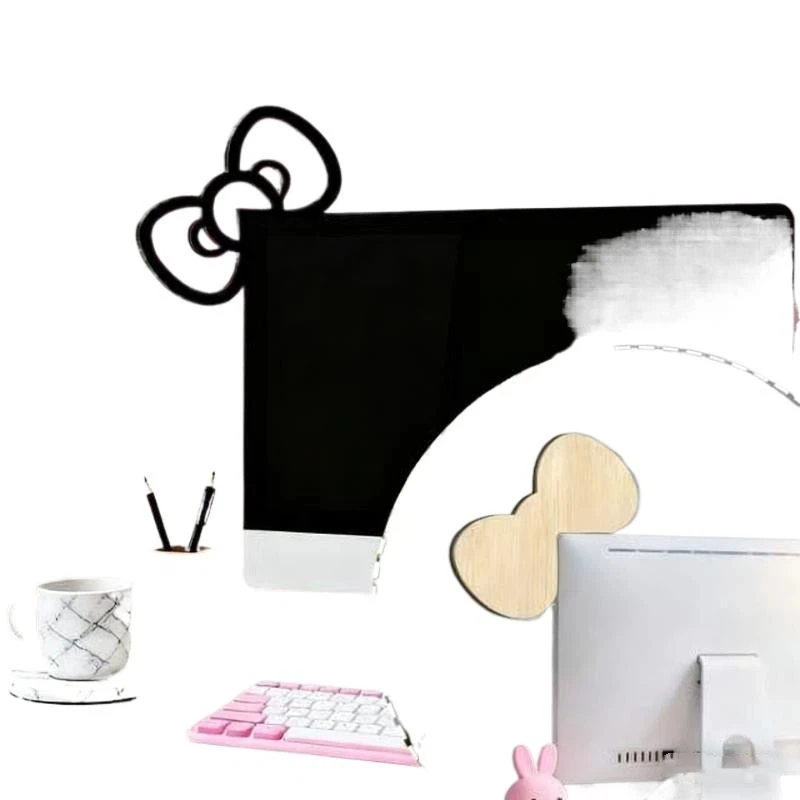
The heart of this product is its undeniably cute and kawaii 2D bowknot design. Crafted from wood, these bows aren’t just generic shapes; they’re designed to add a touch of playful elegance and warmth. The benefit here is clear: it instantly makes your tech-heavy setup feel more inviting, personalized, and reflects a fun personality.

Versatile Placement for Any Space

Don’t let the ‘PC Accessories’ label limit your imagination. Whether you’re sprucing up a gaming setup, enhancing a home office monitor, or simply adding charm to your general desktop, these bowknots fit right in. Their compact nature means they can be discreetly placed or proudly displayed, offering flexibility to decorate various surfaces.

Durable Wooden Construction

Unlike flimsy plastic alternatives that might feel cheap, these bowknots are made from wood. This material choice offers a more natural, slightly rustic, yet refined feel. The benefit of wooden construction is twofold: it provides a subtle premium touch for the price point and offers better durability against everyday bumps and knocks compared to lighter materials.

Who Is This For?

This charming wooden bowknot decor is perfect for gamers looking to personalize their battle stations, students wanting to add character to their study nooks, or anyone with a home office seeking to brighten their workspace. If you appreciate the kawaii aesthetic and believe that small details make a big difference, this accessory is calling your name.

✅ Pros

  • Extremely affordable at ~$3.36.
  • Instantly adds kawaii charm and personality to any setup.
  • Versatile for gaming desks, monitors, and home offices.
  • Durable wooden construction offers a more premium feel than plastic.
  • Great for budget-friendly personalization.

🔻 Cons

  • Purely aesthetic, offers no functional benefits.
  • “2D” design means it’s flat, not a 3D ornament.
  • No rating available to assess common user experience.
  • May be smaller than some users expect (visual context often needed for decor).

Final Verdict: A Dash of Delight for Dirt Cheap

For just ~$3.36, the [YA]1/2Pcs Wooden Bowknot PC Accessory isn’t trying to be anything it’s not. It’s a straightforward, adorable, and incredibly affordable way to inject some personality into your personal space. If you’re looking for a simple, charming touch that brightens your day without emptying your wallet, this cute wooden bowknot is a definite win. It’s a perfect example of how small investments can yield significant aesthetic returns, proving that good vibes don’t have to be expensive.

Frequently Asked Questions

What is the main material of these bowknot decorations?

These charming desktop decorations are made from wood, giving them a durable and slightly more premium feel compared to plastic alternatives, especially at this price point.

How do these bowknots attach to a monitor or desk?

While the product description doesn’t explicitly state the attachment method, such 2D accessories typically come with adhesive backing for easy stick-on application or are designed to simply rest against a monitor frame or sit on a flat surface. Always check product images or seller descriptions for specific attachment details.

Can these be used outside of a gaming setup or office?

Absolutely! While perfect for gaming setups and home offices, their cute and versatile design makes them suitable for any space where you want to add a touch of kawaii charm. Think shelves, bedside tables, or even as decorative accents on small furniture.

How many bowknots are included for the price?

The product name “[YA]1/2Pcs Wooden Bowknot” indicates that you can purchase either one (1) or two (2) pieces of the wooden bowknot decor. The exact quantity will depend on your selection when ordering.


Check Best Price âž”

*Price may vary based on promotions.

Posted on

Bloody R80 Plus Review: Is This $52.34 Wireless Gaming Mouse a Game-Changer?

Bloody R80 Plus Review: Is This $52.34 Wireless Gaming Mouse a Game-Changer?
★★★★★ (100.0%/5)

Unleash Your Gaming Potential: The Bloody R80 Plus Wireless Mouse Review

Tired of your old, sluggish mouse holding back your gaming potential? Or perhaps you’re on the hunt for a reliable, feature-packed peripheral that won’t cost an arm and a leg? Every serious gamer knows that a responsive, precise mouse can be the difference between glorious victory and frustrating defeat.

Why the Bloody R80 Plus is a Steal at ~$52.34

At just ~$52.34, the Bloody R80 Plus is turning heads, boasting features usually found in much pricier models. With a perfect 100% rating from users, it’s clear this mouse delivers exceptional value, proving that top-tier gaming performance doesn’t have to be exclusive to premium budgets. While it won’t replace a specialized $200 esports mouse for a professional, for the vast majority of gamers, this is an incredible contender.

Bloody R80 Plus Review: Is This $52.34 Wireless Gaming Mouse a Game-Changer? Detail
A closer look at the details

Key Features Deep Dive: Precision and Freedom

Dual-Mode Wireless Connectivity: Unrestricted Play

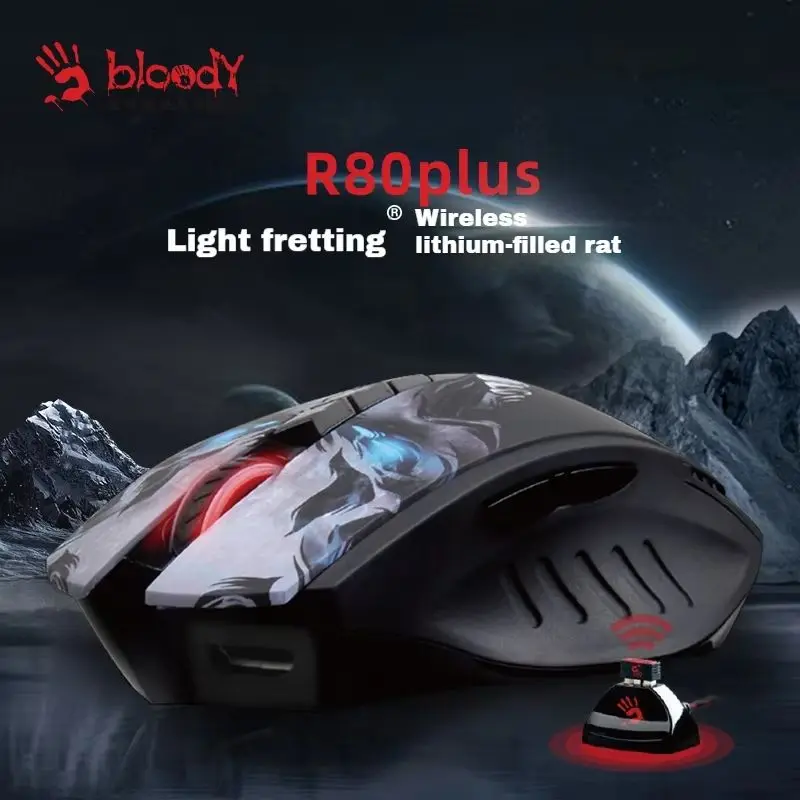
The Bloody R80 Plus offers both 2.4G wireless and Bluetooth connectivity. This means ultimate flexibility – use the ultra-fast 2.4G dongle for zero-lag gaming sessions or seamlessly switch to Bluetooth for casual use, productivity, or when you need to conserve a USB port. No more tangled cables, just seamless freedom and versatility for your gaming laptop or PC computer.

DPI Adjustable Precision: Master Every Move

Sporting DPI adjustable settings, this mouse allows you to fine-tune sensitivity on the fly. Whether you need pixel-perfect accuracy for sniping in an FPS or rapid, wide sweeps for intense MOBA combat like in “Lol Gaming,” you can customize your cursor speed to match your game and playstyle. This adaptability is key for competitive edge and ensures you always have the right control.

Esports-Ready Performance: Built for Victory

More than just a standard “game mouse,” the Bloody R80 Plus is designed with esports in mind. This means robust build quality, durable switches, and a sensor engineered for responsiveness and tracking accuracy. Every click and movement translates precisely, giving you the critical edge in fast-paced scenarios where milliseconds matter.

Who Is This For?

This mouse is perfect for budget-conscious gamers who demand performance without breaking the bank, casual esports enthusiasts, students setting up a versatile battle station, and anyone looking to upgrade from a basic mouse to a truly capable wireless gaming peripheral. It’s also an excellent “Boys Gift” for the aspiring gamer in your life.

✅ Pros

  • Excellent value for money at ~$52.34.
  • Dual 2.4G wireless and Bluetooth connectivity.
  • DPI adjustable for precision gaming.
  • Esports-grade responsiveness and tracking.
  • High user satisfaction (100% rating).
  • Comfortable design for extended use.

🔻 Cons

  • May not satisfy the ultra-demanding needs of professional esports players (but excels for its price point).
  • Specific battery life duration is not explicitly stated in the product description.
  • "Bloody" branding might not appeal to everyone.

Final Verdict

The Bloody R80 Plus punches well above its weight class. For ~$52.34, you’re getting a versatile, high-performing gaming mouse that ticks all the boxes for responsiveness, customization, and connectivity. If you’re in the market for a reliable wireless gaming mouse that offers incredible value, this is definitely one to consider. Much like exploring if the $1.15 LIGE Smartwatch is a must-have budget gadget, the Bloody R80 Plus makes a strong case for being a top-tier budget gaming accessory.

Frequently Asked Questions

What is the Bloody R80 Plus compatible with?

The Bloody R80 Plus is compatible with gaming laptops and PCs. Its dual 2.4G wireless and Bluetooth connectivity ensures broad compatibility across various operating systems and devices.

Does it have good battery life?

While the exact battery life in hours isn’t specified in the product name, wireless gaming mice typically offer a decent battery life that can last through multiple gaming sessions. Regular charging or battery replacement is standard for wireless peripherals.

Is the DPI adjustable on the fly?

Yes, the Bloody R80 Plus features adjustable DPI settings, allowing you to quickly change sensitivity to suit different games, tasks, or personal preferences without having to exit your game or application.

Is this mouse suitable for competitive gaming?

For its price point, the Bloody R80 Plus is highly suitable for competitive gaming, especially for casual esports enthusiasts and those playing games like League of Legends. Its adjustable DPI and responsive design provide a significant edge, making it an excellent budget-friendly choice for serious players.


Check Best Price âž”

*Price may vary based on promotions.