Posted on

Arknights Priestess 122-Key Keycap Set Review: Premium Anime Aesthetic Under $50?

Arknights Priestess 122-Key Keycap Set Review: Premium Anime Aesthetic Under $50?

Staring at the same generic, oil-slicked black keycaps on your mechanical keyboard every single day gets old fast. Yet, if you have ever browsed the custom keyboard scene, you know that designer keycap sets often demand upwards of $120 to $180—often accompanied by painful group-buy wait times that stretch across months.

That is where themed enthusiast sets bridge the gap. The Anime Arknights Priestess 122 Keys Mechanical Keyboard Keycap Set promises a distinctive aesthetic overhaul inspired by the enigmatic Priestess from Arknights for around $49.79. But does it deliver the tactile satisfaction and print quality you actually want under your fingers, or is it just cheap novelty plastic?

Why It’s a Steal

Getting a full custom theme set with novelty accent keys for under $50 is a serious bargain in the mechanical keyboard world. Most licensed or high-tier boutique keycaps easily run double or triple this price before you even factor in international shipping.

Arknights Priestess 122-Key Keycap Set Review: Premium Anime Aesthetic Under $50? Detail
A closer look at the details

Just like we discovered when asking Can $6.29 Earbuds Actually Translate 135 Languages? HTC NE79 TWS Review, budget gear can genuinely disrupt overpriced market segments when you know what to look for. While it won’t replace a bespoke hand-cast artisan cap, this set provides an instant, dramatic desk makeover without forcing you to empty your savings.

Key Features Deep Dive

1. Extensive 122-Key Layout Compatibility

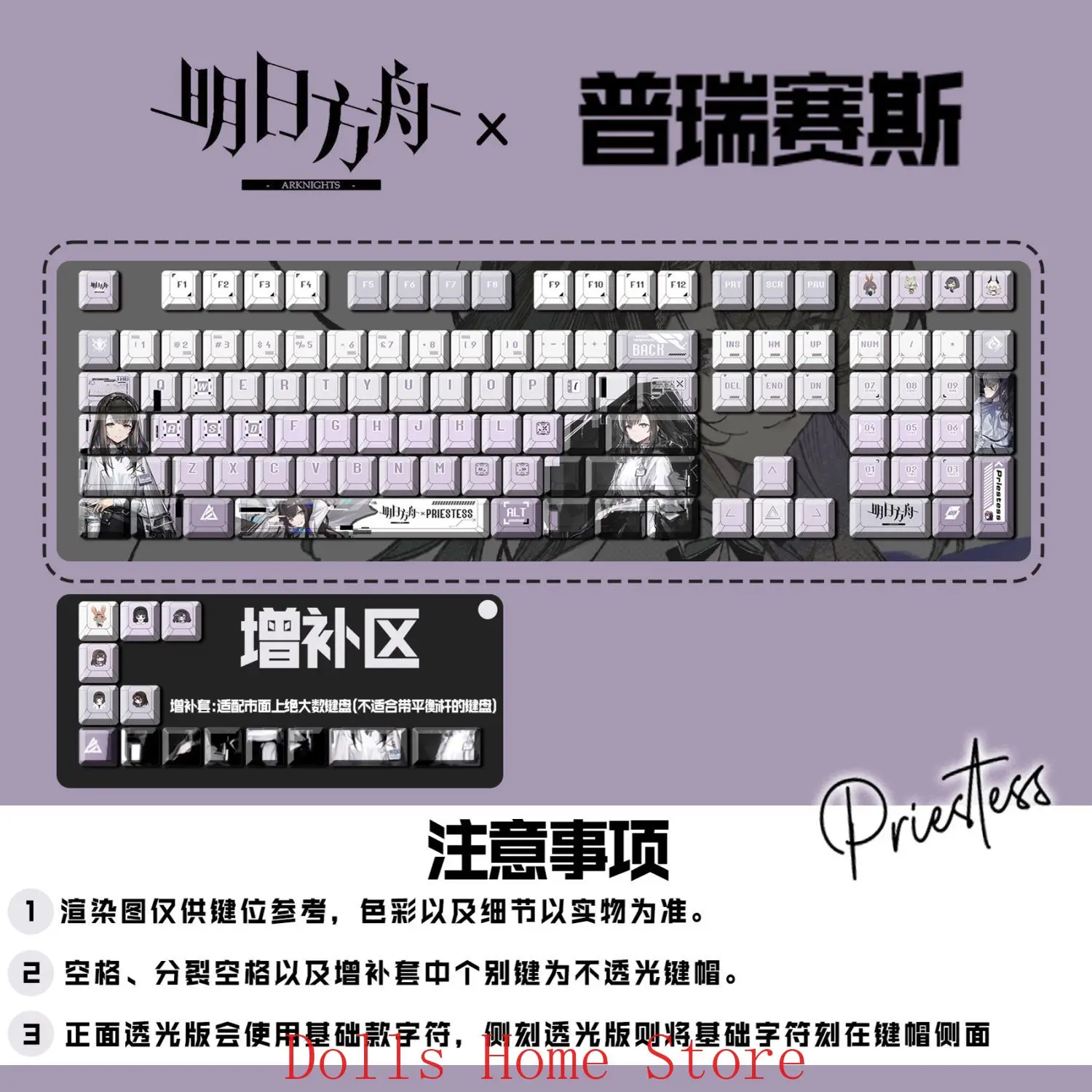
One of the biggest headaches when buying aftermarket keycaps is discovering that your board has an odd-sized right Shift or bottom-row modifier keys. With 122 keys included, this kit easily handles standard 61-key (60%), 87-key (TKL), 104-key, and full-size 108-key layouts, along with popular compact configurations like 68-key and 75% layouts that require non-standard modifier sizing.

2. Stylized Arknights Priestess Novelty Legends

Rather than simply printing basic letters, this set leans heavily into the clean, futuristic sci-fi aesthetic associated with Priestess. You get custom artisan-style novelty keys for your Enter, Spacebar, and Esc positions. The contrast between deep cybernetic accents and crisp background tones gives your entire desk setup an intentional, curated look.

3. Matte Texture and Oil Resistance

Cheap stock keycaps are notoriously made from thin ABS plastic that wears down to a greasy shine within a few months of intense gaming. This set features a textured matte finish engineered to resist finger oils, keeping the keys feeling dry, grippy, and tactilely responsive through long typing and gaming sessions.

Who Is This For?

This keycap set is built specifically for:

  • Arknights & Anime Fans: Anyone wanting to show off their favorite lore and character aesthetic directly on their desk setup.
  • Budget Keyboard Modders: Builders putting together a custom 60%, 75%, or TKL board who want eye-catching aesthetics without blowing $150 on keycaps alone.
  • Work-From-Home Gamers: Anyone looking to refresh a boring office setup with clean typography and unique novelty keys.

✅ Pros

  • Great price-to-aesthetic ratio at ~$49.79
  • 122 keys provide broad compatibility across 60%, 75%, TKL, and full-size boards
  • Stunning Arknights Priestess themed novelty accents
  • Matte, oil-resistant surface texture prevents greasy finger shine
  • Direct MX-stem switch compatibility

🔻 Cons

  • Keycaps only—does not include the actual mechanical keyboard
  • Legends are opaque; backlighting will not shine through the letters
  • Not compatible with membrane or non-MX optical switches

Final Verdict

The Arknights Priestess 122-Key Keycap Set hits a sweet spot that enthusiast builders always appreciate: distinctive character styling at an accessible price. At roughly $49.79, it won’t rival ultra-premium limited-edition German keycap runs in thickness, but it completely outclasses stock factory caps in both personality and feel. If your mechanical keyboard is due for a glow-up and you love the Arknights aesthetic, this set is an absolute winner for your desktop.

Frequently Asked Questions

Does this package include an entire keyboard?

No. This package contains only the 122 keycaps and novelty keys. You will need your own mechanical keyboard with standard MX-style switches (like Cherry, Gateron, Kailh, or Outemu) to install them on.

Will these keycaps fit my keyboard layout?

Thanks to the 122-key count, this set fits standard 61-key (60%), 87-key (Tenkeyless), 104-key, and 108-key boards, as well as most popular 68% and 75% boards that require a standard 1.75u right Shift key.

Does keyboard RGB lighting shine through the letters?

No, these are solid dye-sublimated style keycaps. The RGB backlighting will create an attractive underglow effect around the edges of the keys, but the legends themselves are opaque and will not let light pass through.

Are these compatible with membrane or laptop keyboards?

No. These keycaps require traditional cross-shaped (+) MX stems commonly found on mechanical gaming switches. They will not snap onto scissor-switch laptops or low-profile membrane keyboards.


Check Best Price ➔

*Price may vary based on promotions.
Posted on

MACHENIKE K500 Review: The Best Budget Mechanical Keyboard Under $40?

MACHENIKE K500 Review: The Best Budget Mechanical Keyboard Under $40?
★★★★★ (98.0%/5)

Tired of typing on mushy office keyboards but dreading the thought of dropping $120+ on a big-brand gaming deck? You are not alone. For years, entering the mechanical keyboard hobby meant sacrificing a serious chunk of your paycheck.

Enter the MACHENIKE K500 (K500-B94). Packed with hot-swappable switches, brilliant RGB backlighting, and an ultra-practical 90% compact footprint, it claims to offer premium mechanical thrills for a mind-boggling price tag of around $35.99. But does it actually hold up in daily typing sessions and competitive gaming, or are there hidden corners cut? Let’s dive in.

Why It’s an Absolute Steal

Getting a mechanical keyboard at roughly $35 is uncommon enough, but finding one that features hot-swappable switch sockets and full per-key RGB backlighting is virtually unheard of. Usually, sub-$50 boards solder the switches directly to the PCB, locking you into whatever switch you bought forever. The MACHENIKE K500 flips that script entirely, offering custom-keyboard modularity on a tight student budget.

MACHENIKE K500 Review: The Best Budget Mechanical Keyboard Under $40? Detail
A closer look at the details

While high-end enthusiast boards from Keychron or custom aluminum builds will obviously offer denser acoustic dampening and heavier weights, the K500 easily punches twice above its weight class. If you’re building a clean, modern workstation—perhaps pairing it with a 360 rotating desk organizer to keep your cables and accessories tidy—this keyboard adds serious aesthetics without draining your wallet.

Key Features Deep Dive

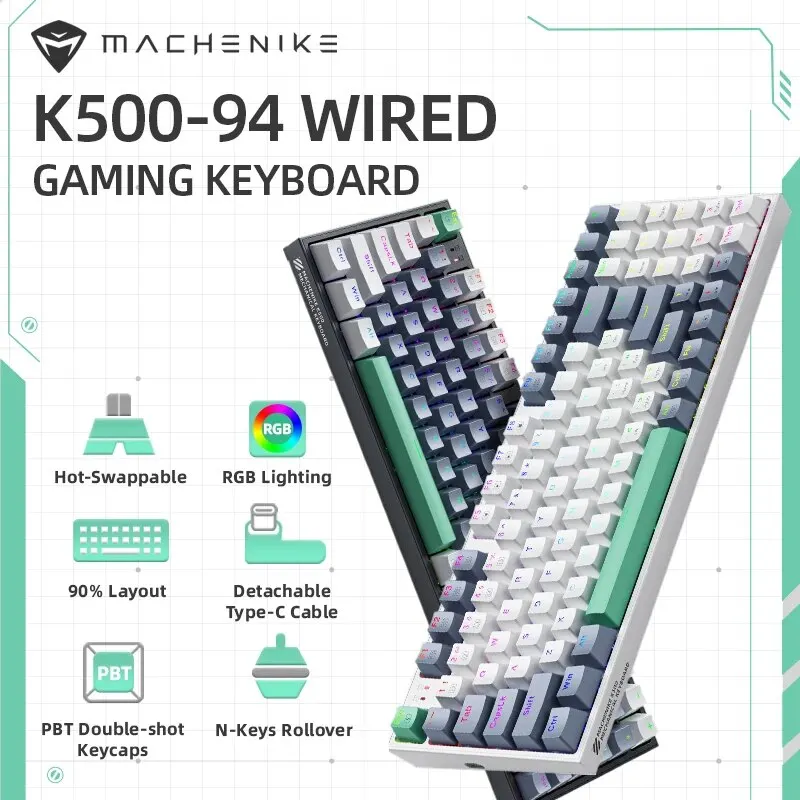
1. Smart 90% Layout (94 Keys)

Full-sized 104-key boards take up an enormous amount of mouse pad real estate, while 60% keyboards force you to abandon your arrow keys and dedicated numpad. The K500-B94 hits the ultimate sweet spot: a compact 94-key arrangement. You get full numeric keypad functionality for data entry or macro keybinding, all while preserving valuable inches of desk space for sweeping flick shots in your favorite shooter.

2. Hot-Swappable Switches

The standout feature here is modularity. Equipped with 3-pin hot-swap sockets, the MACHENIKE K500 lets you replace keys without touching a soldering iron. If a switch ever wears out, or if you want to experiment with clicky blues on the spacebar and linear reds on the WASD cluster, you simply pop them out using the included switch puller and snap in new ones. That’s a massive win for repairability and longevity.

3. Vibrant RGB Lighting & Double-Shot Keycaps

Budget keyboards frequently cheap out with static ‘rainbow’ zones that can’t be changed. The K500 delivers true dynamic RGB backlighting with dozens of onboard animation presets, dynamic speed controls, and adjustable brightness. Combined with durable double-shot injection keycaps, the legends won’t fade or wear smooth under oily fingers, giving you sharp visibility even in late-night gaming sessions.

Who Is This For?

The MACHENIKE K500 is engineered for anyone who demands functionality without high-end markup:

  • Budget PC Gamers: Gamers who want fast mechanical actuation, full anti-ghosting, and flashy RGB without blowing their entire graphics card budget.
  • Students & Home Office Workers: Anyone who punches numbers into Excel but hates bloated, massive keyboards cluttering their work surface.
  • Keyboard Modding Beginners: An ideal entry point for anyone wanting to test switch lubing and tape modding without risking a $150 board.

✅ Pros

  • Incredible price-to-performance ratio (~$35.99)
  • Hot-swappable 3-pin switch sockets
  • Space-saving 94-key layout retains the numpad
  • Bright, customizable RGB lighting modes
  • Durable double-shot keycaps that resist shine

🔻 Cons

  • Plastic case produces slight hollow resonance out of the box
  • Wired-only connection (no Bluetooth or 2.4GHz wireless)
  • Stock stabilizers could benefit from extra lubrication

Final Verdict

At just under $36, the MACHENIKE K500 delivers staggering value. It looks sharp, feels responsive, and boasts modular features that were once reserved strictly for boutique enthusiast setups. While the hollow plastic casing reminds you it’s a budget peripheral, a quick 10-minute foam mod easily remedies the sound profile. If you want a dependable, space-saving mechanical keyboard that nails all the basics and then some, this is an undeniable bargain.

Frequently Asked Questions

Can I swap out the switches with any brand?

Yes, as long as they are standard 3-pin mechanical switches (like Outemu, Gateron, or Akko 3-pin variants). If you purchase 5-pin switches, you will simply need to clip the two extra plastic alignment pins with nail clippers.

Is the USB cable detachable?

Yes, the K500 features a detachable Type-C USB cable, making it very convenient to transport in a backpack or replace with custom coiled aviator cables.

Does it work on macOS as well as Windows?

Yes! The keyboard works plug-and-play across Windows, Mac, and Linux. Note that the layout is primarily printed for Windows, but Mac will instantly recognize the keys (Cmd maps to the Win key).


Check Best Price ➔

*Price may vary based on promotions.

Posted on

Arknights: Endfield PBT Keycaps Review: Worth the $63 Upgrade?

Arknights: Endfield PBT Keycaps Review: Worth the $63 Upgrade?

Staring down at your mechanical keyboard, does it feel a bit… plain? If you are tired of generic black or white ABS plastic that shines up after two weeks of heavy gaming, you are not alone. Customizing your keyboard setup gives your entire desk space an instant aesthetic lift, but artisan sets and custom group buys can easily run upwards of $150 before shipping.

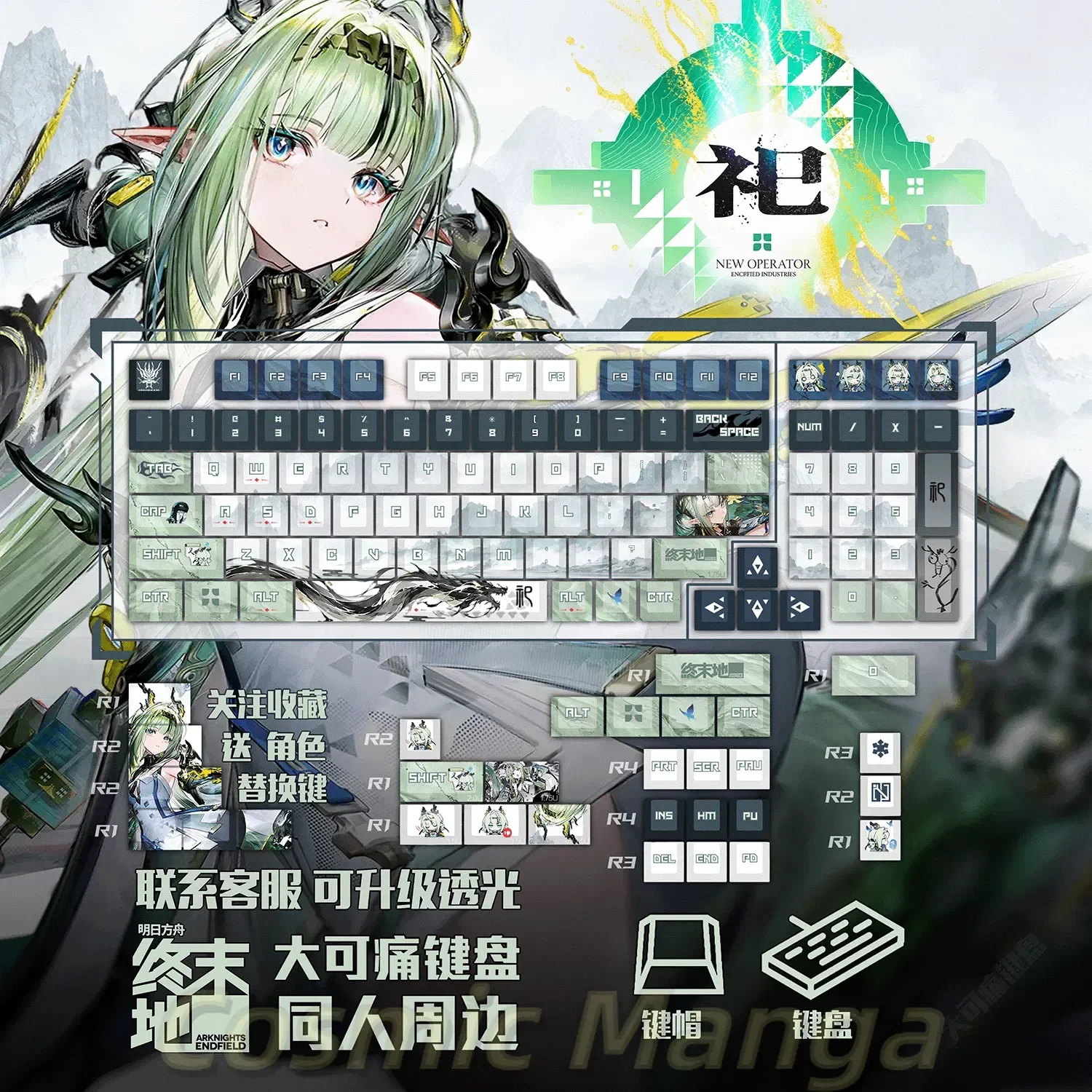
Enter the Arknights: Endfield Themed PBT Keycap Set. Priced right around $63.39, this set promises high-end dye-sublimation graphics, thick PBT material, and distinct anime-inspired techwear aesthetics straight out of Talos-II. Let’s dig into whether this mid-range novelty set delivers true bang for your buck.

Why It’s a Steal

For keyboard hobbyists, custom themed keycaps are notoriously expensive. Premium GMK or high-tier boutique dye-sub sets typically command north of $120 to $180, often paired with months-long preorder wait times. Finding a dedicated anime theme set like this Arknights: Endfield variant at $63.39 sits in that sweet spot of enthusiast styling without draining your entire peripheral budget.

Arknights: Endfield PBT Keycaps Review: Worth the $63 Upgrade? Detail
A closer look at the details

While $63 isn’t impulse-bin cheap, it firmly sits well below enthusiast boutique pricing. You get a fully customized profile with unique novelty keys, detailed legends, and zero shine-prone ABS plastic. If you are already invested in custom switches—or perhaps tuning and soldering your own boards (similar to what we discuss in our Can a $7 Soldering Iron Cleaner Kit Save Your Burnt Tips? Review)—having high-quality keycaps is the crowning touch your battlestation deserves.

Key Features Deep Dive

1. Thermal Sublimation PBT Construction

Cheap keycaps rely on pad printing, which wears off under standard gaming friction within months. This set utilizes PBT thermal dye-sublimation, meaning the ink penetrates deeply into the plastic. PBT resists finger oils, meaning no greasy ‘shine’ spots on your WASD cluster, giving you a smooth, textured feel that remains consistent over years of heavy typing.

2. Industrial Endfield Sci-Fi Novelty Keys

Instead of generic fonts, this set embraces the stark, tactical visual language of the upcoming Arknights: Endfield title. The crisp graphic accents, danger markings, and custom stylized novelty caps let you swap out standard function or modifier keys for artwork that truly pops against both dark and light desk mats.

3. Broad Mechanical Keyboard Compatibility

Nothing is more frustrating than buying keycaps only to discover your right shift key or bottom row doesn’t fit. Designed for MX-style cross-stem switches (Cherry MX, Gateron, Kailh, Outemu), this kit features an extensive key count accommodating standard full-size, TKL (87-key), 75%, and compact 65% or 60% layouts.

Who Is This For?

This keycap set is made for Arknights fans, anime aesthetics lovers, and PC setup enthusiasts who want a distinct techwear desk theme without paying boutique group-buy prices. It’s also an awesome gift for a fellow gamer looking to give their battle station a dramatic cosmetic facelift.

✅ Pros

  • Durable PBT material that resists greasy oils and wear.
  • Crisp thermal dye-sublimated graphics with striking Endfield artwork.
  • Wide compatibility with standard Cherry MX-style stem switches.
  • Significantly cheaper than boutique $150+ group buy keycap sets.

🔻 Cons

  • Priced higher than generic single-color budget caps ($20-$30 tier).
  • Non-translucent legends mean RGB backlighting won’t shine through the letters.

Final Verdict

At $63.39, this Arknights: Endfield keycap kit offers exceptional thematic charm, rich tactile feel, and long-term durability. While it lacks shine-through legends for RGB purists, the dye-sublimated PBT texture and detailed sci-fi styling make it an outstanding value upgrade for any dedicated gaming setup.

Frequently Asked Questions

Will these keycaps fit my keyboard?

These keycaps fit standard cross-shaped (+ stem) mechanical switches like Cherry MX, Gateron, Kailh, Akko, and Outemu. They will not fit low-profile switches or membrane keyboards.

Do these keycaps allow RGB light to shine through the letters?

No, these are solid dye-sublimated PBT keycaps. RGB lighting will diffuse around the borders of the keys, creating a nice underglow, but the legends themselves are opaque.

Will the printing rub off over time?

Unlike cheap screen-printed or pad-printed caps, thermal sublimation embeds the dye directly into the PBT plastic fibers, making the legends highly resistant to fading and daily wear.


Check Best Price ➔

*Price may vary based on promotions.
Posted on

Level Up Your Setup for $10: Kevin Kaslana Anime Keycaps Review

Level Up Your Setup for $10: Kevin Kaslana Anime Keycaps Review

We have all been there: you stare at your plain, factory-black mechanical keyboard and wish it had more personality. But when you browse custom designer keycap sets, reality hits hard. Most boutique sets cost anywhere from $60 to an eye-watering $150—often more than the keyboard itself! If you are a fan of Honkai Impact 3 and want to rep humanity’s coolest Deliverance warrior without emptying your wallet, there is good news.

Why It’s a Steal: Premium Anime Looks on a Dime

Priced at just around $10.65, this Kevin Kaslana themed keycap set delivers high-impact visual flair at a fraction of standard aftermarket costs. You get that striking icy, futuristic aesthetic tailored around one of HoYoverse’s most iconic characters for roughly the price of two fancy coffees.

Level Up Your Setup for $10: Kevin Kaslana Anime Keycaps Review Detail
A closer look at the details

While you shouldn’t expect the heavyweight gauge of a boutique GMK group buy, finding detailed custom anime novelty caps at this price point is astonishingly rare. Before slapping these onto your daily driver, you might want to give your board a fresh start—check out our guide on how to Clean Your Gross Keyboard for $3: 10-Piece Brush Kit Review so your new keycaps sit on a spotless deck.

Key Features Deep Dive

1. Kevin Kaslana Themed Artwork

The standout attraction here is undeniably the art direction. Capturing Kevin Kaslana’s cool-toned, frost-bitten warrior vibe, the legends and novelty graphics bring instant personality to your desk. Instead of generic icons, you get customized key accents that make your battle station feel curated and uniquely yours.

2. Universal Cross-Axis (MX) Compatibility

Nothing is worse than buying desk accessories only to find they do not fit your board. These keycaps utilize standard cross-axis mounting, meaning they slide right onto virtually any Cherry MX clone—including Gateron, Outemu, Kailh, and Akko switches. Swapping them in takes mere seconds with a basic keycap puller.

3. Ergonomic Profile and Matte Grip

Glossy keycaps turn slick and greasy after long gaming sessions. These caps feature a subtle textured matte finish that provides a reliable, tactile grip under your fingertips. Whether you are farming abyss stages or pounding through work emails, your fingers stay firmly planted without unwanted slippage.

Who Is This For?

This set is an absolute no-brainer for Honkai Impact 3 and Honkai: Star Rail fans who want to theme their gaming space. It is also perfect for budget-conscious mechanical keyboard modders, students, and gamers who love swapping aesthetics frequently without suffering buyer’s remorse.

✅ Pros

  • Unbeatable value at roughly $10.65
  • Eye-catching Kevin Kaslana custom artwork
  • Universal compatibility with standard MX-stem switches
  • Pleasant matte texture resists fingerprint buildup
  • Great entry point for keyboard customization

🔻 Cons

  • Thinner plastic walls compared to luxury $100+ sets
  • Not meant for low-profile switches or non-standard stem layouts

Final Verdict

For roughly ten bucks, this Kevin Kaslana keycap set is the ultimate low-risk, high-reward upgrade. It brings instant character and anime flair to any compatible mechanical keyboard. If you want a cool desktop centerpiece without the enthusiast-grade price tag, add this set to your cart with zero hesitation.

Frequently Asked Questions

Will these keycaps fit my keyboard?

Yes, as long as your mechanical keyboard uses switches with a standard “+” (cross) stem—such as Cherry MX, Gateron, Outemu, or Kailh. They are not compatible with membrane boards, Romer-G, or low-profile switches.

Does this package include the entire keyboard?

No, this listing is solely for the custom keycaps. You will need your own mechanical keyboard to install them on.

Will the character print wear off quickly?

Because these utilize surface sublimation/print techniques typical of budget caps, they hold up very well under normal everyday typing. However, using harsh chemical cleaners directly on the printed surface is not recommended.


Check Best Price ➔

*Price may vary based on promotions.

Posted on

Zenless Zone Zero Custom Keycaps Review: Is This $41 Battlestation Upgrade Worth It?

Zenless Zone Zero Custom Keycaps Review: Is This $41 Battlestation Upgrade Worth It?

Staring at a stock, monochromatic mechanical keyboard all day is boring. But if you’ve ever browsed custom keycap group buys, you already know the painful truth: enthusiast designer sets often run upwards of $120 to $180—and sometimes take six months to ship. That is a steep pill to swallow just to give your desk setup some personality.

Enter the Zenless Zone Zero PBT Thermal Sublimation Keycaps, priced right around $41.49. If you are hooked on HoYoverse’s stylish urban fantasy action RPG, this set promises high-end dye-sublimated aesthetics without destroying your wallet. Let’s see if this budget find delivers the goods or cuts too many corners.

Why It’s a Steal

Finding a complete, themed keycap set under $50 that actually uses thick PBT plastic is rare. Most cheap anime-themed alternatives cut corners by using thin ABS plastic that wears down to a greasy shine within a few months of intense gaming. At just $41.49, this set brings both durability and elaborate five-sided artwork to the table without boutique group buy markup.

Zenless Zone Zero Custom Keycaps Review: Is This $41 Battlestation Upgrade Worth It? Detail
A closer look at the details

Instead of dropping triple digits on artisan keycaps, picking up a set like this leaves plenty of spare cash for other desk upgrades—whether that is a desk mat, bias lighting, or even pairing it with something silly like an ice ball maltose squishy to melt away work stress between matches. In terms of price-to-aesthetic ratio, it immediately punches well above its weight class.

Key Features Deep Dive

1. Thick PBT Material That Resists Shine

The primary advantage here is the thick PBT construction. Unlike cheaper ABS keycaps that develop oily-looking smooth spots from your finger oils, PBT retains its subtle textured matte finish for years. It delivers a deeper, more satisfying “thock” sound profile upon bottoming out, elevating the overall typing experience of your board instantly.

2. Thermal Dye-Sublimation Printing

Laser-printed or pad-printed legends eventually scratch off. This set uses thermal dye-sublimation, a process where high heat infuses the ink directly into the plastic itself. The sharp Zenless Zone Zero character art and stylized legends won’t fade, chip, or smudge, even if you put thousands of hours into grinding endgame content.

3. Broad Layout Compatibility

Whether you rock a compact 60%, a popular 75%, a tenkeyless (TKL), or a full-sized 100% board, this set includes a generous variety of novelty and modifier keys. The standard cross-shaped stems fit virtually any standard Cherry MX-style switch (Gateron, Outemu, Kailh, Akko, and clones included), making installation a simple 10-minute swap.

Who Is This For?

This keycap set is tailored for:

  • Zenless Zone Zero & Anime Fans who want to theme their gaming space around their favorite characters.
  • Budget Keyboard Builders looking to customize an entry-level board (like an RK61 or Keychron) without spending more on caps than they did on the keyboard itself.
  • Everyday Typists who want durable, matte PBT keycaps that feel comfortable for long typing sessions.

✅ Pros

  • Exceptional value at just ~$41.49
  • Durable PBT construction avoids shiny wear marks
  • Vibrant dye-sublimated graphics won’t rub off
  • Wide compatibility with standard MX-style mechanical switches
  • Includes fun novelty accent keys to personalize your board

🔻 Cons

  • Legends are opaque (RGB backlighting will not shine through the letters)
  • Spacebar straightness can occasionally have minor tolerance variations typical of budget PBT
  • Keycaps only—does not include the actual keyboard

Final Verdict

If you’re expecting custom hand-poured artisan resin keycaps, you won’t find them here. But for $41.49, these Zenless Zone Zero PBT keycaps offer an unbeatable blend of sharp anime aesthetics, durable materials, and great layout coverage. It is one of the quickest, most budget-friendly ways to inject vibrant personality into your battlestation.

Frequently Asked Questions

Does this package include a mechanical keyboard?

No. This is an aftermarket keycap set only. You will need your own mechanical keyboard equipped with Cherry MX-compatible stems to mount them.

Will these keycaps work with my keyboard switches?

Yes, provided your switches feature the standard ‘+’ cross stem (Cherry MX, Gateron, Kailh, Outemu, Akko, etc.). They will not fit low-profile proprietary switches, optical membrane switches, or vintage Alps stems.

Does RGB lighting shine through the letters?

No. These are dye-sublimated PBT keycaps, meaning the plastic is solid and opaque. Backlighting will glow softly around the edges of the keys (underglow), but it will not shine directly through the lettering.

Why choose PBT over ABS keycaps?

PBT is a denser, more durable plastic compared to standard ABS. It resists high temperatures, finger oils, and wear, ensuring your keys don’t turn slick and shiny over time.


Check Best Price ➔

*Price may vary based on promotions.
Posted on

Is This $7 Coiled Keyboard Cable the Ultimate Budget Upgrade?

Is This $7 Coiled Keyboard Cable the Ultimate Budget Upgrade?
★★★★★ (94.6%/5)

Introduction: Untangle Your Desk, Unleash Your Style!

Tired of your desk looking like a spaghetti monster attacked your mechanical keyboard setup? Is your plain, flimsy cable a visual buzzkill, detracting from the sleek aesthetics of your gaming station or clean workspace? If you’re nodding along, you know the struggle is real. A good keyboard cable isn’t just about connectivity; it’s about **durability, organization, and making a statement**.

Enter the "Coiled Keyboard Cable Type C To USB-A Mechanical Keyboard Cable Detachable Metal Aviator Double Sleeved Wire". That’s a mouthful, but what if we told you this feature-packed accessory could be yours for around $7.10? With an impressive 94.6% 5-star rating, it’s clear this isn’t just another cheap wire. Let’s dive in and see if this budget marvel truly lives up to the hype.

Why It’s a Steal: Premium Looks Without the Premium Price Tag

In the world of custom mechanical keyboards, a high-quality coiled cable with an aviator connector can easily set you back $30, $50, or even more. That’s why discovering a product like this, offering similar aesthetics and features for a mere ~$7.10, feels like finding a hidden gem. This cable doesn’t just connect your keyboard; it elevates your entire desk setup, bringing a touch of enthusiast-grade flair without emptying your wallet.

The overwhelmingly positive reviews (nearly 95% perfect!) speak volumes. For a product at this price point, such a high satisfaction rate is rare, signaling exceptional value. It won’t have the bespoke craftsmanship of a hand-made, artisan cable, but for sheer **bang-for-your-buck**, it’s incredibly impressive. If you’re interested in other tech that offers unbelievable value, you might want to check out our review on Unbelievable Value? Testing the $4.19 Fone Air Conduction Headphones.

Is This $7 Coiled Keyboard Cable the Ultimate Budget Upgrade? Detail
A closer look at the details

Key Features Deep Dive: More Than Just a Wire

The Detachable Metal Aviator Connector: Form Meets Function

One of the standout features of this cable is its **detachable metal aviator connector**. This isn’t just for show; it’s incredibly practical. It allows for quick and easy disconnection of your keyboard without having to unplug the entire cable from your PC. This modularity is fantastic for swapping keyboards, transporting your setup, or just making your desk look incredibly neat. Plus, let’s be honest, the rugged metal aviator gives your setup a undeniably cool, professional, and custom-built aesthetic.

Coiled Design & Double Sleeved Wire: Durability Meets Aesthetics

Say goodbye to tangled, messy cables! The **coiled design** not only looks fantastic, adding a retro-futuristic touch to your desk, but it also helps manage cable length and prevents tangles. This keeps your workspace tidy and organized. Beyond the coils, the cable boasts a **double-sleeved wire**. This dual layer of protection enhances durability, shielding the internal wires from wear and tear, and contributes to a more premium feel and look that belies its budget price.

Type C to USB-A Compatibility: Plug and Play Convenience

Most modern mechanical keyboards utilize a USB-C connection, while the majority of computers still offer USB-A ports. This cable’s **Type C to USB-A design** ensures broad compatibility with a vast array of mechanical keyboards and desktop/laptop setups. It’s a straightforward, plug-and-play solution that makes upgrading your cable hassle-free, guaranteeing that it will likely work with your current gear.

Who Is This For? The Ideal User

This coiled keyboard cable is perfect for:

  • Mechanical Keyboard Enthusiasts: Looking to upgrade their setup’s aesthetics without breaking the bank.
  • Gamers: Who want a clean, durable connection that looks great in their battle station.
  • Home Office & Remote Workers: Seeking to tidy up their workspace and add a touch of personal style.
  • Budget-Conscious Users: Anyone wanting premium features and durability at an incredibly affordable price point.
  • Students: Needing a reliable and stylish cable for their dorm setup or portable battlestation.

✅ Pros

  • Unbeatable Value: ~$7.10 for premium features.
  • Stylish Coiled Design: Enhances desk aesthetics and prevents tangles.
  • Detachable Aviator Connector: Convenient modularity and cool factor.
  • Double Sleeved Durability: Offers enhanced protection and a quality feel.
  • High Compatibility: Type C to USB-A works with most modern keyboards.
  • Exceptional User Rating: 94.6% 5-star reviews speak for themselves.

🔻 Cons

  • May not feel as "premium" as custom cables costing 5-10x more.
  • Color options might be limited (check product page for specifics).
  • Initial stiffness from the coiling, common for new coiled cables.

Final Verdict: A No-Brainer Upgrade for Mechanical Keyboard Owners

Considering its incredibly low price point of around $7.10 and the robust feature set including a coiled design, double sleeving, and that coveted detachable metal aviator connector, this "Coiled Keyboard Cable" is an absolute winner. The nearly perfect 94.6% rating isn’t a fluke; it’s a testament to the product’s quality and the immense value it offers. If you’re looking to significantly upgrade the look and feel of your mechanical keyboard setup without splurging, this cable comes with our enthusiastic recommendation. It’s a small investment that delivers a huge aesthetic and functional return.

Frequently Asked Questions

Is this cable compatible with my keyboard?

This cable features a USB Type-C connector for the keyboard end and a standard USB-A connector for your computer. If your mechanical keyboard has a USB Type-C port, it’s highly likely to be compatible.

What’s the main benefit of a coiled cable?

A coiled cable offers several benefits: a stylish aesthetic that enhances your desk setup, improved cable management by naturally keeping excess length tidy, and often increased durability due to the tighter coil structure and double sleeving.

What is a detachable aviator connector and why is it useful?

The detachable metal aviator connector is a quick-release mechanism that allows you to easily connect and disconnect the keyboard section of the cable without unplugging it from your computer. This is great for swapping keyboards, traveling, or just adding a premium, modular look to your setup.

Is the ~$7.10 price point too good to be true?

While custom-made coiled cables can be significantly more expensive, the high 94.6% 5-star rating for this product suggests that for its ~$7.10 price, it delivers exceptional value and quality. It’s a fantastic budget-friendly option that punches well above its weight.


Check Best Price ➔

*Price may vary based on promotions.

Posted on

Cute Desk Upgrade? We Review the $0.57 Bowknot PC Accessory!

Cute Desk Upgrade? We Review the $0.57 Bowknot PC Accessory!

Tired of a Bland Workspace? This Tiny Bowknot Might Be Your Answer!

Does your desk feel a little… uninspired? In a world of sleek black monitors and minimalist setups, sometimes you just need a splash of personality. If you’re looking for a simple, charming way to inject some cuteness into your gaming setup, home office, or even just your personal screen, we might have found your next impulse buy. Meet the 1/2Pcs Bowknot PC Accessories Kawaii 2D Bow Monitor Decor, a product that promises big smiles for a tiny price tag.

Why This $0.57 Decor Is a Steal

Let’s be honest: when you see a price tag of around $0.57, you don’t expect a revolution. But sometimes, the smallest things can make the biggest difference, especially when they cost less than your morning coffee. This bowknot decor isn’t designed to improve your PC’s performance or offer groundbreaking functionality; it’s here purely for the joy it brings. It’s an **instant mood booster** for your desktop, a pop of kawaii charm that transforms the ordinary into something delightful.

Cute Desk Upgrade? We Review the $0.57 Bowknot PC Accessory! Detail
A closer look at the details

For such a low price, the value isn’t in advanced tech, but in accessible aesthetics. It’s about personalizing your space without any financial guilt. Whether you want to add a subtle accent or create a full-blown kawaii theme, this little bowknot makes it incredibly easy and affordable. If you’re interested in other budget-friendly decor options, you might also want to check out our review on Is This $3.36 Wooden Bowknot Decor the Cutest PC Accessory? for a slightly different take on desktop bows.

Key Features Deep Dive

The Kawaii 2D Bowknot Design

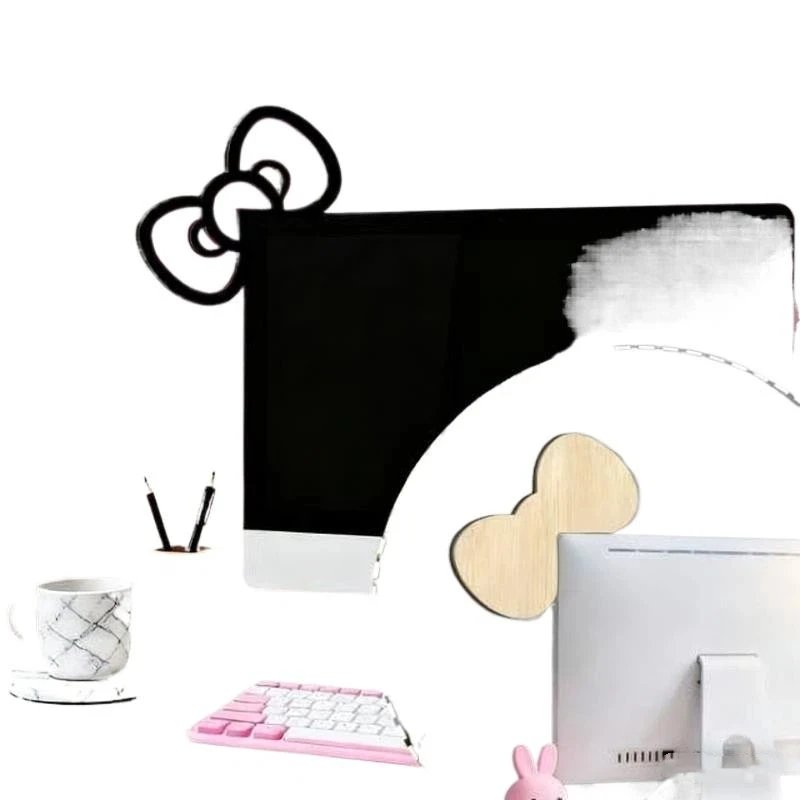
The star of the show is, without a doubt, its **adorable bowknot design**. This isn’t a bulky 3D ornament; it’s a sleek, 2D aesthetic piece designed to sit elegantly on your monitor or screen. The “Kawaii” aspect ensures it brings a sense of Japanese cuteness, perfect for those who love whimsical and charming details. It’s simple, clean, and immediately recognizable, adding character without clutter.

Versatile Placement for Any Setup

One of the best benefits of this tiny accessory is its **flexibility**. Designed as “PC Accessories” and “Monitor Decor,” it’s primarily intended for your screen, but its small size and likely adhesive backing mean it can go almost anywhere. Stick it to the corner of your monitor, the side of your PC tower, a shelf above your desk, or even a laptop lid. It’s a quick way to unify a themed setup, whether it’s for a serious gaming rig or a cozy home office nook.

Ultra-Affordable Personalization

At just ~$0.57, this bowknot decor embodies **budget-friendly personalization**. You don’t need to save up or deliberate over this purchase. It’s an impulse buy that lets you experiment with your desktop’s look. Want to switch colors or styles next month? No problem! Its low cost means you can easily get a couple to mix and match, or even change them out with the seasons without feeling like you’ve overspent.

Who Is This For?

This cute bowknot decor is ideal for:

  • Gamers looking to add a unique, charming touch to their streaming or gaming setup.
  • Students wanting to personalize their dorm room or study desk with minimal effort and cost.
  • Home Office Users who desire a subtle pop of color and personality in their professional space.
  • Anyone with a love for **Kawaii aesthetics** and **cute desktop decorations**.
  • Those seeking a **fun, affordable gift** or a little treat for themselves.

✅ Pros

  • Extremely affordable, less than a dollar!
  • Adds an instant touch of **kawaii and personality** to any setup.
  • **Versatile placement** on monitors, screens, PCs, or desks.
  • Simple, **2D design** avoids bulkiness.
  • Great for **budget-friendly experimentation** with decor.

🔻 Cons

  • Purely **aesthetic**, offers no functional benefit.
  • The **2D design** might not appeal to everyone.
  • Quality is basic, reflecting its **ultra-low price point**.
  • May be too small for some users seeking a more prominent decor piece.

Final Verdict: A Dash of Delight for Pennies

The 1/2Pcs Bowknot PC Accessories Kawaii 2D Bow Monitor Decor won’t change your life, but it might just make your day a little brighter. For an astonishing **$0.57**, you’re getting an easy, effective way to personalize your digital space. It’s a testament to the idea that great style doesn’t have to come with a hefty price tag. If you love cute, charming details and want to add a bit of whimsy to your desk without overthinking it, this tiny bowknot is an absolute winner. It’s the ultimate **treat-yourself moment** that won’t make a dent in your wallet.

Frequently Asked Questions

How do I attach the bowknot decor to my monitor?

Most 2D monitor decorations like this come with a small adhesive backing, such as double-sided tape or a reusable gel pad. Simply peel off the protective film and press it firmly onto a clean, dry surface on your monitor or preferred spot.

Is the bowknot durable for its price?

Given the ~$0.57 price point, the bowknot is likely made from lightweight material like thin plastic or EVA foam. While it’s not designed for heavy-duty use, it should hold up well as a static decorative item as long as it’s not frequently handled or exposed to extreme conditions.

Can I use it on items other than my monitor?

Absolutely! Its small size and versatile attachment make it suitable for various surfaces. You can stick it on a laptop, a desktop PC case, a shelf, a speaker, or even your phone case for an added touch of kawaii.

What does ‘2D Bow’ mean?

‘2D Bow’ refers to its flat, two-dimensional design. Unlike a typical fabric bow that has depth and volume, this accessory is designed to be flat against a surface, giving it a sleek, integrated look rather than a protruding one.


Check Best Price ➔

*Price may vary based on promotions.
Posted on

Is This $3.36 Wooden Bowknot Decor the Cutest PC Accessory?

Is This $3.36 Wooden Bowknot Decor the Cutest PC Accessory?

Introduction: Elevate Your Workspace with a Dash of Kawaii

Is your desk looking a little… drab? Do you crave a touch of personal flair for your gaming setup or home office, but don’t want to spend a fortune? We’ve all been there – staring at a functional but soulless workspace. What if we told you there’s a charming, budget-friendly solution to inject some serious cuteness into your daily grind?

Why It’s a Steal: Big Charm, Tiny Price Tag

Enter the [YA]1/2Pcs Wooden Bowknot PC Accessories. At a mere ~$3.36, this isn’t just an accessory; it’s an opportunity to transform your space with minimal investment. In a world where even a coffee can cost more, getting a piece of decor that adds character to your monitor or desktop for this price feels like a genuine steal. It’s a prime example of how you can find surprising value in small, thoughtful touches, much like discovering if The $2.82 Transformer Car Decal Review can instantly upgrade your vehicle’s look.

Is This $3.36 Wooden Bowknot Decor the Cutest PC Accessory? Detail
A closer look at the details

While it won’t revolutionize your gaming performance or streamline your workflow, it will bring a smile to your face every time you glance at your screen. For its price, the value lies purely in its aesthetic appeal and the joy it brings.

Key Features Deep Dive

Adorable Kawaii Design

The heart of this product is its undeniably cute and kawaii 2D bowknot design. Crafted from wood, these bows aren’t just generic shapes; they’re designed to add a touch of playful elegance and warmth. The benefit here is clear: it instantly makes your tech-heavy setup feel more inviting, personalized, and reflects a fun personality.

Versatile Placement for Any Space

Don’t let the ‘PC Accessories’ label limit your imagination. Whether you’re sprucing up a gaming setup, enhancing a home office monitor, or simply adding charm to your general desktop, these bowknots fit right in. Their compact nature means they can be discreetly placed or proudly displayed, offering flexibility to decorate various surfaces.

Durable Wooden Construction

Unlike flimsy plastic alternatives that might feel cheap, these bowknots are made from wood. This material choice offers a more natural, slightly rustic, yet refined feel. The benefit of wooden construction is twofold: it provides a subtle premium touch for the price point and offers better durability against everyday bumps and knocks compared to lighter materials.

Who Is This For?

This charming wooden bowknot decor is perfect for gamers looking to personalize their battle stations, students wanting to add character to their study nooks, or anyone with a home office seeking to brighten their workspace. If you appreciate the kawaii aesthetic and believe that small details make a big difference, this accessory is calling your name.

✅ Pros

  • Extremely affordable at ~$3.36.
  • Instantly adds kawaii charm and personality to any setup.
  • Versatile for gaming desks, monitors, and home offices.
  • Durable wooden construction offers a more premium feel than plastic.
  • Great for budget-friendly personalization.

🔻 Cons

  • Purely aesthetic, offers no functional benefits.
  • “2D” design means it’s flat, not a 3D ornament.
  • No rating available to assess common user experience.
  • May be smaller than some users expect (visual context often needed for decor).

Final Verdict: A Dash of Delight for Dirt Cheap

For just ~$3.36, the [YA]1/2Pcs Wooden Bowknot PC Accessory isn’t trying to be anything it’s not. It’s a straightforward, adorable, and incredibly affordable way to inject some personality into your personal space. If you’re looking for a simple, charming touch that brightens your day without emptying your wallet, this cute wooden bowknot is a definite win. It’s a perfect example of how small investments can yield significant aesthetic returns, proving that good vibes don’t have to be expensive.

Frequently Asked Questions

What is the main material of these bowknot decorations?

These charming desktop decorations are made from wood, giving them a durable and slightly more premium feel compared to plastic alternatives, especially at this price point.

How do these bowknots attach to a monitor or desk?

While the product description doesn’t explicitly state the attachment method, such 2D accessories typically come with adhesive backing for easy stick-on application or are designed to simply rest against a monitor frame or sit on a flat surface. Always check product images or seller descriptions for specific attachment details.

Can these be used outside of a gaming setup or office?

Absolutely! While perfect for gaming setups and home offices, their cute and versatile design makes them suitable for any space where you want to add a touch of kawaii charm. Think shelves, bedside tables, or even as decorative accents on small furniture.

How many bowknots are included for the price?

The product name “[YA]1/2Pcs Wooden Bowknot” indicates that you can purchase either one (1) or two (2) pieces of the wooden bowknot decor. The exact quantity will depend on your selection when ordering.


Check Best Price ➔

*Price may vary based on promotions.

Posted on

Is the BlitzWolf BW-CML6 RGB Monitor Light Bar Worth Its $56 Price?

Is the BlitzWolf BW-CML6 RGB Monitor Light Bar Worth Its $56 Price?
★★★★★ (73.3%/5)

Light Up Your Life: Is the BlitzWolf BW-CML6 RGB Monitor Light Bar a Game Changer?

Are your late-night gaming sessions or work marathons leaving you with tired, strained eyes? Do you crave that immersive, vibrant ambiance that truly makes your desk setup pop? Monitor light bars are the secret weapon many are turning to, but they can often come with a hefty price tag. Enter the BlitzWolf BW-CML6 RGB Gaming Monitor Light Bar, a feature-rich contender priced at a mere ~$56.42. But at this price point, can it truly deliver? Let’s dive in and see if this budget-friendly gadget is worth adding to your arsenal.

Why It’s a Steal (or Not)? Evaluating the $56.42 Price Tag

In a market flooded with monitor light bars ranging from basic white lights to high-end, smart-enabled devices costing hundreds, the BlitzWolf BW-CML6 positions itself squarely in the budget segment. For roughly $56, you’re getting features like RGB lighting, a wireless remote, dynamic sound pickup, and stepless dimming – a combination often reserved for more premium offerings. This makes it an intriguing option for anyone looking to upgrade their setup without breaking the bank. It’s a different kind of value assessment than, say, asking Is This Multifunction Work Desk Worth Its $1247 Price Tag?, but the core question of ‘worth’ remains.

Is the BlitzWolf BW-CML6 RGB Monitor Light Bar Worth Its $56 Price? Detail
A closer look at the details

However, the 73.3% / 5-star rating suggests that while many users are pleased, it’s not a universally perfect product. This is typical for budget electronics; while you get a lot for your money, you shouldn’t expect the flawless performance of a device ten times its price. Think of it as a significant upgrade over having no monitor light, rather than a direct competitor to top-tier brands.

Key Features Deep Dive: What You Get for Your Money

RGB Dynamic Pickup Lighting: Immerse Yourself

The standout feature for gamers and media enthusiasts is undoubtedly the RGB dynamic pickup lighting. This isn’t just static mood lighting; the BW-CML6 can sync its vibrant colors to the audio playing from your computer. Imagine your light bar pulsating with the bass of your favorite music or flashing in response to explosions in-game. This creates a truly immersive experience, extending the action beyond your screen and into your peripheral vision, making games and movies feel more alive.

Wireless Remote Control: Convenience at Your Fingertips

Tired of reaching behind your monitor or fumbling for tiny buttons? The BlitzWolf BW-CML6 comes with a sleek wireless remote control. This intuitive remote puts all the power in your hands, allowing you to easily adjust brightness, color temperature, switch between RGB modes, or activate the dynamic pickup feature without interrupting your workflow or game. It’s a small detail that makes a huge difference in daily usability, ensuring you can tailor your lighting environment on the fly.

Stepless Dimming & Color Temperature Adjustment: Perfect Ambiance

Beyond the flashy RGB, the BW-CML6 also offers practical lighting solutions. With stepless dimming, you can precisely fine-tune the brightness to match any time of day or task, preventing eye strain from overly bright or dim environments. Coupled with adjustable color temperature, you can switch from a cool, crisp white for focused work to a warm, soft glow for relaxing or watching movies. This versatility ensures optimal visual comfort and mood setting for any activity, directly addressing the problem of eye fatigue.

Who Is This For?

The BlitzWolf BW-CML6 is ideal for gamers looking to enhance immersion, students and home office users seeking to reduce eye strain and improve focus with ambient lighting, and anyone who wants to add a touch of modern flair and functionality to their desk setup without spending a fortune. It’s also perfect for those who enjoy customizing their environment and appreciate the convenience of wireless control. If you’re on a budget but still want advanced features, this light bar is definitely aimed at you, much like someone looking for small, impactful upgrades like a $2.50 Transformer emblem for their car.

✅ Pros

  • Affordable Price: Excellent value for money given the feature set.
  • Immersive RGB: Dynamic audio sync elevates gaming and media.
  • Wireless Remote: Convenient and intuitive control.
  • Stepless Dimming: Precise brightness adjustment.
  • Reduces Eye Strain: Provides essential bias lighting.
  • Easy Installation: Simple clip-on design for most monitors.

🔻 Cons

  • Not Top-Tier Brightness: May not rival premium light bars.
  • 73.3% Rating: Indicates some users may have minor issues (e.g., build quality, remote range, specific color accuracy).
  • RGB Only Rear-Facing: Ambient light for the wall, not direct task lighting.
  • Plastic Build: May not feel as premium as metal alternatives.

Final Verdict: A Budget Powerhouse with a Caveat

The BlitzWolf BW-CML6 RGB Gaming Monitor Light Bar presents an undeniable value proposition at ~$56.42. It successfully brings advanced features like dynamic RGB sound pickup and wireless control into an accessible price bracket, making it a fantastic entry point for anyone looking to enhance their desk’s aesthetics and ergonomics. While the 73.3% rating suggests it’s not without its minor imperfections, for the price, it’s hard to beat the feature set. If you’re seeking a significant upgrade over basic lighting, or simply want to dip your toes into the world of smart, immersive desk lighting without a major investment, the BW-CML6 is a strong contender that delivers far more than its price tag suggests.

Frequently Asked Questions

Q: How does the dynamic pickup feature work?

A: The light bar has an integrated microphone that detects audio from your computer or environment and synchronizes the RGB lighting effects to the rhythm and intensity of the sound, creating a visually engaging experience.

Q: Is the BlitzWolf BW-CML6 compatible with all monitors?

A: It’s designed to fit most monitors with its clip-on mechanism. However, extremely thin bezels or unusually shaped monitors might present compatibility challenges. It typically works best with flat-panel monitors.

Q: Does the light bar require external power?

A: Yes, the BlitzWolf BW-CML6 is typically powered via a USB cable, which can be plugged into your monitor’s USB port (if available) or a standard USB wall adapter.

Q: Can I turn off the RGB lights and just use the front light?

A: Yes, the wireless remote allows you to control the front main light and the rear RGB ambient light independently, meaning you can have just the front task lighting, just the rear RGB, or both simultaneously.


Check Best Price ➔

*Price may vary based on promotions.