Posted on

Fix Your Keyboard for $2: Budget 3-Pin Mechanical Switches & Puller Review

Fix Your Keyboard for $2: Budget 3-Pin Mechanical Switches & Puller Review

Nothing kills your productivity or gaming groove faster than a mechanical keyboard key that suddenly refuses to register. In the past, dealing with a flaky “W” key or a broken spacebar switch meant scouring specialty enthusiast shops, paying $10 for shipping on a $0.50 part, or just giving up and buying an entirely new keyboard.

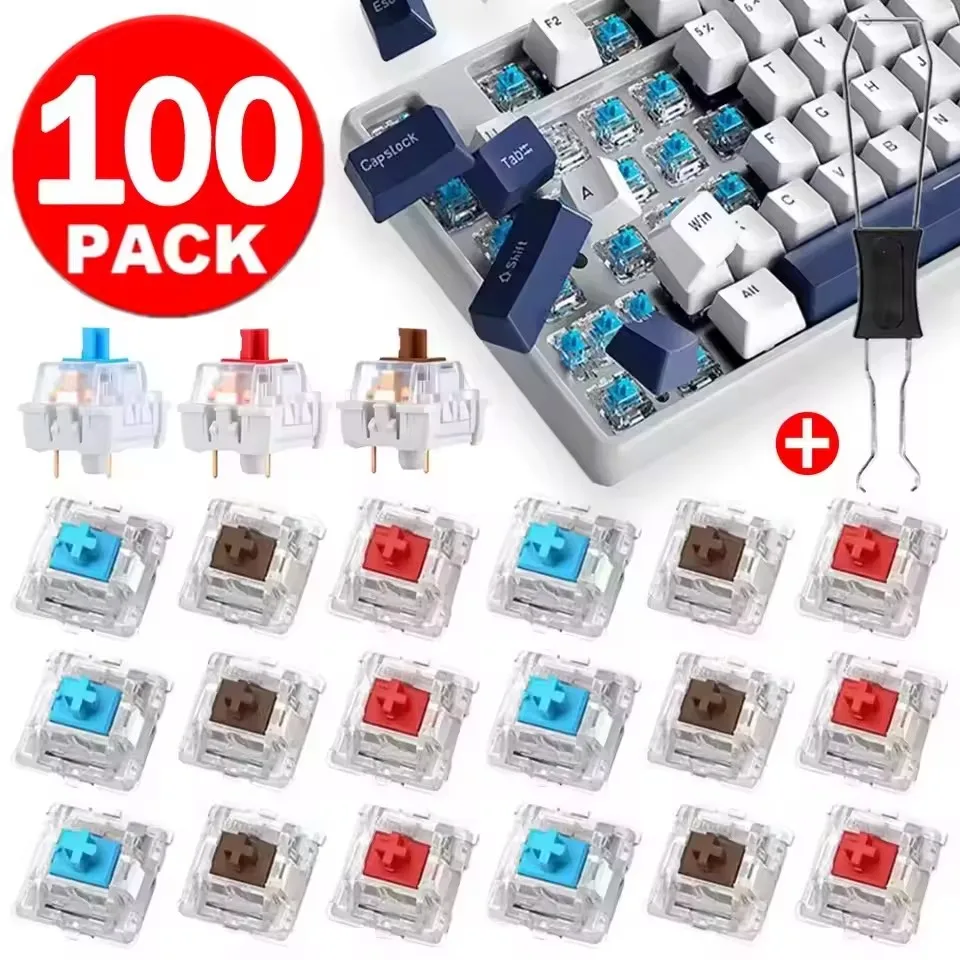
Thankfully, the era of overpriced repairs is behind us. Enter this budget-friendly pack of 10 to 30-piece 3-Pin Mechanical Switches complete with a dedicated switch puller—all for around $1.79. Whether you need a few spares for quick fixes or want to test different tactile profiles before committing to a full rebuild, this pocket-change kit is a massive problem-solver.

Why It’s a Steal

At just ~$1.79, the value proposition here is almost comical. A standalone metal switch puller from a specialty boutique easily costs $3 to $5 on its own. Getting a functional tool alongside a batch of replacement switches for less than the price of an iced coffee is the very definition of a high bang-for-your-buck purchase.

Fix Your Keyboard for $2: Budget 3-Pin Mechanical Switches & Puller Review Detail
A closer look at the details

If you love optimizing your desk setup without emptying your wallet—just like we did when checking out the handy Master the Terminal for Under $9: Linux Cheat Sheet Desk Mat Review—this mini switch kit belongs in every DIY enthusiast’s drawer.

Key Features Deep Dive

1. The Classic Triad: Red, Brown, and Blue Options

Every typist has their flavor, and this listing covers the essential profiles. If you pick Red switches, you get smooth, quiet, linear keypresses ideal for gaming without waking up the house. Brown switches deliver a balanced tactile bump that keeps office typists accurate without loud clicks. And for those who love definitive feedback, the Blue switches deliver that satisfying, classic mechanical snap on every keystroke.

2. Universal 3-Pin Hot-Swap Compatibility

Equipped with standard 3-pin housings (two metal contact pins plus a central plastic stabilizing post), these switches slip seamlessly into standard hot-swap sockets. They are plug-and-play compatible with budget-friendly boards using Outemu-style sockets, as well as broader Kailh or Gateron hot-swap boards. No messy desoldering guns required if your board supports hot-swapping!

3. Included Switch Puller Tool

Prying hot-swappable switches out with flathead screwdrivers or pliers is a recipe for scratched plates and damaged plastic clips. The included metal switch puller has the correct angled teeth to compress switch tabs safely, allowing you to pop old switches out in seconds without risking damage to your keyboard base.

Who Is This For?

This kit is tailored for budget mechanical keyboard owners who need quick, inexpensive replacement keys when a switch fails. It is also an ideal stocking-stuffer for curious tinkerers wanting to sample linear, tactile, and clicky keystyles side-by-side, or hobbyists crafting DIY desk fidget clickers without wasting high-end switches.

✅ Pros

  • Incredible sub-$2 price point with tool included
  • Direct drop-in replacement for standard 3-pin hot-swap boards
  • Available in Red (Linear), Brown (Tactile), and Blue (Clicky) variants
  • Saves older keyboards from the trash bin for pocket change

🔻 Cons

  • Factory unlubed; may feel slightly scratchy out of the box
  • Thin metal pins require careful alignment to avoid bending during insertion

Final Verdict

Let’s keep expectations real: these aren’t hand-lubed $1.50-per-switch boutique components designed for world-class custom builds. But for $1.79, they do exactly what they promise. You get working, responsive replacement keys and the proper extraction tool delivered for less than pocket change. If you have a budget hot-swap keyboard on your desk, keeping a pack of these in your drawer is cheap insurance against broken keys.

Frequently Asked Questions

Will these switches fit my keyboard?

These switches feature a standard 3-pin design compatible with most hot-swappable mechanical keyboards that accept Outemu, Gateron, or Kailh switches. If your keyboard is soldered (non-hot-swap), you will need soldering tools to replace them.

Which switch color should I choose?

Choose Red for smooth, quiet gaming; Brown for a balanced tactile bump great for office work and typing; or Blue if you prefer an audible “click” and noticeable tactile snap.

What if the switch pins get bent during shipping or installation?

The thin copper legs can sometimes bend slightly during transit or if inserted at an angle. Simply use a pair of tweezers or fingernails to gently straighten the pin before pressing it firmly into the socket.


Check Best Price ➔

*Price may vary based on promotions.
Posted on

Unlock Your Keyboard’s Potential: Are These $1.76 Hot-Swappable Switches a Game Changer?

Unlock Your Keyboard's Potential: Are These $1.76 Hot-Swappable Switches a Game Changer?
★★★★★ (98.0%/5)

Tired of Your Keyboard’s Mediocre Feel? A $1.76 Upgrade Might Be All You Need!

Ever wished you could tweak your mechanical keyboard’s typing experience without having to buy a whole new board? Or maybe you’ve got a faulty switch holding you back from peak performance? Customizing your mechanical keyboard can often feel like a deep, expensive rabbit hole. But what if we told you there’s an incredibly affordable way to transform your typing or gaming experience?

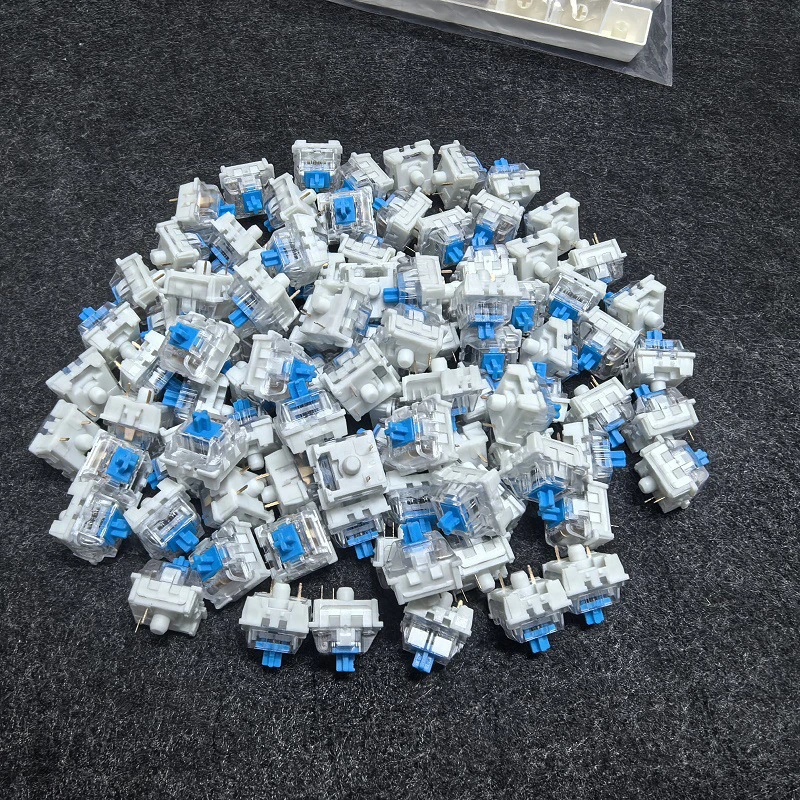
Enter the 20-100pc Mechanical Keyboard Switches. Available in popular Blue, Red, and Brown variants, these hot-swappable, 3-pin, cross-stem switches promise customization and compatibility at a price point that’s almost unbelievable. Let’s dive in and see if this budget wonder truly delivers.

Why These Switches Are an Absolute Steal

In a world where premium mechanical keyboard switches can cost upwards of $0.50 to $1.00 per switch, the idea of getting a pack of switches for around $1.76 seems too good to be true. This isn’t just a low price; it’s a game-changer for anyone looking to build a budget custom keyboard, replace a few faulty switches, or simply experiment with different switch types without breaking the bank.

Unlock Your Keyboard's Potential: Are These $1.76 Hot-Swappable Switches a Game Changer? Detail
A closer look at the details

With an impressive 98.0% / 5-star rating, it’s clear that users are thrilled with the value these switches provide. While they won’t compete head-to-head with high-end, meticulously lubricated switches from established brands, for the price, their performance is outstanding. This makes them an ideal choice for students, DIY enthusiasts, or anyone dipping their toes into the vast world of mechanical keyboard customization. Speaking of customization, if you’re thinking of other ways to personalize your setup, you might wonder Is This $2.19 Transparent Naruto Keycap Worth It for Your Keyboard?, another fantastic budget upgrade!

Key Features Deep Dive

Customizable Typing Experience: Blue, Red, or Brown?

One of the biggest advantages of these switches is the choice of three popular types: Blue, Red, and Brown. Each offers a distinct feel:

  • Blue Switches: Known for their tactile bump and satisfyingly loud click, perfect for typists who enjoy audible feedback.
  • Red Switches: A linear switch with a smooth, consistent keystroke, ideal for gamers and those who prefer a quieter, faster press.
  • Brown Switches: The ‘middle ground’ – they offer a tactile bump without the loud click of blues, making them versatile for both typing and gaming.

This variety means you can tailor your keyboard’s feel precisely to your preference, all from one incredibly affordable product.

Hot-Swappable Design for Effortless Upgrades

The term ‘hot-swappable’ is music to a keyboard enthusiast’s ears. It means you can easily pull out and replace switches without needing to solder anything. This feature is a massive benefit, allowing you to:

  • Experiment with different switch types: Try blues for a week, then switch to reds without commitment.
  • Replace faulty switches: If one switch goes bad, you don’t need to replace the whole board or get into complex repairs.
  • Upgrade or customize on the fly: Perfect for those who love to tinker with their setup.

This flexibility makes customizing your keyboard more accessible than ever before.

Broad Compatibility: 3 Pins, Cross Stem

These switches feature a 3-pin design and a cross-stem (Cherry MX style). This is crucial for compatibility. The 3-pin configuration means they’ll work with the vast majority of hot-swappable mechanical keyboards on the market, while the cross-stem ensures they’re compatible with almost any standard keycap set you might want to use. This universal design means you won’t have to worry about finding obscure parts or being locked into a specific ecosystem.

Who Is This For?

These switches are perfectly suited for a wide range of users:

  • Budget Keyboard Builders: Looking to assemble an affordable custom mechanical keyboard.
  • First-Time Customizers: An easy and inexpensive entry point into keyboard modding.
  • Gamers on a Budget: Who want to fine-tune their gaming experience without a hefty investment.
  • Students & Home Office Users: Seeking a more comfortable or enjoyable typing experience.
  • Experimenters: Anyone curious to try different switch types without committing to a full set of expensive switches.

Pros & Cons

✅ Pros

  • Unbeatable Price: Extremely affordable for a pack of switches.
  • Hot-Swappable: Easy installation and removal without soldering.
  • Variety of Types: Choose between Blue (clicky), Red (linear), and Brown (tactile).
  • Broad Compatibility: 3-pin design and cross-stem fit most hot-swappable boards and keycaps.
  • High User Rating: 98.0%/5 stars indicates strong user satisfaction.
  • Entry-Level Friendly: Great for beginners in keyboard customization.

🔻 Cons

  • Budget Build Quality: May not offer the premium smoothness or consistency of higher-end brands.
  • Generic Branding: Specific performance metrics (e.g., actuation force, lifespan) might be less defined.
  • Potential for Batch Variation: Consistency across large orders might vary slightly due to the budget nature.
  • No Lubing: Likely unlubed, which might require DIY lubing for optimal smoothness.

Final Verdict

The “20-100pc Mechanical Keyboard Switches Blue Red Brown Switch” are a phenomenal option for their price. At around $1.76 for a pack (depending on the quantity you choose), they offer unparalleled value for anyone looking to enter the world of mechanical keyboard customization or simply replace some old switches. While they won’t dethrone the top-tier switches, their hot-swappable nature, choice of switch types, and broad compatibility make them an incredibly attractive proposition. If you’re on a budget and craving a new typing experience, these switches are definitely worth a look.

Frequently Asked Questions

Q: What does “hot-swappable” mean for these switches?

A: Hot-swappable means you can install or remove these switches from a compatible mechanical keyboard without needing to use a soldering iron. This makes customization and maintenance incredibly easy and tool-free.

Q: What’s the main difference between Blue, Red, and Brown switches?

A: Blue switches are ‘clicky’ and ‘tactile,’ providing an audible click and a noticeable bump. Red switches are ‘linear,’ offering a smooth, consistent keystroke without a bump or click. Brown switches are ‘tactile’ but not ‘clicky,’ meaning they have a bump without the loud sound, making them a good middle-ground.

Q: Will these 3-pin switches work with a 5-pin hot-swappable keyboard?

A: Yes, 3-pin switches are generally compatible with 5-pin hot-swappable PCBs. The extra two pins on a 5-pin switch are simply plastic guide pins for stability, which are not necessary for the switch to function. A 3-pin switch will fit perfectly fine in a 5-pin socket.

Q: How many switches are included for the ~$1.76 price?

A: The product name “20-100pc” indicates that you can choose the quantity you need within that range. The ~$1.76 price typically refers to the starting quantity offered, such as a pack of 20 switches. Always double-check the product page for the exact quantity corresponding to the advertised price.


Check Best Price ➔

*Price may vary based on promotions.

Posted on

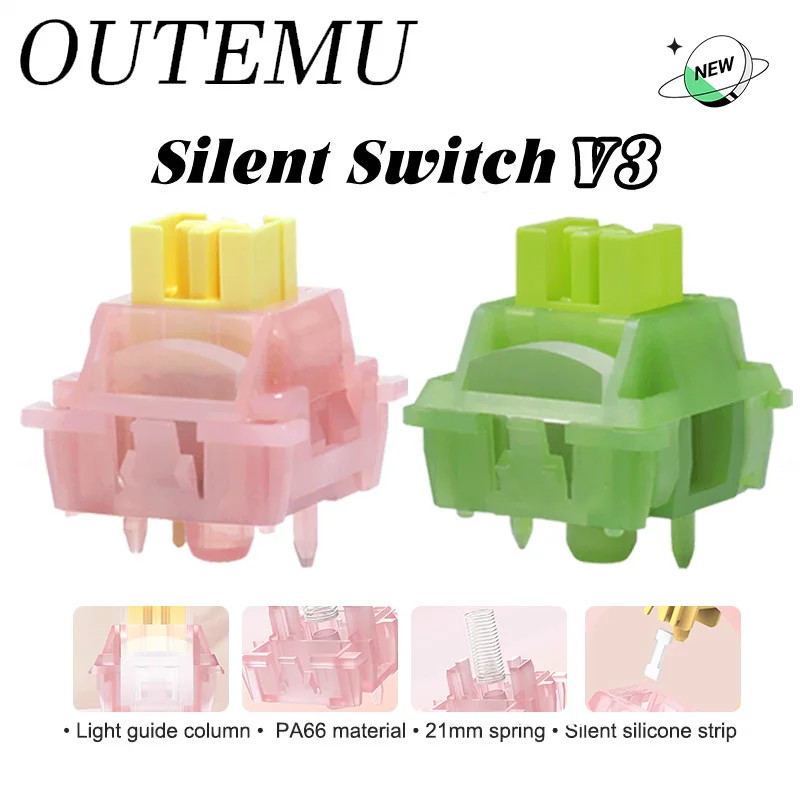
Outemu Silent Peach V3 Switches Review: Are These Lubed Switches a ~$3 Game Changer?

Outemu Silent Peach V3 Switches Review: Are These Lubed Switches a ~$3 Game Changer?
★★★★★ (98.0%/5)

Tired of Noisy Keyboards and Expensive Upgrades? These ~$3 Switches Might Be Your Silent Solution

Ah, the satisfying click-clack of a mechanical keyboard… or maybe not so satisfying when you’re trying to focus, sharing an office, or late-night gaming without disturbing anyone. Customizing your typing experience can often feel like a deep dive into an expensive rabbit hole. But what if we told you that an incredible upgrade for your mechanical keyboard could cost you less than your morning coffee? Enter the **Outemu Silent Peach V3 and Silent Lemon V3 switches**.

Why These Outemu Switches Are an Absolute Steal

At a jaw-dropping price point of just **~$3.04** (likely for a small pack, making each switch incredibly affordable), these aren’t just any budget switches. They come pre-lubed, offer silent operation, and are hot-swap compatible. This combination is almost unheard of at this price, fundamentally changing the game for budget-conscious enthusiasts and casual users alike. With a stellar **98.0%/5 stars** rating, it’s clear that users are thrilled with the value these switches bring.

Outemu Silent Peach V3 Switches Review: Are These Lubed Switches a ~$3 Game Changer? Detail
A closer look at the details

Silent Performance with Your Preferred Feel

One of the biggest pain points for many mechanical keyboard users is the noise. The Outemu Silent Peach V3 (linear) and Silent Lemon V3 (tactile, or ‘Paragraph Axis’) switches are engineered to significantly reduce sound without sacrificing feel. The **Silent Peach V3** offers a smooth, consistent keypress from top to bottom, ideal for fast typists and gamers who prefer an unobstructed motion. The **Silent Lemon V3** provides a gentle tactile bump, giving you satisfying feedback without the loud click, perfect for those who want to *feel* their actuation point in quiet environments. The benefit? A dramatically quieter workspace or gaming setup, fostering better focus and harmony.

Pre-Lubed: Instant Smoothness, Zero Hassle

Lubing switches is a common practice among keyboard enthusiasts to achieve a smoother, less scratchy keypress and a more refined sound profile. However, it’s an incredibly time-consuming and often intimidating process for newcomers. The **Outemu Silent Peach V3 and Silent Lemon V3 switches come factory-lubed**, offering a buttery-smooth experience right out of the box. This means you skip hours of painstaking work and immediately enjoy a premium feel that often requires significant extra investment in other switches.

Hot-Swap & 5-Pin Compatibility: Easy Upgrades for Everyone

The **5-pin design** provides superior stability when mounted on your PCB, reducing switch wobble. Even better, these switches are **hot-swap compatible**. This feature is a game-changer, allowing you to install or remove switches without any soldering. Whether you’re upgrading your current hot-swappable keyboard, experimenting with different switch types, or building your first mechanical keyboard, the ease of installation makes these switches incredibly accessible. It’s perfect for beginners and seasoned modders alike.

Who Is This For?

These Outemu Silent switches are ideal for:

  • **Budget Keyboard Builders:** Get premium features without the premium price tag.
  • **Office Workers & Students:** Achieve a quieter typing experience in shared spaces.
  • **Gamers:** Enjoy smooth, consistent presses (Peach) or tactile feedback (Lemon) without disturbing housemates.
  • **Mechanical Keyboard Enthusiasts:** Looking for an affordable way to expand their switch collection or experiment with silent options.
  • **Anyone seeking an easy upgrade:** For existing hot-swappable mechanical keyboards.

✅ Pros

  • **Unbeatable Value:** Pre-lubed, silent, and hot-swappable at an incredibly low price.
  • **Silent Operation:** Significantly reduces typing noise, great for quiet environments.
  • **Smooth & Consistent:** Factory-lube ensures a pleasant typing experience out of the box.
  • **Choice of Feel:** Linear (Peach) and Tactile (Lemon) options cater to different preferences.
  • **Easy to Install:** Hot-swap compatibility means no soldering required.
  • **High User Satisfaction:** Backed by an excellent 98% rating.

🔻 Cons

  • **Budget Feel:** While excellent for the price, they might not feel as ‘premium’ as high-end switches.
  • **Lube Consistency:** Factory lube, while convenient, can sometimes have slight inconsistencies compared to hand-lubing.
  • **Limited Force/Travel Details:** Specific actuation force and travel distances are not immediately available from the product name.
  • **Brand Perception:** Outemu is a budget brand; some enthusiasts prefer more established premium brands.

Final Verdict: A Budget Game-Changer

The Outemu Silent Peach V3 and Silent Lemon V3 switches are, without a doubt, an incredible find. For just **~$3.04**, you’re getting pre-lubed, silent, 5-pin, hot-swappable switches that punch far above their weight. While they won’t replicate the feel of a $1000 custom build, they offer a vastly improved typing experience compared to stock, un-lubed budget switches. If you’re looking to quiet your keyboard, upgrade its feel, or just start your mechanical keyboard journey without emptying your wallet, these switches are a phenomenal choice.

If you’re already thinking about upgrading other parts of your setup, perhaps a new mouse is on your radar. We recently reviewed the Attack Shark R1 Superlight Mouse Review: Is This $20 Gadget Your Next Upgrade?, another budget-friendly gadget worth checking out.

Frequently Asked Questions

Q: Are these switches compatible with all mechanical keyboards?

A: These switches are 5-pin and hot-swap compatible. They will work with mechanical keyboards that support 5-pin (or 3-pin with modification) hot-swappable sockets. Always check your keyboard’s specifications for compatibility.

Q: What’s the difference between Silent Peach V3 and Silent Lemon V3?

A: The Silent Peach V3 is a linear switch, meaning it offers a smooth, consistent press without any bump. The Silent Lemon V3 is a tactile switch (often referred to as ‘Paragraph Axis’), providing a noticeable bump during actuation for feedback.

Q: Do I need to lube these switches myself?

A: No, these switches come pre-lubed from the factory. While some enthusiasts might opt for a custom lube job later, they are designed to offer a smooth experience right out of the box.

Q: Is the ~$3.04 price for a single switch or a pack?

A: The product title specifies “Switches” (plural), indicating that the ~$3.04 price is likely for a small pack of switches (e.g., 10 or 20). This makes the per-switch cost extremely low and offers incredible value for money.


Check Best Price ➔

*Price may vary based on promotions.

Posted on

Outemu Silent Switches: Are These $2.76 Wonders Worth It?

Outemu Silent Switches: Are These $2.76 Wonders Worth It?
★★★★★ (98.0%/5)

Introduction

Tired of clicky keyboard switches driving your roommates (or yourself!) crazy? Want to upgrade your typing experience without breaking the bank? The Outemu Silent Lemon V3 and Silent Peach V3 switches promise a quieter, smoother keystroke. But at around $2.76, are they *actually* any good? Let’s dive in and see if these budget switches are a hidden gem.

Why It’s a Steal

For the price of a coffee, you can snag a set of these Outemu switches and potentially transform your keyboard. That’s the key here: the *potential*. We’re not talking top-of-the-line, enthusiast-grade performance, but for $2.76, the bang for your buck is genuinely impressive. These switches offer a significant step up from stock membrane keyboards and even some cheaper mechanical options. They’re pre-lubed, which is a massive bonus at this price point, promising a smoother feel right out of the box. Is the this $1.01 Silicone Phone Holder a Sticky Steal?? Likewise, let’s see how well this works out!

Outemu Silent Switches: Are These $2.76 Wonders Worth It? Detail
A closer look at the details

These Outemu switches present an interesting proposition. You’re getting near-silent operation and a smoother feel that is similar to much more expensive switches. For someone just getting into the mechanical keyboard world, the low barrier to entry provides a really accessible way to discover the hobby.

Key Features Deep Dive

Pre-Lubed Smoothness

The biggest selling point is the pre-lubrication. Applying lubricant to switches yourself can be time-consuming and messy. Outemu has done the work for you, resulting in a noticeably smoother keystroke and reduced scratchiness, especially compared to unlubricated switches.

Silent Operation

These switches are designed to be quiet. While they won’t be *completely* silent (it’s still a mechanical switch), they significantly reduce the noise compared to clicky or even tactile switches. Perfect for shared workspaces or late-night gaming sessions where you don’t want to disturb others.

Hot-Swappable Compatibility

The 5-pin design makes them compatible with most hot-swappable keyboards. This means you can easily install and remove them without soldering, making it a breeze to experiment with different switch types and customize your keyboard’s feel.

Who Is This For?

These switches are perfect for students, office workers, or anyone who wants a quieter keyboard experience without spending a fortune. They’re also a great option for beginners looking to experiment with mechanical keyboards and customize their feel.

✅ Pros

  • Inexpensive upgrade for keyboard feel and noise reduction
  • Pre-lubed for smoother keystrokes out of the box
  • Hot-swappable compatible for easy installation and customization
  • Noticeably quieter than standard mechanical switches

🔻 Cons

  • Won’t match the performance of high-end switches
  • Still not completely silent; some noise is present
  • Lubrication quality may not be as consistent as hand-lubed switches

Final Verdict

The Outemu Silent Lemon V3 and Silent Peach V3 switches are an excellent value for the money. They offer a significant upgrade in feel and noise reduction compared to stock options, especially considering the low price point. While they might not compete with top-tier switches, they’re a fantastic entry point for anyone looking to improve their keyboard experience on a budget. Before you checkout, you may be also interested in the Spice Rack Showdown: Is This $17.92 Kitchen Organizer Worth It?

FAQ

Are these switches completely silent?

No, they are not completely silent, but they significantly reduce the noise compared to clicky or tactile mechanical switches.

Do I need to lubricate these switches myself?

No, these switches are pre-lubed, so you don’t need to lubricate them yourself. This is a major benefit at this price point.

Are these switches compatible with my keyboard?

They are compatible with most hot-swappable mechanical keyboards that use a 5-pin design. Check your keyboard’s specifications to ensure compatibility.

What’s the difference between the Lemon and Peach versions?

The primary difference lies in the spring weight and the resulting typing feel. The specifics can vary, so research user reviews for a more detailed comparison.


Check Best Price ➔

*Price may vary based on promotions.