
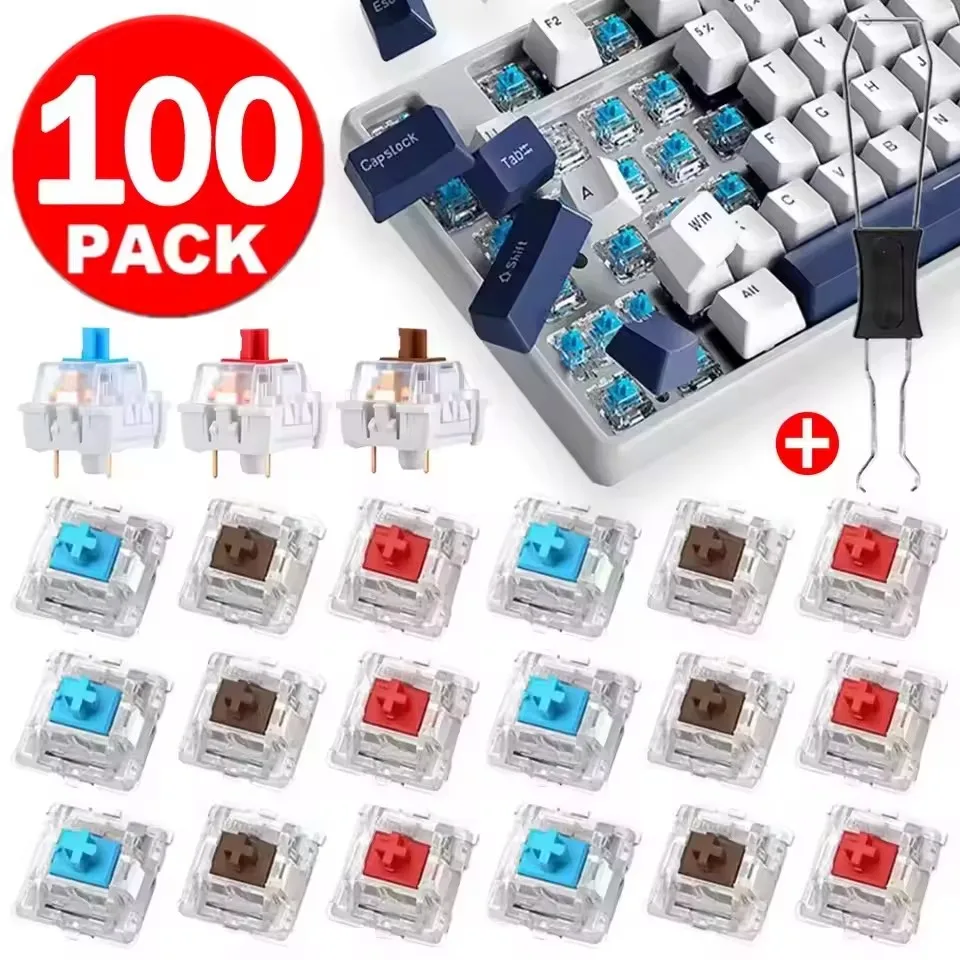
Nothing kills your productivity or gaming groove faster than a mechanical keyboard key that suddenly refuses to register. In the past, dealing with a flaky “W” key or a broken spacebar switch meant scouring specialty enthusiast shops, paying $10 for shipping on a $0.50 part, or just giving up and buying an entirely new keyboard.
Thankfully, the era of overpriced repairs is behind us. Enter this budget-friendly pack of 10 to 30-piece 3-Pin Mechanical Switches complete with a dedicated switch puller—all for around $1.79. Whether you need a few spares for quick fixes or want to test different tactile profiles before committing to a full rebuild, this pocket-change kit is a massive problem-solver.
Why It’s a Steal
At just ~$1.79, the value proposition here is almost comical. A standalone metal switch puller from a specialty boutique easily costs $3 to $5 on its own. Getting a functional tool alongside a batch of replacement switches for less than the price of an iced coffee is the very definition of a high bang-for-your-buck purchase.

If you love optimizing your desk setup without emptying your wallet—just like we did when checking out the handy Master the Terminal for Under $9: Linux Cheat Sheet Desk Mat Review—this mini switch kit belongs in every DIY enthusiast’s drawer.
Key Features Deep Dive
1. The Classic Triad: Red, Brown, and Blue Options
Every typist has their flavor, and this listing covers the essential profiles. If you pick Red switches, you get smooth, quiet, linear keypresses ideal for gaming without waking up the house. Brown switches deliver a balanced tactile bump that keeps office typists accurate without loud clicks. And for those who love definitive feedback, the Blue switches deliver that satisfying, classic mechanical snap on every keystroke.
2. Universal 3-Pin Hot-Swap Compatibility
Equipped with standard 3-pin housings (two metal contact pins plus a central plastic stabilizing post), these switches slip seamlessly into standard hot-swap sockets. They are plug-and-play compatible with budget-friendly boards using Outemu-style sockets, as well as broader Kailh or Gateron hot-swap boards. No messy desoldering guns required if your board supports hot-swapping!
3. Included Switch Puller Tool
Prying hot-swappable switches out with flathead screwdrivers or pliers is a recipe for scratched plates and damaged plastic clips. The included metal switch puller has the correct angled teeth to compress switch tabs safely, allowing you to pop old switches out in seconds without risking damage to your keyboard base.
Who Is This For?
This kit is tailored for budget mechanical keyboard owners who need quick, inexpensive replacement keys when a switch fails. It is also an ideal stocking-stuffer for curious tinkerers wanting to sample linear, tactile, and clicky keystyles side-by-side, or hobbyists crafting DIY desk fidget clickers without wasting high-end switches.
✅ Pros
- Incredible sub-$2 price point with tool included
- Direct drop-in replacement for standard 3-pin hot-swap boards
- Available in Red (Linear), Brown (Tactile), and Blue (Clicky) variants
- Saves older keyboards from the trash bin for pocket change
🔻 Cons
- Factory unlubed; may feel slightly scratchy out of the box
- Thin metal pins require careful alignment to avoid bending during insertion
Final Verdict
Let’s keep expectations real: these aren’t hand-lubed $1.50-per-switch boutique components designed for world-class custom builds. But for $1.79, they do exactly what they promise. You get working, responsive replacement keys and the proper extraction tool delivered for less than pocket change. If you have a budget hot-swap keyboard on your desk, keeping a pack of these in your drawer is cheap insurance against broken keys.
Frequently Asked Questions
Will these switches fit my keyboard?
These switches feature a standard 3-pin design compatible with most hot-swappable mechanical keyboards that accept Outemu, Gateron, or Kailh switches. If your keyboard is soldered (non-hot-swap), you will need soldering tools to replace them.
Which switch color should I choose?
Choose Red for smooth, quiet gaming; Brown for a balanced tactile bump great for office work and typing; or Blue if you prefer an audible “click” and noticeable tactile snap.
What if the switch pins get bent during shipping or installation?
The thin copper legs can sometimes bend slightly during transit or if inserted at an angle. Simply use a pair of tweezers or fingernails to gently straighten the pin before pressing it firmly into the socket.
Check Best Price ➔
*Price may vary based on promotions.