Posted on

Fix Your Keyboard for $2: Budget 3-Pin Mechanical Switches & Puller Review

Fix Your Keyboard for $2: Budget 3-Pin Mechanical Switches & Puller Review

Nothing kills your productivity or gaming groove faster than a mechanical keyboard key that suddenly refuses to register. In the past, dealing with a flaky “W” key or a broken spacebar switch meant scouring specialty enthusiast shops, paying $10 for shipping on a $0.50 part, or just giving up and buying an entirely new keyboard.

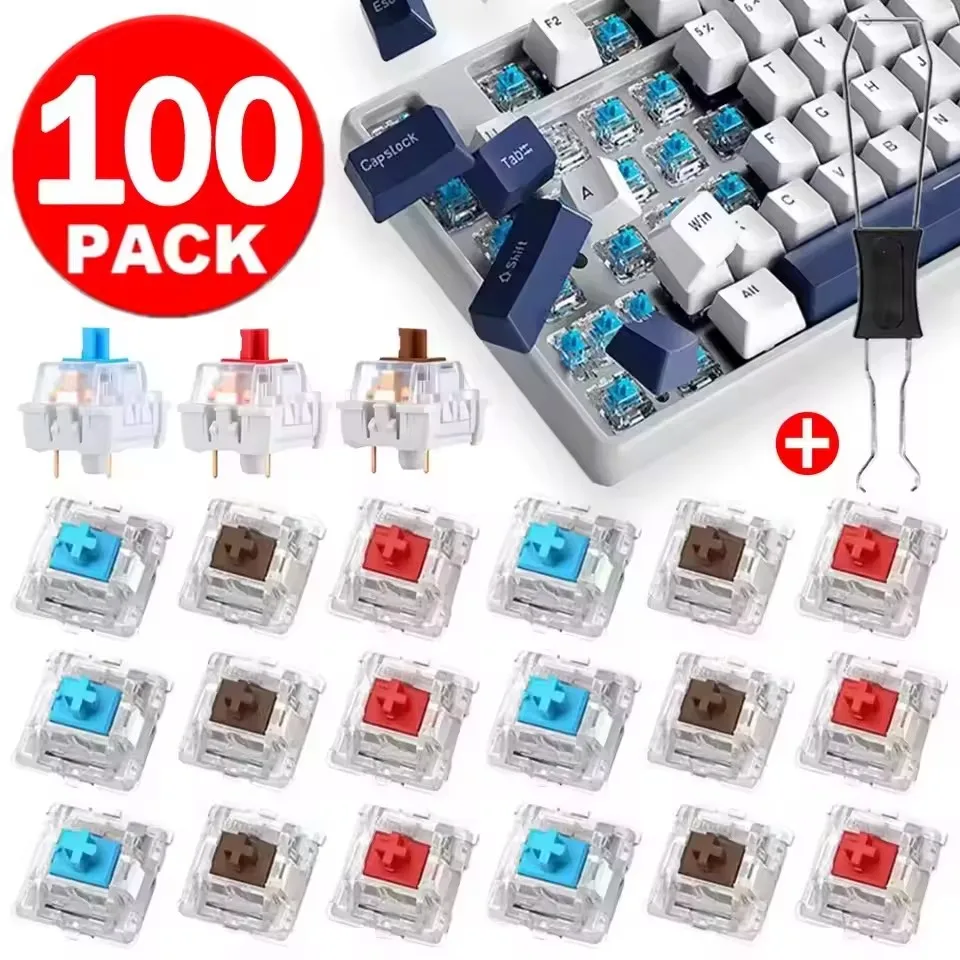
Thankfully, the era of overpriced repairs is behind us. Enter this budget-friendly pack of 10 to 30-piece 3-Pin Mechanical Switches complete with a dedicated switch puller—all for around $1.79. Whether you need a few spares for quick fixes or want to test different tactile profiles before committing to a full rebuild, this pocket-change kit is a massive problem-solver.

Why It’s a Steal

At just ~$1.79, the value proposition here is almost comical. A standalone metal switch puller from a specialty boutique easily costs $3 to $5 on its own. Getting a functional tool alongside a batch of replacement switches for less than the price of an iced coffee is the very definition of a high bang-for-your-buck purchase.

Fix Your Keyboard for $2: Budget 3-Pin Mechanical Switches & Puller Review Detail
A closer look at the details

If you love optimizing your desk setup without emptying your wallet—just like we did when checking out the handy Master the Terminal for Under $9: Linux Cheat Sheet Desk Mat Review—this mini switch kit belongs in every DIY enthusiast’s drawer.

Key Features Deep Dive

1. The Classic Triad: Red, Brown, and Blue Options

Every typist has their flavor, and this listing covers the essential profiles. If you pick Red switches, you get smooth, quiet, linear keypresses ideal for gaming without waking up the house. Brown switches deliver a balanced tactile bump that keeps office typists accurate without loud clicks. And for those who love definitive feedback, the Blue switches deliver that satisfying, classic mechanical snap on every keystroke.

2. Universal 3-Pin Hot-Swap Compatibility

Equipped with standard 3-pin housings (two metal contact pins plus a central plastic stabilizing post), these switches slip seamlessly into standard hot-swap sockets. They are plug-and-play compatible with budget-friendly boards using Outemu-style sockets, as well as broader Kailh or Gateron hot-swap boards. No messy desoldering guns required if your board supports hot-swapping!

3. Included Switch Puller Tool

Prying hot-swappable switches out with flathead screwdrivers or pliers is a recipe for scratched plates and damaged plastic clips. The included metal switch puller has the correct angled teeth to compress switch tabs safely, allowing you to pop old switches out in seconds without risking damage to your keyboard base.

Who Is This For?

This kit is tailored for budget mechanical keyboard owners who need quick, inexpensive replacement keys when a switch fails. It is also an ideal stocking-stuffer for curious tinkerers wanting to sample linear, tactile, and clicky keystyles side-by-side, or hobbyists crafting DIY desk fidget clickers without wasting high-end switches.

✅ Pros

  • Incredible sub-$2 price point with tool included
  • Direct drop-in replacement for standard 3-pin hot-swap boards
  • Available in Red (Linear), Brown (Tactile), and Blue (Clicky) variants
  • Saves older keyboards from the trash bin for pocket change

🔻 Cons

  • Factory unlubed; may feel slightly scratchy out of the box
  • Thin metal pins require careful alignment to avoid bending during insertion

Final Verdict

Let’s keep expectations real: these aren’t hand-lubed $1.50-per-switch boutique components designed for world-class custom builds. But for $1.79, they do exactly what they promise. You get working, responsive replacement keys and the proper extraction tool delivered for less than pocket change. If you have a budget hot-swap keyboard on your desk, keeping a pack of these in your drawer is cheap insurance against broken keys.

Frequently Asked Questions

Will these switches fit my keyboard?

These switches feature a standard 3-pin design compatible with most hot-swappable mechanical keyboards that accept Outemu, Gateron, or Kailh switches. If your keyboard is soldered (non-hot-swap), you will need soldering tools to replace them.

Which switch color should I choose?

Choose Red for smooth, quiet gaming; Brown for a balanced tactile bump great for office work and typing; or Blue if you prefer an audible “click” and noticeable tactile snap.

What if the switch pins get bent during shipping or installation?

The thin copper legs can sometimes bend slightly during transit or if inserted at an angle. Simply use a pair of tweezers or fingernails to gently straighten the pin before pressing it firmly into the socket.


Check Best Price ➔

*Price may vary based on promotions.

Posted on

Ajazz AJ179 APEX PAW3950: Is This $69.98 Gaming Mouse a True Performer?

Ajazz AJ179 APEX PAW3950: Is This $69.98 Gaming Mouse a True Performer?

Upgrade Your Game: The Ajazz AJ179 APEX PAW3950 Review

Are you tired of your old mouse holding back your competitive edge? Or perhaps you’re simply looking for an ergonomic upgrade that won’t require you to empty your wallet? Finding a gaming mouse that balances precision, comfort, and affordability can feel like a quest for the holy grail. Many high-performance options come with prohibitive price tags, leaving budget-conscious gamers feeling left out.

Enter the Ajazz AJ179 APEX PAW3950. This wireless gaming mouse promises an exceptional experience with its top-tier sensor and ergonomic design, all while clocking in at a surprisingly accessible ~$69.98. Is it truly a game-changer for the money?

Why It’s a Steal at $69.98

At first glance, a price tag of around $69.98 for a wireless gaming mouse featuring a PAW3950 sensor might raise an eyebrow – in the best way possible. The PAW3950 is widely recognized as a cutting-edge optical sensor, delivering incredibly precise tracking and responsiveness that’s usually reserved for much more expensive flagship models. For this price, Ajazz is delivering serious performance where it counts most: your in-game accuracy.

It’s designed to give you the competitive edge without the premium overhead. Speaking of enhancing your gaming setup, if you’re looking for other ways to personalize your rig and express your fandom, you might be interested in our review of whether Genshin Impact Columbina Keycaps are worth $47.66.

Ajazz AJ179 APEX PAW3950: Is This $69.98 Gaming Mouse a True Performer? Detail
A closer look at the details

While it won’t feature every single bells-and-whistles of a $200+ mouse, the focus here is clearly on core performance and user comfort. For the demanding gamer on a budget, this could be the ultimate value proposition, offering a premium feel and performance where it matters most, making it a true steal.

Key Features Deep Dive

Unmatched Precision with the PAW3950 Sensor

The heart of any gaming mouse is its sensor, and the Ajazz AJ179 boasts the **PAW3950 optical sensor**. What does this mean for you? It translates to incredibly accurate, pixel-perfect tracking that virtually eliminates spin-outs and jitters, even during the most frantic gaming moments. Whether you’re making subtle adjustments in an FPS or executing complex maneuvers in an RTS, you can trust your movements will be registered precisely, giving you a distinct advantage over the competition.

Ergonomic & Lightweight for Marathon Sessions

Long gaming sessions can take a toll on your wrist and hand. The Ajazz AJ179 addresses this with its **ergonomic and comfortable right-handed design**. It’s sculpted to fit snugly in your hand, reducing strain and allowing for natural grip. Coupled with its **lightweight construction**, this mouse enables swift, effortless glides and flick shots, preventing fatigue and keeping you at the top of your game for hours on end.

Reliable 2.4G USB Wireless Freedom

Cut the cord without cutting corners on performance. The **2.4G USB wireless connectivity** provides a stable, ultra-low latency connection, ensuring your actions are registered instantly. Say goodbye to cable drag and tangled wires that can impede your movement and concentration. Enjoy the freedom to move your mouse unhindered, allowing for a cleaner desk setup and a more immersive gaming experience.

Who Is This For?

The Ajazz AJ179 APEX PAW3950 is ideal for **right-handed gamers** of all skill levels, from casual players to aspiring esports enthusiasts, who demand high-end tracking performance and ergonomic comfort without the premium price tag. It’s also a great option for **power users** or **graphic designers** who appreciate precision and comfort for long workdays. If you’re looking to upgrade from a basic office mouse or an aging gaming peripheral, this mouse offers a significant leap in quality and performance for a very reasonable investment.

✅ Pros

  • High-precision PAW3950 sensor for flawless tracking
  • Exceptional ergonomic design for right-handed users
  • Lightweight construction enables fast, fatigue-free usage
  • Responsive 2.4G wireless for cable-free gaming
  • Outstanding value for money at ~$69.98

🔻 Cons

  • Right-handed only design limits accessibility for left-handed users
  • No user ratings available yet (N/A status)
  • May lack extensive RGB lighting or advanced software customization of premium models

Final Verdict

The Ajazz AJ179 APEX PAW3950 positions itself as a formidable contender in the mid-range gaming mouse market. For ~$69.98, it delivers a performance package that punches well above its weight class, primarily thanks to the inclusion of the high-end PAW3950 sensor and a thoughtfully designed ergonomic, lightweight body. While it’s built specifically for right-handed users and might skip some of the flashier RGB bells and whistles of more expensive alternatives, its focus on core performance, comfort, and wireless reliability makes it an incredibly compelling option. If you’re seeking a competitive edge and superior comfort without breaking the bank, the Ajazz AJ179 APEX PAW3950 is definitely worth considering.

Frequently Asked Questions

What does the PAW3950 sensor offer?

The PAW3950 is a top-tier optical sensor known for its exceptional precision, tracking accuracy, and responsiveness. It virtually eliminates acceleration and jitters, providing a consistent and reliable experience crucial for competitive gaming.

Is this mouse suitable for left-handed users?

No, the Ajazz AJ179 APEX PAW3950 features a specifically designed ergonomic shape for right-handed users, which may not be comfortable or suitable for left-handed individuals.

Is the wireless connection reliable for gaming?

Yes, the mouse uses a 2.4G USB wireless connection, which is known for providing a stable, low-latency, and responsive experience, making it highly reliable for gaming without perceptible lag.

Is it really lightweight?

Yes, the Ajazz AJ179 is designed to be lightweight, contributing to faster movements, easier flick shots, and reduced hand fatigue during extended gaming sessions.


Check Best Price ➔

*Price may vary based on promotions.