
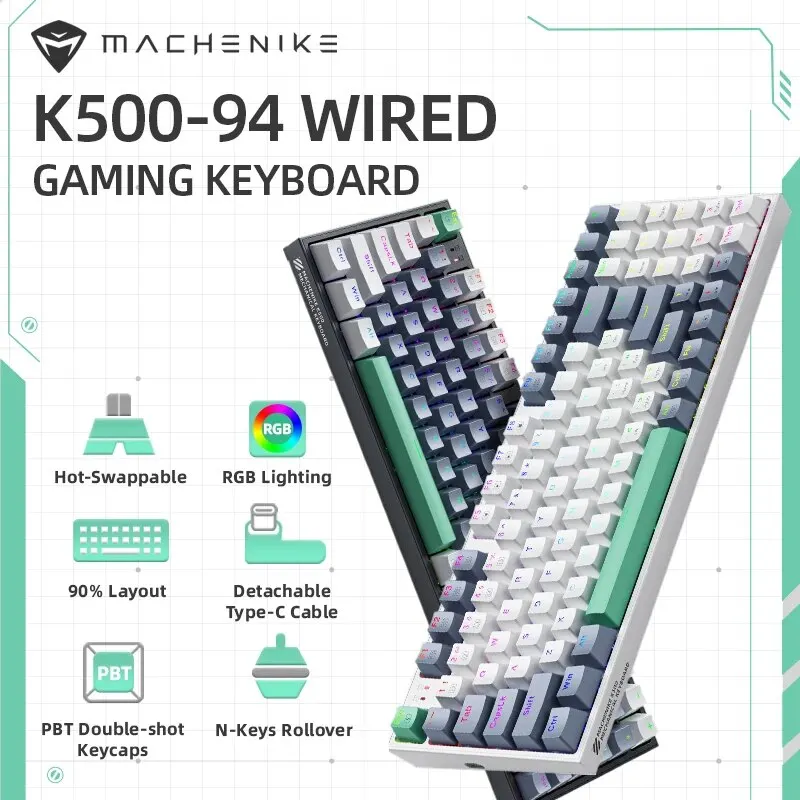
Tired of typing on mushy office keyboards but dreading the thought of dropping $120+ on a big-brand gaming deck? You are not alone. For years, entering the mechanical keyboard hobby meant sacrificing a serious chunk of your paycheck.
Enter the MACHENIKE K500 (K500-B94). Packed with hot-swappable switches, brilliant RGB backlighting, and an ultra-practical 90% compact footprint, it claims to offer premium mechanical thrills for a mind-boggling price tag of around $35.99. But does it actually hold up in daily typing sessions and competitive gaming, or are there hidden corners cut? Let’s dive in.
Why It’s an Absolute Steal
Getting a mechanical keyboard at roughly $35 is uncommon enough, but finding one that features hot-swappable switch sockets and full per-key RGB backlighting is virtually unheard of. Usually, sub-$50 boards solder the switches directly to the PCB, locking you into whatever switch you bought forever. The MACHENIKE K500 flips that script entirely, offering custom-keyboard modularity on a tight student budget.

While high-end enthusiast boards from Keychron or custom aluminum builds will obviously offer denser acoustic dampening and heavier weights, the K500 easily punches twice above its weight class. If you’re building a clean, modern workstation—perhaps pairing it with a 360 rotating desk organizer to keep your cables and accessories tidy—this keyboard adds serious aesthetics without draining your wallet.
Key Features Deep Dive
1. Smart 90% Layout (94 Keys)
Full-sized 104-key boards take up an enormous amount of mouse pad real estate, while 60% keyboards force you to abandon your arrow keys and dedicated numpad. The K500-B94 hits the ultimate sweet spot: a compact 94-key arrangement. You get full numeric keypad functionality for data entry or macro keybinding, all while preserving valuable inches of desk space for sweeping flick shots in your favorite shooter.
2. Hot-Swappable Switches
The standout feature here is modularity. Equipped with 3-pin hot-swap sockets, the MACHENIKE K500 lets you replace keys without touching a soldering iron. If a switch ever wears out, or if you want to experiment with clicky blues on the spacebar and linear reds on the WASD cluster, you simply pop them out using the included switch puller and snap in new ones. That’s a massive win for repairability and longevity.
3. Vibrant RGB Lighting & Double-Shot Keycaps
Budget keyboards frequently cheap out with static ‘rainbow’ zones that can’t be changed. The K500 delivers true dynamic RGB backlighting with dozens of onboard animation presets, dynamic speed controls, and adjustable brightness. Combined with durable double-shot injection keycaps, the legends won’t fade or wear smooth under oily fingers, giving you sharp visibility even in late-night gaming sessions.
Who Is This For?
The MACHENIKE K500 is engineered for anyone who demands functionality without high-end markup:
- Budget PC Gamers: Gamers who want fast mechanical actuation, full anti-ghosting, and flashy RGB without blowing their entire graphics card budget.
- Students & Home Office Workers: Anyone who punches numbers into Excel but hates bloated, massive keyboards cluttering their work surface.
- Keyboard Modding Beginners: An ideal entry point for anyone wanting to test switch lubing and tape modding without risking a $150 board.
✅ Pros
- Incredible price-to-performance ratio (~$35.99)
- Hot-swappable 3-pin switch sockets
- Space-saving 94-key layout retains the numpad
- Bright, customizable RGB lighting modes
- Durable double-shot keycaps that resist shine
🔻 Cons
- Plastic case produces slight hollow resonance out of the box
- Wired-only connection (no Bluetooth or 2.4GHz wireless)
- Stock stabilizers could benefit from extra lubrication
Final Verdict
At just under $36, the MACHENIKE K500 delivers staggering value. It looks sharp, feels responsive, and boasts modular features that were once reserved strictly for boutique enthusiast setups. While the hollow plastic casing reminds you it’s a budget peripheral, a quick 10-minute foam mod easily remedies the sound profile. If you want a dependable, space-saving mechanical keyboard that nails all the basics and then some, this is an undeniable bargain.
Frequently Asked Questions
Can I swap out the switches with any brand?
Yes, as long as they are standard 3-pin mechanical switches (like Outemu, Gateron, or Akko 3-pin variants). If you purchase 5-pin switches, you will simply need to clip the two extra plastic alignment pins with nail clippers.
Is the USB cable detachable?
Yes, the K500 features a detachable Type-C USB cable, making it very convenient to transport in a backpack or replace with custom coiled aviator cables.
Does it work on macOS as well as Windows?
Yes! The keyboard works plug-and-play across Windows, Mac, and Linux. Note that the layout is primarily printed for Windows, but Mac will instantly recognize the keys (Cmd maps to the Win key).
Check Best Price ➔
*Price may vary based on promotions.