Posted on

Retro Punk Keyboard & Mouse Combo Review: Vintage Aesthetic for Under $45!

Retro Punk Keyboard & Mouse Combo Review: Vintage Aesthetic for Under $45!

Let’s be honest: standard modern computer peripherals can be downright boring. Staring at the same generic, matte-black rectangular keyboard day in and day out drains the excitement out of your work or gaming desk. For years, if you wanted that chic, vintage typewriter aesthetic with glowing lights, you had to drop well over $150 on custom enthusiast mechanical boards.

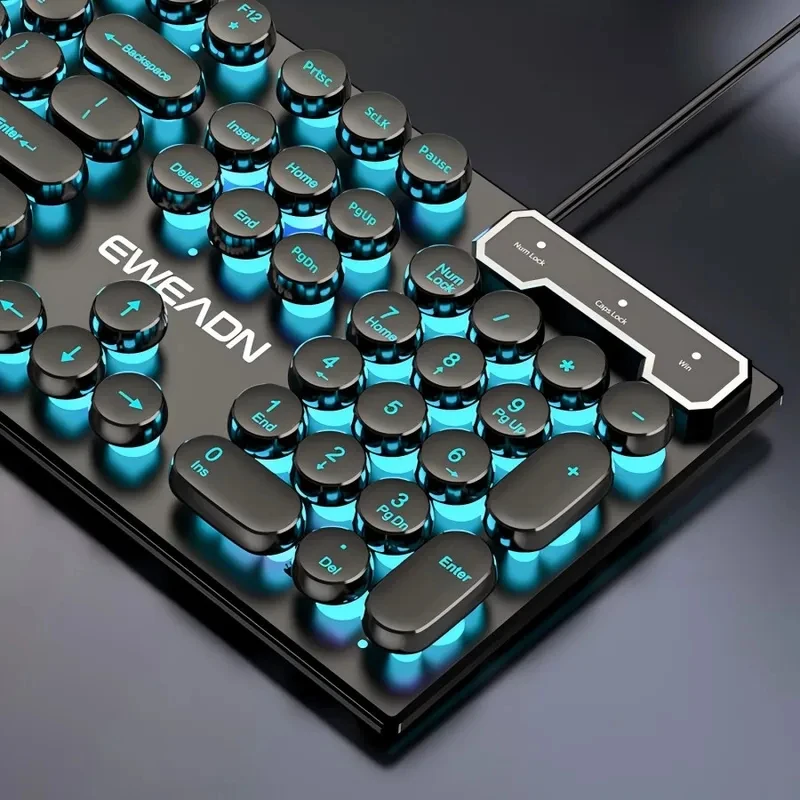
Enter the Retro Punk Mechanical Feel Keyboard and Mouse Combo. Priced at just around $44.69, this set promises to overhaul your workspace with nostalgic steampunk charm, dynamic lighting, and satisfying keystrokes—all without clearing out your bank account. But does it actually hold up under daily typing pressure? Let’s dive in.

Why It’s a Steal

Finding a distinctive desktop aesthetic on a budget is notoriously tricky. At ~$44.69, you aren’t just getting an eye-catching keyboard; you are getting a complete dual-peripherals bundle featuring a matched ergonomic mouse, striking round keycaps, and vibrant RGB lighting.

Retro Punk Keyboard & Mouse Combo Review: Vintage Aesthetic for Under $45! Detail
A closer look at the details

When you consider that standalone budget mechanical boards often sell for $40 alone without matching peripherals, this combo provides exceptional bang for your buck. Pair it up with an affordable ergonomic accessory like the Three-Section Foldable Desk Phone Stand, and you can achieve a complete, Pinterest-worthy desk overhaul for well under fifty bucks.

Key Features Deep Dive

1. Vintage Punk Round Keycaps

The standout feature is unquestionably the steampunk-inspired circular keycaps. Beyond looking gorgeous on your desk, the indentation on each cap cradles your fingertips naturally. This helps reduce accidental double-strikes while typing out long essays or navigating game macros, delivering that classic tactile typewriter nostalgia with a modern flair.

2. “Mechanical Feel” Hybrid Switches

It is important to keep expectations grounded: this set features mechanical-feel switches rather than individual, loud solder-in mechanical switches. The benefit? You get responsive, cushioned key travel with a distinct tactile bump, but without the deafening clatter. Your family, roommates, or office coworkers will definitely thank you during late-night typing sessions.

3. Multi-Zone RGB Illumination & Matching Mouse

Working in the dark? The board sports dynamic RGB backlighting that filters around the circular floating keycaps, creating a stunning halo effect across the baseplate. The accompanying mouse features matching lighting accents and adjustable sensitivity, meaning you won’t have to suffer through mismatched, clashing desk accessories.

Who Is This For?

This combo is an absolute home run for students, home-office workers, and casual gamers who want their desk setup to stand out on video calls or social media. If you are an esports competitor looking for ultra-low latency optical switches, you will want a specialized board; but for everyday productivity and stylish casual gaming, this combo punches far above its weight class.

✅ Pros

  • Stunning Retro Design: Distinctive typewriter circular caps that turn heads.
  • Complete Combo: Bundles both a keyboard and matching gaming mouse for ~$44.69.
  • Quiet Yet Tactile: Delivers satisfying feedback without obnoxiously loud clicks.
  • Vibrant Backlighting: Bright RGB lights elevate late-night study and work sessions.

🔻 Cons

  • Not Pure Mechanical: Uses mechanical-feel membrane domes rather than hot-swappable switches.
  • Typing Learning Curve: Round keycaps require a day or two to build muscle memory.

Final Verdict

If you’ve been yearning to upgrade your workstation aesthetics without burning a hole through your wallet, the Retro Punk Keyboard & Mouse Combo is a no-brainer. It delivers charismatic looks, satisfying daily comfort, and lively RGB lighting at a fraction of boutique retail prices.

Frequently Asked Questions

Is this a genuine mechanical keyboard?

No, it is a “mechanical-feel” keyboard. It uses high-grade, cushioned membrane switches engineered to simulate the resistance and tactile travel of a mechanical switch, making it much quieter and significantly more budget-friendly.

Is this set compatible with Mac and Windows?

Yes! The set works via standard plug-and-play USB connectivity on Windows, macOS, Linux, and modern laptops without requiring specialized companion drivers.

Can the RGB lighting effects be turned off?

Yes, you can easily toggle the backlighting on and off or cycle between modes using dedicated shortcut combinations on the keyboard.


Check Best Price ➔

*Price may vary based on promotions.

Posted on

Logitech G502 Tuning Weights Review: Perfect Mouse Balance for Under $24

Logitech G502 Tuning Weights Review: Perfect Mouse Balance for Under $24

Ever picked up your gaming mouse and felt like something was just… off? Maybe you bought a secondhand flagship, or perhaps during your last LAN party or desk cleanout, those tiny metal weights vanished into the void. For competitive FPS players and daily desktop warriors alike, mouse balance is muscle memory. When your center of gravity is skewed, your aim follows suit.

If you rock the iconic Logitech G502 Lightspeed Wireless, you know how crucial weight distribution is to its ergonomic feel. That brings us to these dedicated Balance Tuning Weights (2g increments) designed specifically to restore your mouse’s custom balance without needing to shell out for a brand-new gaming pointer.

Why It’s a Steal: Saving a $120+ Mouse for Just $23

At around $23.39, some might wonder why a few small grams of metal cost what they do. Here is the reality check: OEM Logitech replacement parts are notoriously hard to track down directly from customer support. Third-party resellers and scalpers on secondary auction sites frequently charge $35 to $50 just for leftover accessory trays. Picking up precise replacement weights for around twenty-three bucks breathes new life into a premium $120+ gaming mouse.

Logitech G502 Tuning Weights Review: Perfect Mouse Balance for Under $24 Detail
A closer look at the details

Instead of retiring an otherwise immaculate gaming setup, this affordable fix gets your tracking dialed right back into tournament shape. Plus, if you like keeping tiny parts from disappearing forever off your desktop, it pairs exceptionally well with smart organizers—check out our guide on how to Declutter Your Desk for Under $4? Hidden Under-Desk Drawer Review to stash your mouse accessories safely.

Key Features Deep Dive

1. Precise 2g Incremental Tuning

The beauty of the G502 system is modularity. These weights come in 2g micro-increments, letting you carefully shift the center of gravity forward, backward, or laterally. If you find your wrist flicking too far past headshots, adding just 2g or 4g towards the base stabilizes your decelerations without turning the mouse into an unwieldy brick.

2. Snug Compartment Tolerances

Third-party weights often raise red flags about rattle. Nobody wants a loose metal chunk clattering under their palm during intense flick shots. These units are cut to match the internal cavity of the G502 Lightspeed wireless housing snugly, meaning they seat firmly into the rubberized weight cartridge without shifting or scraping against the bottom cover plate.

3. Reliable Magnet & Door Latch Compatibility

The G502 Lightspeed relies on a bottom magnetic puck and cavity door mechanism. These replacement weights fit flush into the dedicated slots, ensuring the magnetic underside door snaps completely shut. You will not experience any bottom-plate dragging or uneven mouse skate contact on your pad.

Who Is This For?

This replacement pack is ideal for competitive PC gamers, secondhand bargain hunters who snagged a bare G502 without accessories, and Logitech enthusiasts looking to replace lost weights. If you are entirely happy with an ultralight setup with an empty weight chamber, you can skip this; but if you crave that dense, tailored hand-feel, this is your ticket.

✅ Pros

  • Exact fit for Logitech G502 Lightspeed internal slots
  • 2g increments allow granular balance adjustments
  • Significantly cheaper than buying OEM replacements on auction sites
  • Maintains flush closure of the bottom magnetic door

🔻 Cons

  • $23.39 is a bit steep for small metal pieces, though cheaper than alternatives
  • Unnecessary if you prefer ultra-lightweight gaming mice

Final Verdict

For roughly $23.39, these balance tuning weights are an easy, high-utility purchase that saves you from replacing a top-tier gaming mouse over missing accessories. They snap into place cleanly, eliminate chassis rattle, and restore the custom tracking balance that made the G502 famous in the first place.

Frequently Asked Questions

Will these weights fit the older wired Logitech G502 Proteus Core or Hero?

These are sized specifically around the internal layout of the G502 Lightspeed Wireless. While some G502 variants share internal geometry, always verify your exact model tray layout before ordering to prevent fitment issues.

Do these weights cause the bottom door to bulge or scrape on mousepads?

No. When placed correctly in the designated slots, they sit flush with the internal housing, allowing the bottom magnetic plate to latch completely flat.

Why do competitive gamers adjust mouse weights?

Fine-tuning mouse weight shifts the center of gravity, which helps balance wrist movements, controls cursor overshooting, and adapts mouse glide friction to specific mousepads.


Check Best Price ➔

*Price may vary based on promotions.

Posted on

Clean Your Gross Keyboard for $3: 10-Piece Brush Kit Review

Clean Your Gross Keyboard for $3: 10-Piece Brush Kit Review

Take a quick look down at your keyboard right now. If you see trapped crumbs, pet hairs, and an unsettling layer of dust wedged between the keycaps, you are not alone. Our desks attract grime like magnets, and compressed air cans are both pricey and run out in minutes.

Enter the 10-Piece PC Laptop Keyboard Cleaning Brush Kit. Priced at just about $3.19, this budget-friendly micro-brush arsenal promises to dislodge trapped debris from every tight nook in your setup without breaking the bank.

Why It’s a Steal

When you break down the math, this kit works out to roughly 32 cents per tool. Buying a single branded detailing brush at a computer store or hardware shop can easily cost $6 to $10 on its own. Getting an entire fleet of 10 targeted shapes and stiffness levels for pocket change is an unbeatable bargain.

Clean Your Gross Keyboard for $3: 10-Piece Brush Kit Review Detail
A closer look at the details

While high-end detailing kits often come with fancy storage pouches and metal handles, the primary goal here is utility. These brushes do the exact same physical work—loosening stubborn debris—at a fraction of the cost, making it an essential no-brainer pickup for any workspace.

Key Features Deep Dive

1. Ten Specialized Brush Profiles

Not every crevice requires the same bristle profile. This 10-piece bundle offers a mixture of narrow angled heads, flat wide sweeps, round micro-brushes, and stiff probe-like tips. This variety ensures you have the exact right profile whether you are sweeping crumbs across a laptop chiclet board or digging lint out of a smartphone charging port.

2. Anti-Static, Non-Abrasive Nylon Bristles

Electronics hate static electricity, and glossy plastic hates scratches. The bristles are crafted from resilient nylon that provides enough stiffness to dislodge sticky dust while remaining gentle enough to prevent scuffing delicate switch stems or keycap coatings. If you are someone who loves clicky switches and desk gear—perhaps even testing your switches on The $2 Desk Toy Every Mechanical Keyboard Nerd Needs: 4-Key Fidget Keychain—keeping those mechanical stems clean is key to smooth key travel.

3. Multi-Purpose Everyday Utility

Don’t limit this kit strictly to keyboards. Because the package includes multiple brushes, you can designate different tools for different rooms. Keep two at your desk for keyboards and monitors, take two out to your vehicle to sweep dust from AC dashboard vents, and toss one in the bathroom cabinet to brush hair out of electric shavers.

Who Is This For?

This 10-piece toolset is ideal for remote workers, gamers, students, and PC hobbyists who want a tidy desk without spending double digits on specialized cleanup gear. It is also fantastic for car enthusiasts who need ultra-fine micro-brushes for interior car vents and infotainment screen seams.

✅ Pros

  • Incredible price-to-quantity ratio (~$3.19 for 10 tools)
  • Great variety of bristle sizes and tip shapes
  • Gentle nylon bristles safe for sensitive electronics
  • Reusable alternative to disposable compressed air cans
  • Versatile for laptops, phones, car vents, and shavers

🔻 Cons

  • Plastic handles feel lightweight and basic
  • No storage pouch or organizer case included

Final Verdict

At approximately $3.19, this 10-piece brush kit easily earns the Budget Deal Hunter seal of approval. It won’t feel like a luxury heirloom tool in your hand, but it performs its job relentlessly well. If your keyboard, car dash, or shaver could use a thorough deep clean, grab this set and save your cash for bigger hardware upgrades.

Frequently Asked Questions

Can these brushes scratch laptop screens or keycaps?

No. The nylon bristles are soft and flexible, specifically suited for plastic, electronics, and keycaps. However, always ensure the bristles are free from trapped grit or sand before wiping glossy displays.

Are these brushes washable and reusable?

Yes! You can wash the nylon bristles under warm soapy water to remove accumulated oils and dirt. Just let them air-dry completely before using them on electronics again.

Why buy these instead of canned compressed air?

Canned air costs $5 to $8 per can, runs out fast, and often just blasts dust deeper inside switch housings. These physical brushes allow you to pull dust and hair out of tight crevices permanently without recurring costs.


Check Best Price ➔

*Price may vary based on promotions.

Posted on

Can This $3 Ice Ball Maltose Squishy Actually Melt Away Work Stress?

Can This $3 Ice Ball Maltose Squishy Actually Melt Away Work Stress?
★★★★★ (87.6%/5)

We’ve all been there: you’re stuck in a grueling 45-minute video call that easily could have been an email, your foot is tapping relentlessly, and your fingers are aggressively clicking your ballpoint pen until your coworkers silently mute you. When daily work tension builds up, mindless fidgeting is almost involuntary. But buying high-end tactile desk toys can quickly run you $15 to $25 for what is essentially glorified silicone.

Enter the Ice Ball Maltose Squishy Toy. At roughly $3.27, this frosted, crystal-blue mochi ball promises slow-rebound decompression without clearing out your wallet. But is it genuinely satisfying, or just another cheap novelty doomed to burst on day two? Let’s break it down.

Why It’s a Steal

In the world of tactile fidgets, high-resistance “maltose-style” dough balls normally carry a hefty boutique markup. For barely $3.27, this budget ice ball delivers that exact dense, slow-rebound sensation you usually get from premium sensory brands. Much like our hands-on experience with The $5 Toothpaste Stress Ball, this quirky little decompression gadget proves you do not need to spend big bucks to get genuine desk stress relief.

Can This $3 Ice Ball Maltose Squishy Actually Melt Away Work Stress? Detail
A closer look at the details

Boasting a solid 87.6% positive rating from buyers, it hits the absolute sweet spot of the price-to-performance ratio. Even if you manage to wear it out after a few months of intense kneading, replacing it costs less than a single morning latte.

Key Features Deep Dive

1. Dense Maltose-Style Slow Rebound

Unlike standard air-filled rubber stress balls that snap back instantly, this mochi fidget is filled with a dense, maltose-mimicking compound. When you sink your thumbs into it, there is deep mechanical resistance. It yields slowly, holding your imprint for a split second before sluggishly creeping back to shape. This provides superior sensory feedback that genuinely grounds your focus during high-stress multitasking.

2. Frosted “Ice Cube” Aesthetic

Let’s be honest: a lot of fidget toys look like neon kindergarten leftovers that clash horribly with a sleek desk setup. This squishy features a translucent, icy-blue frosted skin. Sitting next to your mechanical keyboard or monitor, it looks more like a modern glass paperweight or an artisanal ice sphere than an anti-stress toy.

3. Washable, Non-Greasy Exterior

A notorious problem with budget TPR (thermoplastic rubber) toys is how quickly they attract desk dust and pocket lint. Fortunately, the outer skin here rinses completely clean under lukewarm tap water. A quick pat dry and a pinch of cornstarch or baby powder restores its velvety, non-sticky matte finish in seconds.

Who Is This For?

This little blue sphere is tailor-made for:

  • Remote & Office Workers: Anyone enduring endless conference calls who needs silent, beneath-the-desk tactile stimulation.
  • Students & Crammers: Great for keeping restless hands occupied while reading dense study material.
  • ADHD & Sensory Seekers: Anyone who craves firm, slow-give resistance over flimsy foam toys.

✅ Pros

  • Incredible value at around $3.27
  • Deep, satisfying slow-rebound resistance
  • Completely silent—zero squeaks or clicks during meetings
  • Minimalist “frosted ice” look fits aesthetic desk setups
  • Easily washable with warm water

🔻 Cons

  • Vulnerable to sharp fingernails or aggressive over-stretching
  • Attracts stray pet hair without routine rinsing
  • Not meant for aggressive twisting or puncturing

Final Verdict

At $3.27, expectations should always be realistic: it won’t survive a scissor jab, and aggressive fingernail gouging will shorten its lifespan. But treated as a palm-squishing desktop companion, the Ice Ball Maltose Squishy offers astonishingly rich, silent tactile satisfaction. If your workday is full of tension and your desk needs a budget-friendly dopamine boost, this icy little sphere is an absolute no-brainer purchase.

Frequently Asked Questions

What is inside the Ice Ball Squishy?

It is filled with a non-toxic, highly viscous maltose-like polymer syrup encased inside a flexible TPR (thermoplastic rubber) shell, giving it that signature heavy, slow-return squish.

How do I keep it from feeling sticky after washing?

After washing it with mild soap and warm water, let it air dry completely, then lightly dust it with a small pinch of cornstarch or baby powder. It will immediately regain its smooth, matte texture.

Can kids play with this squishy toy?

Yes, but it is best suited for older kids, teens, and adults. Because the internal filling should not be ingested, it is not recommended for toddlers or anyone prone to biting toys.


Check Best Price ➔

*Price may vary based on promotions.

Posted on

Raiden Shogun 3D Resin Keycap Review: Mechanical Keyboard Swag for Under $7!

Raiden Shogun 3D Resin Keycap Review: Mechanical Keyboard Swag for Under $7!

If you have ever spent five minutes browsing custom mechanical keyboard forums, you already know the brutal reality: custom artisan keycaps are insanely expensive. It is not uncommon to see boutique resin keycaps selling for $35, $50, or even north of $80 for a single keycap. For most of us who just want our keyboard to look sweet without burning rent money, that is a tough pill to swallow.

Enter the Genshin Impact Raiden Shogun 3D Embossed Resin Keycap. Coming in at around $6.22, this little accent piece promises to bring high-tier anime aesthetics to your desktop setup for the price of an iced latte. But is it actually worth adding to your daily typing rig?

Why It’s a Steal

Let’s talk pure value. At roughly $6.22, you are paying a fraction of what traditional group-buy artisans cost. Handcrafted artisan makers spend hours casting resin, and while those luxury caps are stunning, this budget alternative delivers an eye-catching 3D tribute to the Electro Archon without the wallet-draining hype tax.

Raiden Shogun 3D Resin Keycap Review: Mechanical Keyboard Swag for Under $7! Detail
A closer look at the details

Whether you want to slap it onto your ESC key or park it on the function row, this keycap serves as an instant centerpiece. When upgrading your desk vibe, you do not always need a complete multi-hundred-dollar overhaul—sometimes small, quirky desk pieces (much like a fun Green Apple Squeeze Toy to fidget with during gaming breaks) are all it takes to make your setup feel uniquely yours.

Key Features Deep Dive

1. 3D Embossed Character Detailing

Instead of a flat printed picture that will fade after two months of intense gaming, this keycap features a raised 3D embossed resin design. The profile stands out visually and physically, giving your keyboard an authentic artisan showcase look every time you look down at your hands.

2. Solid Resin Build

Resin is the gold standard for novelty keycaps because it holds sculpted shapes nicely and offers solid structural rigidity. The glossy resin finish resists common finger oils, keeping the vibrant purple Electro aesthetic looking fresh even after long typing sessions.

3. Universal Cherry MX Stem Compatibility

What good is a custom keycap if it doesn’t fit your board? Fortunately, it uses the standard cross-shaped stem mount. This means it easily snaps right into standard Cherry MX switches, as well as clones from Gateron, Outemu, Kailh, and Akko. If your keyboard has standard mechanical switches, you are good to go in seconds.

Who Is This For?

This keycap is an absolute no-brainer for Genshin Impact fans, anime enthusiasts, and casual keyboard modders who want a visually interesting ESC or accent key. It is also an awesome, low-cost stocking stuffer or birthday gift for any gamer friend who already has a mechanical keyboard.

✅ Pros

  • Unbeatable price point (~$6.22) compared to $40+ artisan keycaps
  • Eye-catching 3D embossed Raiden Shogun design
  • Universal fit for Cherry MX and compatible clone switches
  • Instant visual upgrade for any basic mechanical keyboard

🔻 Cons

  • Irregular profile means it is best suited for ESC or function keys, not typing rows
  • Mass-produced resin finish won’t match a $100 hand-cast boutique cap

Final Verdict

Will this $6.22 keycap compete with rare, hand-painted collector pieces traded on keyboard forums? Probably not. But does it deliver 90% of the visual fun for less than 15% of the price? Absolutely. For the cost of a couple of energy drinks, you get an iconic Raiden Shogun centerpiece that instantly upgrades your keyboard aesthetic.

Frequently Asked Questions

Will this keycap fit my mechanical keyboard?

Yes, as long as your keyboard uses standard mechanical switches with a cross-shaped (+) stem (such as Cherry MX, Gateron, Kailh, Outemu, etc.). It will not fit membrane or low-profile scissor switches.

Which key slot should I put this on?

Because of the raised 3D embossed sculpt, it is best placed on non-typing keys such as the ESC key, F-row keys, or navigation keys (like Print Screen or Pause).

Is the stem fit too tight or loose?

Most budget resin keycaps have a snug cross-stem fit. If a resin keycap ever feels slightly too tight, gently warming the bottom stem with a hairdryer for a few seconds can help ease it onto the switch safely.


Check Best Price ➔

*Price may vary based on promotions.

Posted on

Upgrade Your Desk: Is This $9.64 Coiled Keyboard Cable Worth It?

Upgrade Your Desk: Is This $9.64 Coiled Keyboard Cable Worth It?
★★★★★ (98.0%/5)

Tired of Tangled Wires? Elevate Your Mechanical Keyboard Aesthetic on a Budget!

Is your desk a battlefield of tangled wires? Does your premium mechanical keyboard deserve a cable that matches its style and performance? Many enthusiasts spend fortunes on custom setups, but often overlook the humble cable that connects it all. A standard cable can detract from a carefully curated workspace, but what if you could snag a significant upgrade for less than the cost of your lunch?

Why This $9.64 Coiled Cable is a Steal

Enter the 7 Colors USB Type C Mechanical Keyboard Coiled Cable. For an incredibly low price of just ~$9.64, you’re not just getting a cable; you’re getting a statement piece. With a stellar 98.0%/5-star rating, it’s clear that this budget-friendly accessory is punching well above its weight class.

Upgrade Your Desk: Is This $9.64 Coiled Keyboard Cable Worth It? Detail
A closer look at the details

In a world where custom coiled cables can easily run you $30-$60 or more, finding one with an aviator connector and multiple color options at this price point is truly remarkable. It’s a prime example of how you can achieve a premium look without breaking the bank, much like finding a great deal on a powerful LED video light for your streaming setup for a fraction of the cost.

Key Features Deep Dive

The Iconic Coiled Design for a Clean Aesthetic

The **coiled design** isn’t just for show; it’s highly functional. It provides natural cable management, keeping your desk looking neat and organized without sacrificing flexibility. The springy coil allows for adjustable reach while maintaining a compact footprint when not fully extended, offering that classic custom keyboard look many aspire to.

Durable Aviator Connector for Easy Swaps

One of the standout features is the **aviation connector**. This heavy-duty, quick-release connector isn’t just about industrial aesthetics; it offers immense practicality. It allows you to easily detach and swap out your keyboard or cable without fumbling with the USB port on your computer, making your setup more modular and future-proof. It adds a touch of professional flair and durability.

Vibrant 7 Colors & USB Type-C Modernity

With **7 vibrant color options**, you can perfectly match or contrast your keyboard, keycaps, and overall desk theme. This level of customization at such a low price is a huge plus for personal expression. Coupled with the **universal USB Type-C** connection, you get modern compatibility, reversible plugging, and robust data transfer for your mechanical keyboard.

Who Is This For?

This coiled cable is perfect for **mechanical keyboard enthusiasts** on a budget, **gamers** looking to upgrade their battlestation’s aesthetics, **PC builders** who appreciate a clean and organized desk, and anyone who wants to add a touch of personality and modularity to their workspace without spending a fortune. If you’re tired of generic black cables and crave a more custom look, this is an accessible entry point.

✅ Pros

  • Exceptional Value: Premium features like coiled design and aviator connector at an unbeatable price.
  • Enhanced Aesthetics: Instantly upgrades the look of any mechanical keyboard setup.
  • Improved Cable Management: Coiled design keeps your desk tidy.
  • Durable & Modular: Aviator connector adds ruggedness and ease of swapping.
  • High Customer Satisfaction: 98% 5-star rating speaks volumes.

🔻 Cons

  • Coil tightness/length might vary slightly at this price point compared to high-end custom cables.
  • Limited to USB-A to USB-C connection; not a fully custom, handmade cable.

Final Verdict

The 7 Colors USB Type C Mechanical Keyboard Coiled Cable is a fantastic little upgrade for mechanical keyboard users who want to add style and functionality without emptying their wallets. For just ~$9.64, you’re getting an accessory that dramatically improves desk aesthetics and offers the convenience of an aviator connector, a feature usually reserved for much pricier options. While it won’t be a bespoke, artisan-crafted cable, its high rating and robust feature set make it an undeniable bargain for the vast majority of users. If you’re looking for an instant desk glow-up, this cable is an easy recommendation.

Frequently Asked Questions

What is an aviator connector and why is it useful?

An aviator connector is a circular, often metal, quick-release connector that allows you to easily detach the coiled section of the cable from the straight section. It’s useful for quickly swapping keyboards, changing cable styles, or simply making your setup more modular and visually appealing without needing to unplug from your PC.

Is this cable compatible with all mechanical keyboards?

This cable features a USB Type-C connector for the keyboard end, which is the standard for most modern mechanical keyboards. It connects to your computer via a standard USB-A port. If your keyboard uses USB-C, it should be compatible.

Can I choose the length of the coiled section?

Typically, budget coiled cables like this come in a standard length, which includes both the coiled and straight sections. While you can’t customize the length, the coil itself offers some stretchability and compact storage for a tidy desk.

Given the low price, should I worry about quality?

While it’s always good to manage expectations with budget items, this particular cable boasts an impressive 98% 5-star rating, suggesting high customer satisfaction with its quality relative to its price. It’s designed to offer aesthetic and functional benefits at an accessible cost, making it a great value.


Check Best Price ➔

*Price may vary based on promotions.

Posted on

$10 Mechanical Keyboard Cable: Ultimate Desk Upgrade on a Budget?

$10 Mechanical Keyboard Cable: Ultimate Desk Upgrade on a Budget?
★★★★★ (94.6%/5)

Is Your Desk Missing That Premium Touch?

Is your mechanical keyboard setup missing that final touch? Often, the standard cable can be an eyesore, rigid, or simply not match the premium aesthetic you’ve worked hard to create. Imagine a cable that not only performs flawlessly but also elevates your entire desk’s look with a retro-futuristic charm. Enter the Mechanical Keyboard Coiled Cable USB Type C, a small but mighty upgrade promising both style and functionality.

Why This Coiled Cable is a Steal

At a stunning price point of just ~$10.62, this coiled cable isn’t just an accessory; it’s an absolute steal. With a remarkable 94.6%/5-star rating from users, it’s clear that this product delivers exceptional value. While it won’t replicate the feel of a custom, handcrafted cable costing ten times as much, for its price, the quality and aesthetic appeal are truly incredible. It’s an accessible way to instantly upgrade your setup without breaking the bank, offering a premium feel that belies its budget-friendly tag.

$10 Mechanical Keyboard Cable: Ultimate Desk Upgrade on a Budget? Detail
A closer look at the details

It’s a perfect example of how small, affordable changes can make a big impact on your workspace’s overall vibe. If you’re also looking for other budget-friendly tech to complete your setup, you might be interested in our review of the Wireless RGB Mouse for Laptops: Is This $3.96 Gadget a Game Changer?

Key Features Deep Dive

The Coiled Design & Aesthetic Upgrade

Say goodbye to tangled, messy cables cluttering your desk. The defining feature of this product is its beautifully coiled design. This isn’t just for looks; it provides flexibility, allowing you to manage cable length efficiently and keep your workspace incredibly tidy. The coil adds a dynamic, professional touch that complements the custom build of many mechanical keyboards, making your entire setup look more polished and intentional.

Robust Aviator Connector for Modularity

Beyond its visual appeal, the aviation connector (often called an aviator connector) is a game-changer. This sturdy, quick-disconnect connector isn’t just for show. It allows you to detach your keyboard from the main cable with ease, perfect for swapping out keyboards, traveling, or simply keeping your desk tidy when not in use. It also adds a layer of modularity and durability, ensuring a secure and reliable connection every time.

Modern USB Type C Compatibility & Ample Length

Equipped with a USB Type C connector for your keyboard end, this cable ensures broad compatibility with the vast majority of modern mechanical keyboards. USB-C offers reversible insertion, meaning no more fumbling to plug it in correctly. The cable also boasts a maximum length of 3 meters (Max 3M) when fully extended, providing ample reach for various desk setups, from compact workstations to larger gaming battle stations, giving you flexibility without restrictive short cables.

Who Is This For?

This coiled cable is ideal for mechanical keyboard enthusiasts looking to enhance their setup’s aesthetics and functionality. It’s also perfect for gamers, streamers, and remote workers who value a clean, organized, and stylish desk. If you’re someone who appreciates premium touches without the premium price tag, and you love customizing your tech, this cable is definitely for you.

✅ Pros

  • Exceptional value for its low price (~$10.62)
  • High user satisfaction (94.6% / 5 stars)
  • Stylish coiled design for a clean, organized desk
  • Durable and functional aviator (quick-disconnect) connector
  • Modern USB Type C compatibility for most keyboards
  • Generous 3M maximum length for versatile setups

🔻 Cons

  • May not offer the same ultra-premium feel as high-end custom cables
  • 3M length might be more than needed for extremely compact setups
  • Color options might be limited compared to bespoke offerings

Final Verdict

For just ~$10.62, the Mechanical Keyboard Coiled Cable USB Type C is an undeniable value proposition. It’s a simple, yet impactful upgrade that brings a premium look and enhanced functionality to any mechanical keyboard setup. With its high user rating and thoughtful design, it’s easy to recommend this cable to anyone looking to elevate their desk aesthetic without stretching their budget. It’s more than just a cable; it’s a statement for your workspace.

Frequently Asked Questions

Q: What mechanical keyboards are compatible with this cable?

A: This cable is designed with a USB Type C connector for the keyboard end, making it compatible with the vast majority of modern mechanical keyboards that use a USB-C port. Always double-check your keyboard’s port type before purchasing.

Q: What is the primary benefit of the aviator connector?

A: The aviator connector offers quick and easy detachment of your keyboard from the main cable, which is great for swapping keyboards, travel, or maintaining a tidy desk. It also adds a robust, modular, and aesthetically pleasing element to your setup.

Q: Is the coiled section just for looks, or does it offer functionality?

A: The coiled section serves both aesthetic and functional purposes. Aesthetically, it provides a clean, customized, and retro-inspired look. Functionally, it helps manage cable length, reduces clutter, and offers flexibility in positioning your keyboard without excess slack.

Q: How long is the cable, and is it suitable for all desk sizes?

A: The cable has a maximum length of 3 meters (Max 3M) when fully stretched. This generous length provides significant flexibility for most desk setups, allowing you to reach various PC ports. For very compact desks, the coiled section helps manage the length, but 3M straight length might still be more than some truly minimal setups require.


Check Best Price ➔

*Price may vary based on promotions.
Posted on

Genshin Impact Klee Keycaps: Is This $77.98 Desk Upgrade Worth It?

Genshin Impact Klee Keycaps: Is This $77.98 Desk Upgrade Worth It?

Tired of Your Boring Keyboard? Unleash Your Inner Adventurer!

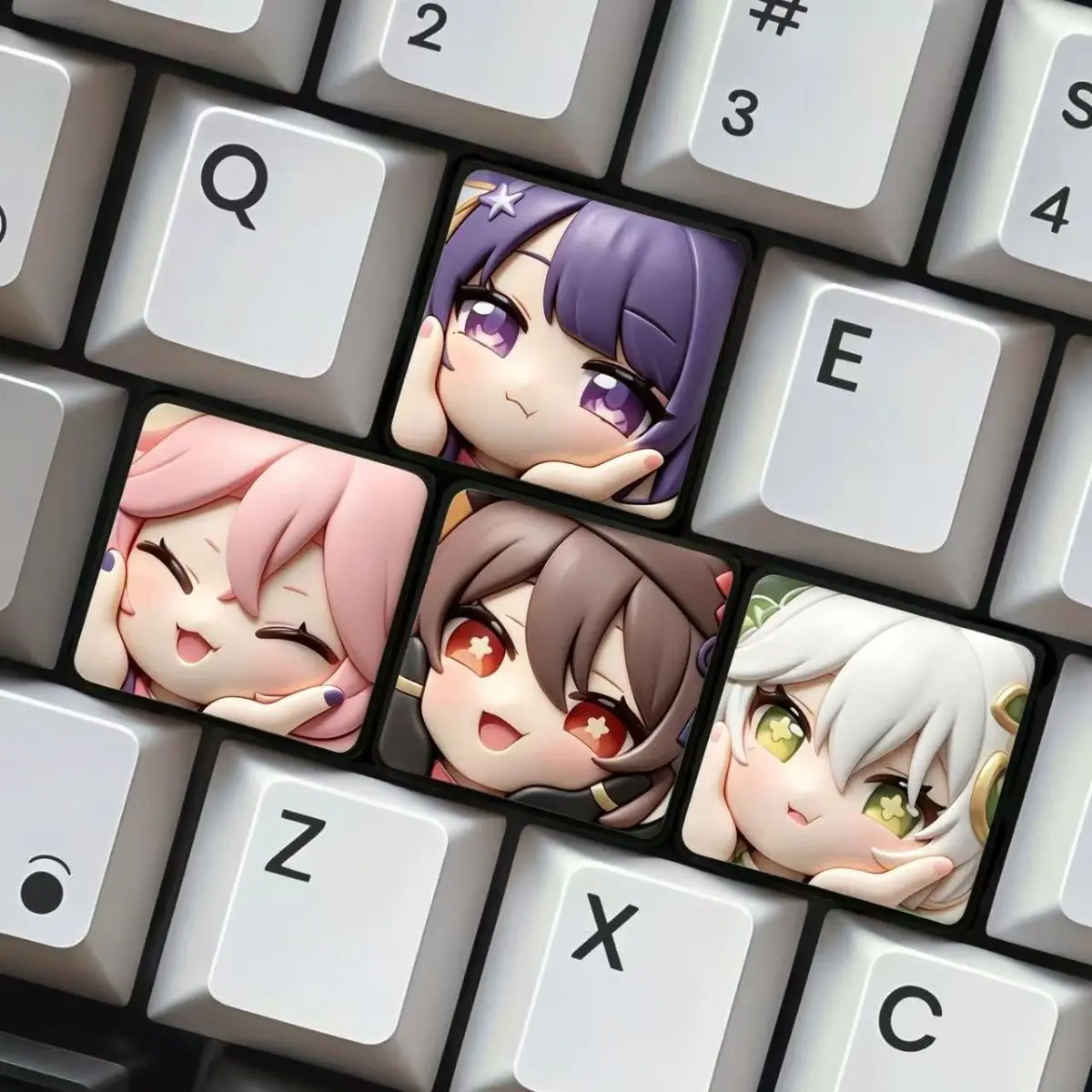
Does your mechanical keyboard feel a little… generic? While standard keycaps get the job done, they often lack the personality that truly reflects your passions. If you’re a dedicated fan of Teyvat and its most explosive character, Klee, then you know the struggle of finding unique, high-quality merchandise to express your love for Genshin Impact. That’s where the **Klee keycap Mechanical keyboard accessories** step in, promising to ignite your desk setup with a touch of Pymon’s favorite bomber!

Why This Genshin Impact Keycap Set is a Steal (For the Right Adventurer)

At approximately **$77.98**, this Klee-themed keycap set isn’t your average budget accessory. However, for Genshin Impact enthusiasts and collectors, the value proposition shifts dramatically. You’re not just buying plastic; you’re investing in a piece of your favorite game world, designed to personalize one of your most used pieces of equipment. This price point positions it as a premium fan item, similar to other collectible merchandise, offering a unique blend of utility and fandom expression.

Genshin Impact Klee Keycaps: Is This $77.98 Desk Upgrade Worth It? Detail
A closer look at the details

Considering the intricate designs and the niche market, the cost reflects the dedication to bringing a beloved character to life on your desktop. It transforms a functional item into a focal point, a conversation starter, and a constant reminder of the adventures awaiting you in Genshin Impact. If you’re looking for other ways to personalize your workspace without breaking the bank, check out our review of a Cute Desk Upgrade? We Review the $0.57 Bowknot PC Accessory! for some budget-friendly inspiration!

Key Features Deep Dive: Bring Teyvat to Your Fingertips

🎮 Immersive Klee and Genshin Impact Design

The star of the show is, undeniably, the **vibrant Klee-themed aesthetic**. Expect keycaps adorned with familiar elements from Klee’s design – her signature red, explosive motifs, and perhaps even adorable depictions of Dodoco. This isn’t just a generic red keycap set; it’s specifically tailored for Genshin Impact fans, ensuring every press feels like a step into the world of Teyvat. The attention to detail is crucial for merchandise like this, making it a true collectible.

✨ Quality & Feel: Elevating Your Typing Experience

While specific material details aren’t provided in the name, keycap sets in this price range often feature **durable PBT plastic** (known for its resistance to shine and wear) or high-quality ABS with crisp legends. The benefit? A satisfying tactile feel under your fingers and longevity, meaning Klee will be detonating on your desk for years to come. A good set of keycaps can fundamentally change the feel of your mechanical keyboard, making every keystroke more enjoyable.

🔧 Mechanical Keyboard Compatibility & Customization

Labeled as "Mechanical keyboard accessories," this set is designed to be highly compatible with most standard mechanical keyboards, typically featuring the popular Cherry MX stem. This means you can easily swap out your existing keycaps and instantly upgrade your setup. Whether you’re looking for a full keyboard overhaul or just a few accent keycaps, the modular nature allows for **extensive personalization**, letting you decide how much Klee you want on your desk.

Who Is This For? The Aspiring Knights of Favonius

This Klee keycap set is perfectly suited for **Genshin Impact fans** who want to infuse their gaming or work setup with their passion. It’s ideal for:

  • **Dedicated Gamers & Streamers**: Show off your allegiance while you play or stream.
  • **Mechanical Keyboard Enthusiasts**: Looking for unique, themed keycaps to expand their collection.
  • **Collectors of Genshin Impact Merchandise**: A functional piece of fan art.
  • **Anyone seeking a Personalized Desk Setup**: Who wants their workspace to reflect their personality.

If you’re upgrading your gaming setup, you might also be interested in our Teeline M33 Headphones Review: Incredible ANC Sound for Under $53? for an audio boost!

✅ Pros

  • **Unique Klee/Genshin Impact design**
  • **Strong appeal for fans and collectors**
  • Excellent way to personalize your setup
  • Potentially high-quality material (PBT/ABS)
  • Makes your keyboard a visual centerpiece

🔻 Cons

  • **High price point for non-fans**
  • Niche appeal (primarily for Genshin players)
  • Specific keycap material not detailed in product name
  • No user ratings available for direct feedback

Final Verdict: Explode Your Expectations!

The Klee keycap set for mechanical keyboards, priced at around **$77.98**, isn’t just an accessory; it’s a statement. For dedicated Genshin Impact fans and those who appreciate unique, high-quality themed merchandise, this set offers incredible value. It transforms a mundane keyboard into a personal homage to your favorite game, making every typing or gaming session a more immersive experience. While not a budget item for the casual user, it’s a worthwhile investment for adventurers looking to bring a piece of Teyvat to their desktop. Get ready to add some sparkle and boom to your setup!

Frequently Asked Questions

Are these Klee keycaps compatible with all mechanical keyboards?
Most mechanical keycap sets are designed for keyboards using Cherry MX style switches (which have a cross-shaped stem). It’s highly probable these Klee keycaps follow that standard, offering broad compatibility. Always double-check with the seller if you have a non-standard layout or switch type.
What material are the Klee keycaps made from?
While the product name doesn’t specify, keycaps in this price range and for enthusiast markets typically use durable materials like PBT (Polybutylene Terephthalate) or high-quality ABS (Acrylonitrile Butadiene Styrene). PBT is known for its texture and resistance to shine, while ABS can offer vibrant colors. It’s best to inquire directly with the seller for exact material details.
Is the price of $77.98 worth it for these keycaps?
For a standard, un-themed keycap set, $77.98 might seem high. However, for a specialty item tied to a popular game like Genshin Impact and featuring a beloved character like Klee, the price reflects its unique design, niche appeal, and collectible nature. If you’re a devoted fan looking for a significant aesthetic upgrade and a statement piece for your desk, many would consider it a worthwhile investment in personalization and fandom.
Are these officially licensed Genshin Impact keycaps?
The product name includes "mIHOYO Game Genshin Impact," suggesting an association with the official game. However, it also includes "Doujin Game," which often refers to fan-made or unofficial works. This creates some ambiguity. While it clearly celebrates Genshin Impact and Klee, for definitive licensing information, it’s always recommended to check directly with the product seller or miHoYo’s official merchandise channels.

Check Best Price ➔

*Price may vary based on promotions.