
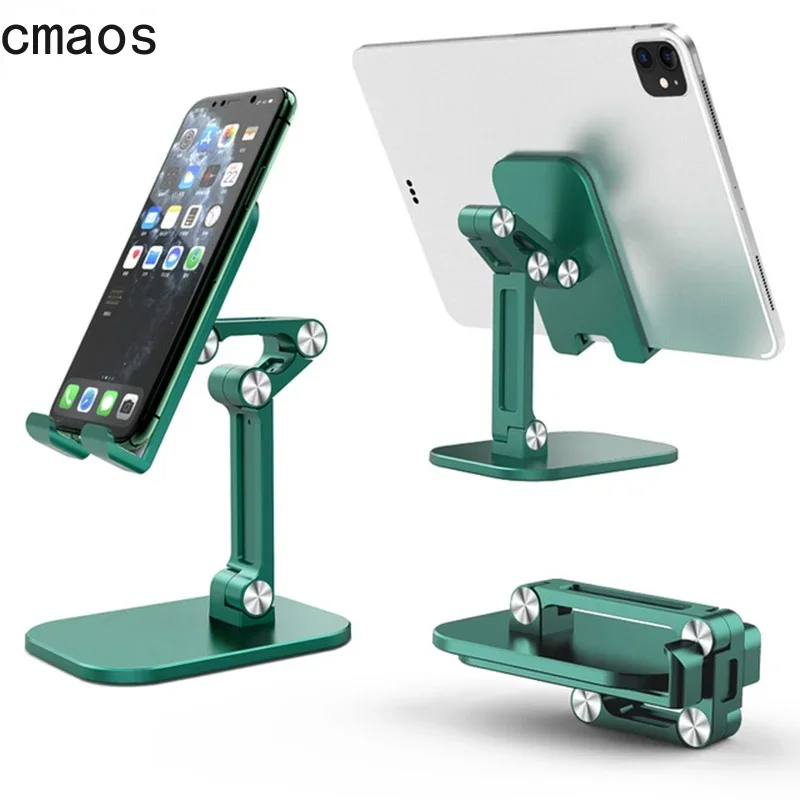
We have all been there: you are trying to follow a recipe in the kitchen, watch a video at your desk, or join a casual video chat, and your phone is precariously propped up against a coffee mug. Inevitably, it slides flat, sending your screen face-down right when you need it most. That awkward neck angle is no fun either.
Premium aluminum stands often retail for $20 to $30, which feels excessive for something whose sole job is holding a piece of glass upright. Enter this Three Sections Foldable Desk Mobile Phone Holder, selling for a jaw-dropping price of around $3.05. Can a gadget that costs less than your morning latte actually deliver real desktop ergonomics?
Why It’s a Steal
The sheer value proposition here is off the charts. For just over $3, you are getting a mechanical stand featuring a triple-joint design that allows multi-angle elevation and tilt adjustments. While outfitting a productive desk setup with smart essentials—much like the humble gem we explored in our Transparent Plastic Ruler Review—finding practical items at rock-bottom prices feels like finding cheat codes for modern life.

With a user rating hovering around 76% (approx. 3.8/5 stars), expectations need to be realistic. This is primarily a lightweight composite build rather than a hefty block of milled metal. Yet, at roughly $3.05, you get functionality that mirrors stands five times its price, making it an undeniable bargain for everyday desk tasks.
Key Features Deep Dive
1. Three-Section Articulated Adjustability
Unlike rigid plastic wedges that lock your screen at a single steep angle, this holder features three distinct pivoting sections. You can tweak the base angle, intermediate arm height, and phone cradle angle independently. This means you can raise your smartphone up toward eye level, drastically reducing that dreaded “tech-neck” hunch during long video sessions.
2. Fold-Flat Portability
Desk real estate is precious, and mobility is key. When fully collapsed, the stand folds down completely flat into a pocket-friendly footprint. You can slide it effortlessly into a laptop sleeve, backpack side pocket, or even a jacket pocket, making it an excellent companion for coffee shop work or library study sessions.
3. Thoughtful Charging Cutout & Universal Fit
The bottom hooks feature a dedicated gap that lets you route a USB-C or Lightning cable cleanly through the stand. You can leave your device charging in portrait mode without kinking your charging wire. The cradle arms fit standard iPhones, Samsung Galaxy devices, and small tablets up to around 10 inches with ease.
Who Is This For?
This stand is ideal for college students looking to optimize their study space on a micro-budget, remote workers who need an auxiliary screen prop for two-factor authentication and notifications, or anyone who wants a dedicated, hands-free recipe holder by the kitchen stove without worrying about grease ruining a luxury accessory.
✅ Pros
- Unbeatable price point (around $3.05)
- Three adjustable joints for flexible viewing angles
- Folds completely flat for travel
- Integrated cable slot allows charging in portrait orientation
- Fits virtually any smartphone and standard e-readers
🔻 Cons
- Lightweight plastic base can wobble with heavy 11″+ tablets
- Hinges may loosen over extended heavy use
- Not suitable for heavy typing while mounted
Final Verdict
Does this budget stand replace a heavy-duty, $35 CNC-machined metal workstation rig? No. If you tap aggressively on your screen or try to balance a massive 12.9-inch iPad Pro, you will notice some bounce. But for setting your phone upright beside your monitor, watching YouTube during lunch, or joining a FaceTime call, this Three Sections Foldable Stand provides 90% of the utility of branded competitors at a fraction of the cost. At roughly $3.05, it is easily one of the smartest impulse purchases for any messy workspace.
Frequently Asked Questions
Can this stand hold a full-sized iPad or tablet?
It comfortably supports smaller tablets (like an iPad Mini or basic 10-inch tablets) in landscape orientation. For larger or heavier devices in portrait mode, the center of gravity may cause tipping unless the stand is adjusted low to the base.
Can I plug in my charger while my phone is on the stand?
Yes! The bottom cradle includes an open channel specifically designed to pass charging cables through, allowing portrait charging without bending the connector.
Does the stand slip around on polished wood or glass desks?
The base has small rubberized pads to reduce sliding. While it isn’t as anchored as heavy weighted metal docks, it remains stable under standard everyday use.
Check Best Price ➔
*Price may vary based on promotions.

