
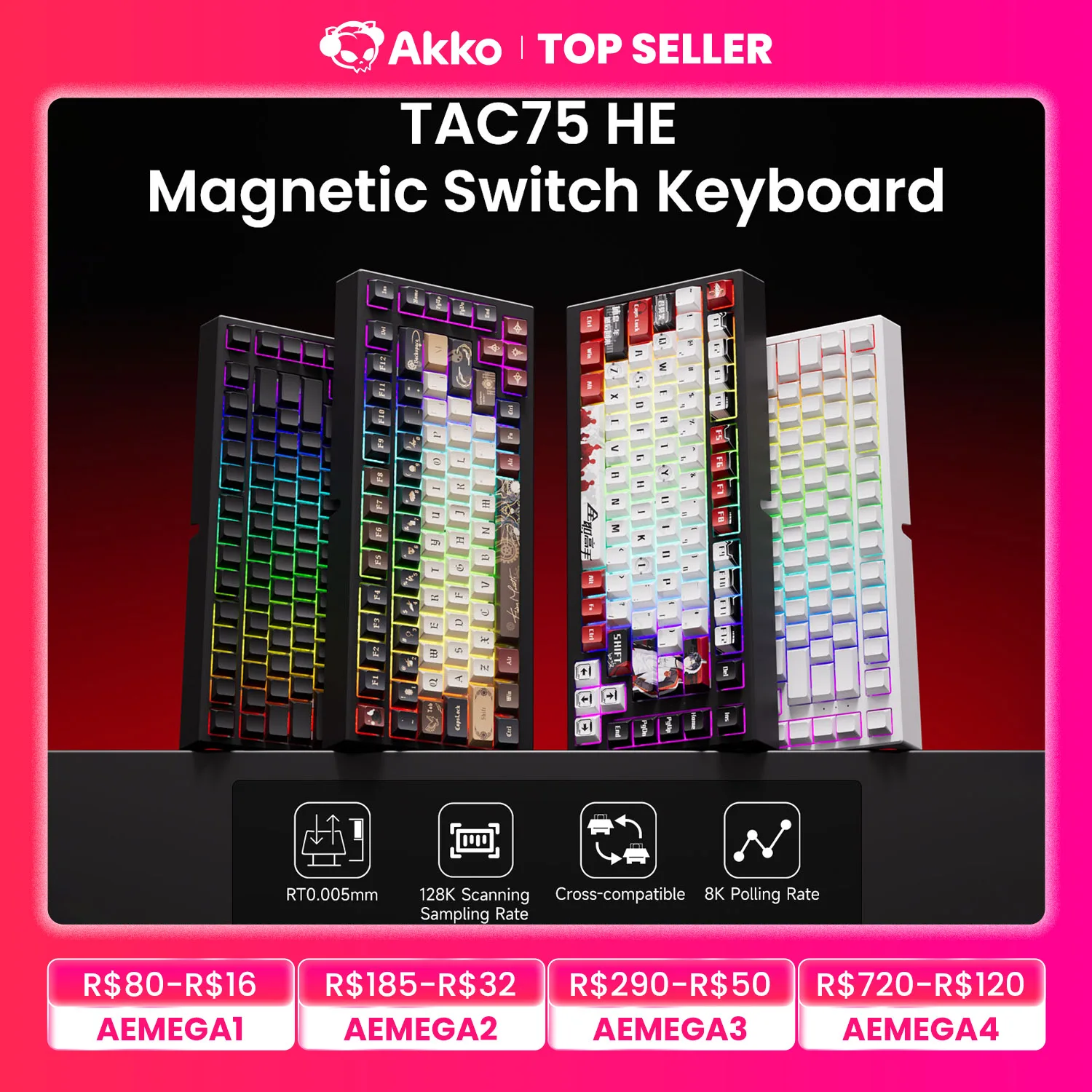
Introduction: The Hall Effect Hype Meets Budget Reality
If you have been playing competitive tactical shooters like Valorant or Counter-Strike 2 recently, you already know the buzzword dominating the scene: Rapid Trigger. Until recently, snagging a Hall Effect magnetic switch keyboard meant shelling out $180 to $250 for high-end boards like the Wooting 60HE or Razer Huntsman V3 Pro.
Enter the AKKO TAC75 HE. Priced at just ~$52.89, this board promises ultra-fast magnetic switches, an insane 0.005mm adjustable actuation, and a blazing 8000Hz polling rate. Can a budget board really deliver flagship esports performance, or is there a catch? Let’s dive into what makes this device tick.
Why It’s a Steal: Esports Tech Without the Esports Tax
At roughly fifty bucks, the AKKO TAC75 HE completely disrupts the mechanical keyboard market. You are getting Hall Effect magnetic switches—which register keystrokes using magnetic flux rather than physical metal leaf contacts—at a fraction of the traditional cost.

While premium alternatives give you fancy aluminum cases and high-profile branding, the TAC75 HE channels every penny into pure in-game performance. When paired with a great mouse and a solid surface—like we explored in our guide on Can an Under-$10 XXL Gaming Desk Mat Transform Your Battlestation?—this keyboard transforms your battlestation into a responsive esports arena without draining your wallet.
Key Features Deep Dive
1. Magnetic Hall Effect Switches with 0.005mm Rapid Trigger
The standout feature here is undoubtedly the Rapid Trigger capability. Traditional mechanical switches need to reset past a fixed physical point before you can register another keystroke. With the TAC75 HE’s magnetic sensors, the switch dynamically resets the microsecond your finger lifts up, down to an astonishing 0.005mm sensitivity.
What does this mean in game? Your counter-strafing becomes instantaneous. You stop on a dime, shoot with pinpoint accuracy, and jiggle-peek corners faster than players using standard mechanical keyboards.
2. True 8K (8000Hz) Polling Rate
Most standard gaming keyboards operate at a 1000Hz polling rate (1ms delay). The AKKO TAC75 HE boosts transmission up to 8000Hz, reporting input data to your PC every 0.125ms.
While the jump from 1K to 8K is subtle to the human eye, it completely eliminates input bottlenecking during chaotic firefights or high-APM rhythm games like osu!. Every command registers with zero perceivable delay.
3. Ergonomic 75% Layout with Vibrant RGB
Unlike restrictive 60% keyboards that ditch your arrow keys and function row, the 75% layout strikes the golden balance. You get plenty of mouse desk space for low-DPI flick shots while keeping dedicated arrow keys and navigation keys handy for everyday typing.
Plus, the per-key customizable RGB backlighting shines brilliantly through the board, offering clean aesthetics to match any battlestation theme.
Who Is This For?
The AKKO TAC75 HE is tailor-made for:
- Competitive FPS Players: Gamers grinding Valorant, CS2, Apex Legends, or Overwatch 2 who need rapid counter-strafing.
- Rhythm Gamers: Players who need lightning-fast key resets for extreme speed maps.
- Budget-Conscious Enthusiasts: Anyone who wants to test the waters of Hall Effect technology without dropping over $150.
✅ Pros
- Unbeatable value at ~$52.89 for Hall Effect tech
- Ultra-precise 0.005mm Rapid Trigger sensitivity
- Blazing fast 8000Hz wired polling rate
- Practical 75% layout retains dedicated arrow keys
- Smooth linear keystrokes with vivid RGB lighting
🔻 Cons
- Wired only (no Bluetooth or 2.4GHz wireless)
- Plastic case build feels lightweight compared to premium aluminum boards
- Not compatible with traditional 3-pin/5-pin mechanical switches
Final Verdict
Let’s be realistic: the AKKO TAC75 HE isn’t going to out-thock a custom $300 CNC aluminum keyboard. But for pure esports performance? It punches way above its ~$52.89 price tag.
With an exceptional 98.2% customer approval score, lightning-fast 8K polling, and buttery-smooth magnetic switches, it provides 95% of the performance of top-tier esports boards at less than a third of the cost. If you want a genuine competitive edge on a budget, this is easily one of the best buys in PC gaming right now.
Frequently Asked Questions
What is Rapid Trigger and how does it help in games?
Rapid Trigger allows a key to reset immediately the moment you release pressure, rather than having to travel back over a fixed reset point. This allows for near-instant repeated inputs, significantly speeding up counter-strafing and movement stops in games like CS2 and Valorant.
Can I swap these switches with standard mechanical switches?
No. The AKKO TAC75 HE uses magnetic Hall Effect switches that rely on PCB sensors to read magnetic flux. Standard 3-pin or 5-pin mechanical switches (like Cherry MX clones) lack magnets and will not register on this PCB.
Does the AKKO TAC75 HE work on both Windows and macOS?
Yes, the keyboard is plug-and-play compatible with both Windows and Mac operating systems via USB-C. However, the driver software for adjusting custom actuation points and Rapid Trigger curves is primarily optimized for Windows PCs.
Check Best Price ➔
*Price may vary based on promotions.
K61 Magnetic Switch Keyboard Review: Is This $88 Esports Beast Real?
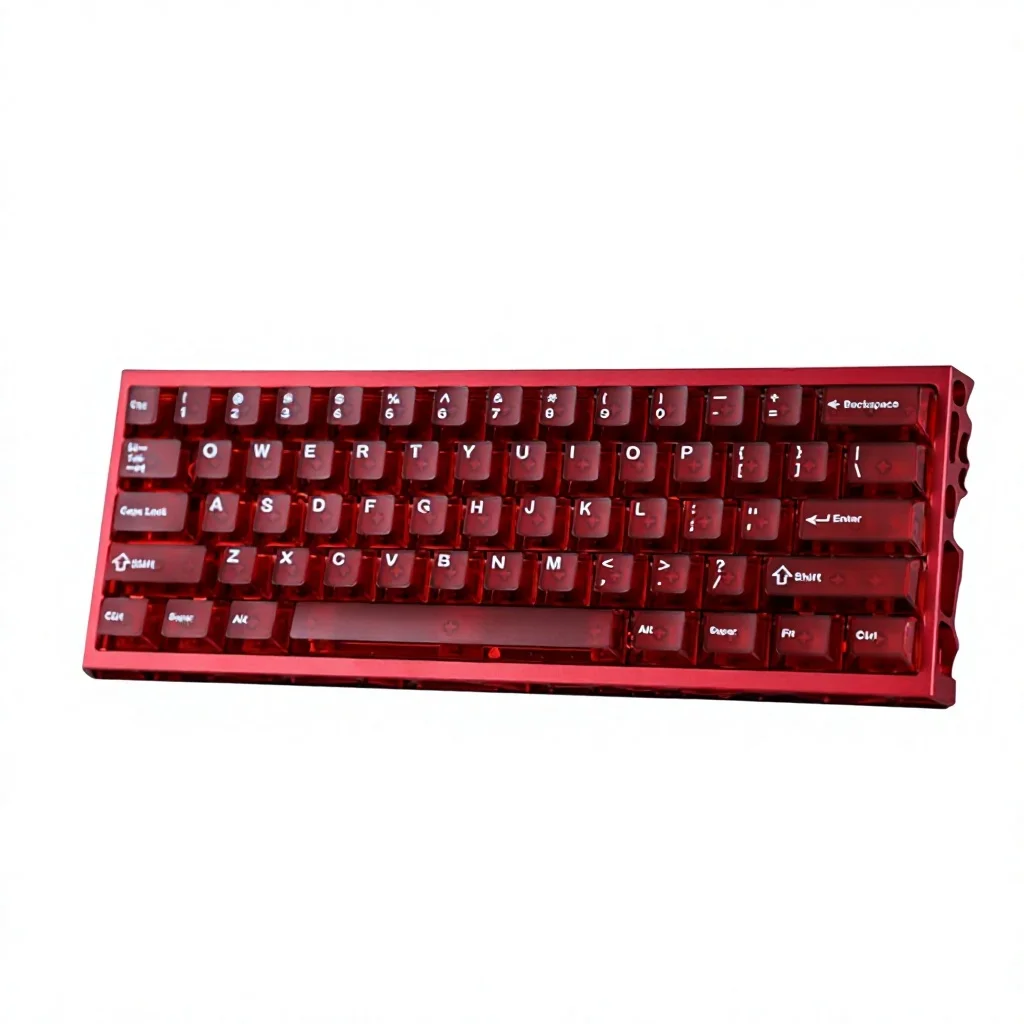
Leveling the Playing Field on a Budget
If you have been keeping an eye on competitive shooters like Valorant, Counter-Strike 2, or Apex Legends lately, you know that magnetic switch keyboards have completely taken over. Big brands charge anywhere between $180 to $250 for these Hall Effect beasts. For gamers on a sensible budget, dropping two hundred bucks just for faster strafe stops hurts.
Enter the K61 CNC Aluminum Alloy Hollow-out Magnetic-Axis Keyboard. Ringing up at roughly $88.09, this aggressive little mechanical board promises high-end magnetic switch performance wrapped in a premium aluminum chassis without draining your wallet.
Why It’s a Steal
Finding a full CNC aluminum chassis under $100 is already a challenge in the custom keyboard world. Finding one combined with magnetic Hall Effect switches and custom actuation software at this price point feels almost like a typo. You are getting performance hardware that directly rivals keyboards twice or three times the price.

Much like how we uncovered hidden value when reviewing budget audio in our X15 TWS Gaming Earbuds Review, this board proves you don’t need a pro-esports salary to rock a tournament-grade setup.
Key Features Deep Dive
1. Hall Effect Magnetic Switches & Rapid Trigger
The star of the show here is the magnetic-axis switch technology. Traditional mechanical switches use metal leaf contacts that require debounce filters, inherently adding a tiny layer of input lag. The K61’s Hall Effect switches measure magnetic field strength instead, translating to near-instantaneous key registration. With customizable actuation and Rapid Trigger capability, keys reset the split second your finger lifts, letting you counter-strafe with pinpoint precision.
2. CNC Aluminum Alloy Hollow-Out Design
Instead of cheap, hollow ABS plastic that creaks whenever your desk takes a bump, the K61 boasts a machined CNC aluminum frame. The skeletal, hollowed-out aesthetic gives it a modern cyberpunk edge while significantly dampening chassis resonance. It feels dense, stays planted during intense gaming sessions, and looks substantially more expensive than its sub-$90 price tag suggests.
3. Esports-Grade Low-Latency Wired Connection & RGB
Wireless keyboards are convenient, but pure wired connections remain king when every millisecond dictates whether you win a clutch round. The K61’s wired connection delivers consistent, ultra-low latency. Paired with dynamic, per-key customizable RGB backlighting, the illumination shines through the open side chassis accents, adding serious flair to your desk setup.
Who Is This For?
The K61 is built from the ground up for competitive esports players, FPS enthusiasts, and tech-savvy gamers looking to gain an edge in titles where fast input resets matter. Its compact 60% layout is also ideal for minimalists and gamers with tight desk spaces who need maximum clearance for wide mouse swipes.
✅ Pros
- Magnetic Hall Effect Switches: Unlocks rapid trigger and adjustable actuation for competitive games.
- Premium CNC Aluminum: Solid, hollow-out industrial design that punches far above its price tier.
- Ultra-Low Input Latency: Reliable wired responsiveness without wireless dropouts.
- Compact 60% Form Factor: Maximizes desk space for mouse movement.
🔻 Cons
- Wired Only: No wireless 2.4GHz or Bluetooth flexibility.
- Compact Layout Learning Curve: Lacks dedicated arrow and function keys.
- Open Chassis: Hollow-out framework may collect dust faster than sealed cases.
Final Verdict
It won’t replace a bespoke $400 custom enthusiast keyboard with hand-lubed switches and boutique sound profiles, but for $88.09, the K61 gives you the exact competitive advantages of high-end gaming hardware at a fraction of the cost. If your goal is snappy movement, crisp actuation, and rugged build quality, this magnetic marvel is an undeniable bargain.
Frequently Asked Questions
What are magnetic-axis (Hall Effect) switches?
Unlike standard mechanical switches that rely on physical metal contacts, magnetic switches use Hall Effect sensors to detect how far a key is pressed. This eliminates debounce delay, allows customizable actuation points, and enables rapid trigger features.
Does the K61 keyboard support Rapid Trigger functionality?
Yes, because it uses magnetic switches, the firmware allows for dynamic actuation and rapid trigger resets, allowing keys to register multiple taps instantaneously—crucial for competitive FPS games like Valorant and CS2.
Is the hollow-out aluminum frame hard to keep clean?
The open, hollowed-out CNC aluminum chassis looks stunning and sheds weight, but it can collect dust over time. Keeping a simple can of compressed air nearby makes cleaning quick and effortless.
Can I use the K61 on Mac as well as PC?
Yes, it works as a standard plug-and-play USB keyboard on macOS, Linux, and Windows. However, key customization and actuation profile software is predominantly tailored for Windows systems.
Check Best Price ➔
*Price may vary based on promotions.