
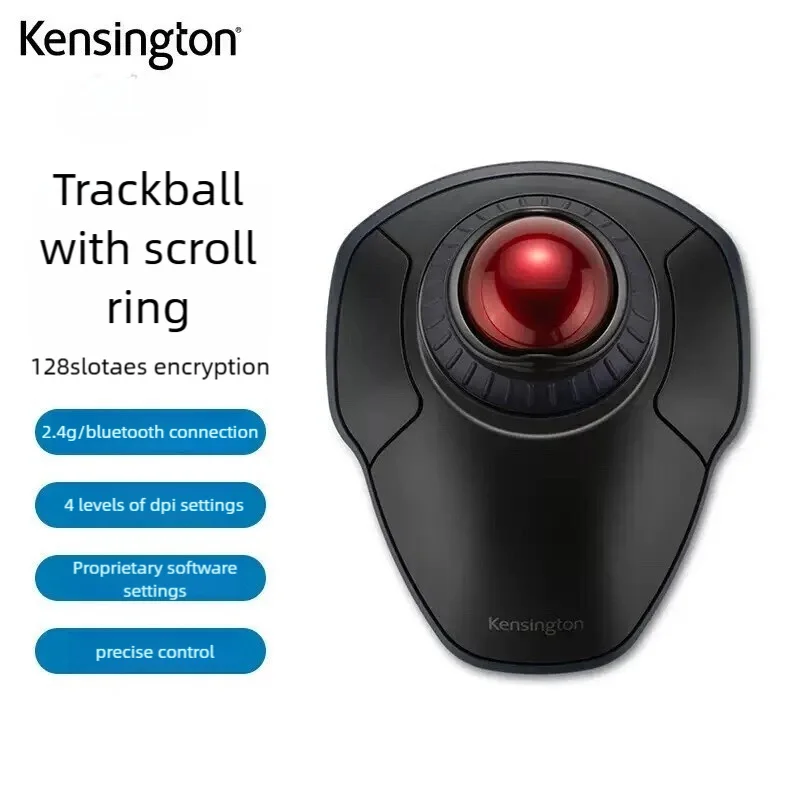
Tired of Wrist Strain? The Kensington Orbit Trackball Might Be Your Solution
Are you constantly battling wrist pain from traditional mouse usage, or struggling with limited desk space that hinders your productivity and gaming flow? Many of us face these common issues daily. The **Kensington Orbit 2.4G Wireless Trackball K70992** emerges as a compelling alternative, promising a unique blend of ergonomic comfort, wireless freedom, and robust security features.
Why This $78.12 Trackball Is a Steal
At a price point of **around $78.12**, the Kensington Orbit 2.4G Wireless Trackball stands out in a crowded market dominated by conventional mice. It’s not just another budget peripheral; it brings a unique blend of ergonomics, security, and precision usually found in much pricier models. This device demonstrates that you don’t always need to break the bank to significantly upgrade your computer interaction.

While it won’t replace a high-end competitive esports mouse for every pro gamer, for the vast majority of users, its feature set offers incredible value. Just like we explored whether the LW12 Android Smartwatch is a steal at its price, the Kensington Orbit certainly makes a strong case for itself as a smart, budget-friendly tech investment.
Key Features Deep Dive
2.4G Wireless Trackball with Scroll Ring
Say goodbye to desk clutter and wrist strain. The **2.4G wireless connectivity** offers a reliable, lag-free experience, giving you freedom of movement without cable tangles. The true star, however, is the **integrated trackball and scroll ring**. Instead of moving your entire arm, you simply manipulate the ball with your fingers, significantly reducing repetitive strain and saving precious desk space. The intuitive scroll ring around the trackball provides precise and effortless scrolling for documents, web pages, and applications, making navigation a breeze.
128bit AES Encryption
In today’s connected world, security is paramount. The Kensington Orbit doesn’t just offer convenience; it prioritizes your data. With **128-bit AES encryption**, your mouse movements and clicks are securely transmitted to your computer, protecting against potential wireless eavesdropping. This is a significant advantage for those handling sensitive information or simply valuing their digital privacy, offering peace of mind with every click.
Rollerball Gaming Mouse for PC/Laptop
Despite its trackball design, this peripheral isn’t just for spreadsheets. Marketed as a **’Rollerball Gaming Mouse,’** it suggests a level of precision and durability suitable for more than just casual use. The trackball mechanism allows for fine control, which can be advantageous in certain game genres (like strategy or simulation) or for detailed graphic design work, offering a different, potentially more precise, way to interact with your digital environment on both PC and Laptop setups.
Who Is This For?
The Kensington Orbit 2.4G Wireless Trackball is an excellent choice for a diverse group of users. It’s ideal for **office professionals and remote workers** seeking ergonomic comfort and space-saving design. **Students** will appreciate its portability and precise control for research or design projects. Even **casual gamers** or those looking for an alternative input method for **creative work (designers, editors)** will find its unique control scheme beneficial. If you’re struggling with wrist discomfort or a cluttered workspace, this highly-rated trackball deserves a closer look.
✅ Pros
- **Ergonomic Design**: Reduces wrist and arm strain.
- **Space-Saving**: Ideal for small desks or mobile setups.
- **Precise Control**: Excellent for detailed work and certain gaming genres.
- **128-bit AES Encryption**: Enhanced security for wireless transmission.
- **Wireless Convenience**: Freedom from cables and clutter.
- **Scroll Ring Functionality**: Intuitive and efficient scrolling.
🔻 Cons
- **Learning Curve**: Trackball usage can take time to master for new users.
- **Not for All Gamers**: May not suit fast-paced, competitive FPS games.
- **Maintenance**: Requires occasional cleaning of the trackball sensor for optimal performance.
Final Verdict
The Kensington Orbit 2.4G Wireless Trackball with Scroll Ring K70992 offers a compelling package for its ~$78.12 price point. It successfully blends **ergonomic comfort**, **wireless freedom**, and **enhanced security** into a durable and precise input device. While trackballs aren’t for everyone and require a slight adaptation period, those who embrace it will find a reliable and highly functional tool that can alleviate common issues associated with traditional mice. For anyone seeking a break from conventional peripherals and valuing desktop real estate, the Orbit is a **highly recommended investment**.
Frequently Asked Questions
What are the key benefits of using a trackball mouse?
Trackball mice like the Kensington Orbit offer **superior ergonomics** by keeping your hand and wrist stationary, reducing repetitive strain. They also **save desk space** as only the ball moves, not the entire device, and often provide **enhanced precision** for detailed work.
How does the 128-bit AES encryption work, and is it truly secure?
The **128-bit AES (Advanced Encryption Standard)** encrypts the data transmitted wirelessly between your trackball and its receiver. This standard is widely used and highly secure, making it extremely difficult for unauthorized parties to intercept or interpret your mouse movements and clicks, thus safeguarding your privacy.
Is the Kensington Orbit trackball suitable for gaming, especially fast-paced genres?
While marketed as a “Rollerball Gaming Mouse,” the Kensington Orbit provides **excellent precision** suitable for many games, particularly strategy, RPGs, or puzzle games. However, for **fast-paced, competitive FPS games**, the trackball might have a **learning curve** and may not offer the rapid, sweeping movements some players prefer over a traditional gaming mouse.
How do I maintain and clean the Kensington Orbit trackball?
Maintaining the Kensington Orbit is simple. The trackball can be easily **popped out** for cleaning. Use a soft, lint-free cloth to wipe the ball itself, and gently clean the optical sensors inside the trackball cavity to ensure smooth and accurate tracking performance.
Check Best Price ➔
*Price may vary based on promotions.